ChatGPT vs Claude vs Gemini: A Practical Comparison
Ask five different people which AI assistant is best and you will get five confident, contradictory answers, usually based on whichever one they happened to try first and never seriously compared against the others. That is a reasonable way to end up with a favourite. It is a poor way to figure out which one actually suits the specific work you do.
This is a practical comparison of ChatGPT (made by OpenAI), Claude (made by Anthropic) and Gemini (made by Google), covering how they actually differ in daily use, not a spec sheet of numbers that will be outdated within a season. A caution worth stating up front: these products update constantly, sometimes monthly, and any comparison written today is a snapshot, not a permanent verdict. What tends to stay stable for longer is each company's general approach and personality, which is what this guide focuses on.
What they actually have in common
All three are large language models you talk to in plain text, all three can hold a conversation, write, summarise, explain code, and reason through a problem step by step, and all three offer a free tier alongside a paid one with higher usage limits and access to their most capable models. For a huge share of everyday tasks, drafting an email, explaining a concept, brainstorming names, summarising a long document, the honest answer is that any of the three will do a perfectly competent job, and the differences that matter most only show up once you push into more specific or demanding territory.
ChatGPT: the broadest ecosystem
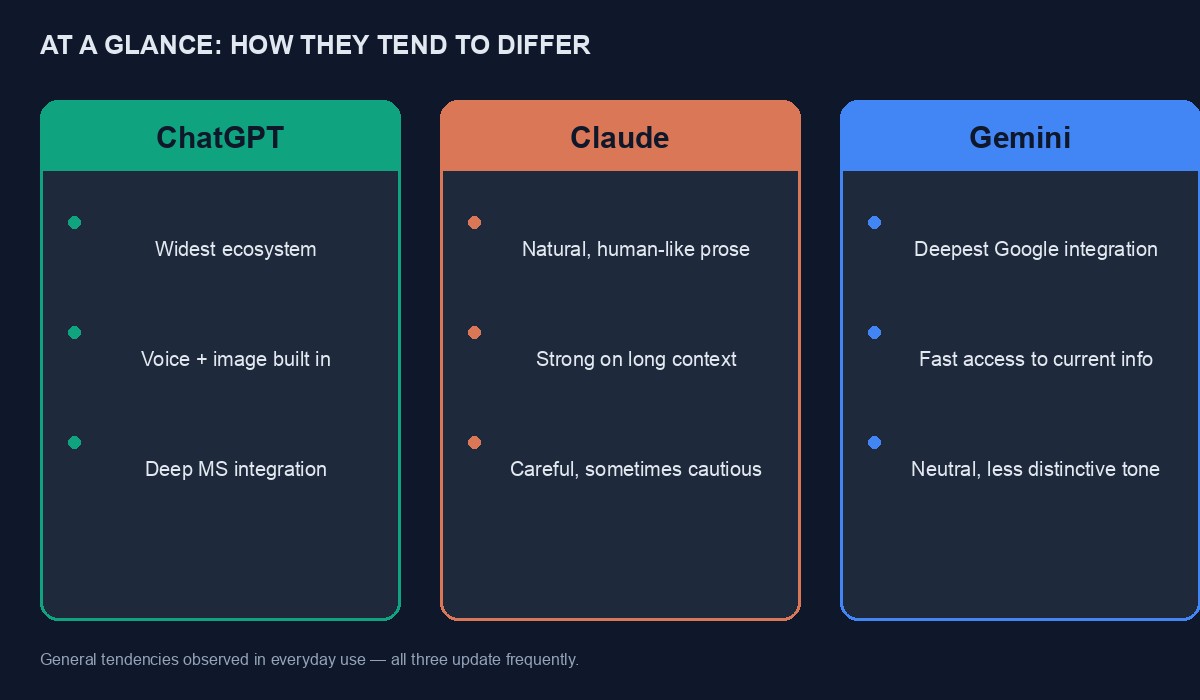
ChatGPT has the largest user base and the widest set of surrounding features: a large marketplace of custom "GPTs" built by other users for narrow tasks, deep integration into Microsoft's products for people already inside that ecosystem, image generation built directly into the chat, and a mobile app with voice conversation that many people find genuinely natural to use. If you want an assistant with the most third-party tools and plugins built around it, ChatGPT currently has the widest selection by a clear margin.
Where people commonly report friction is a tendency toward long, hedged answers unless you explicitly ask for brevity, and a writing style that, left unprompted, leans toward a recognisable, slightly promotional tone, full of enthusiasm and bullet points, that needs editing down for anything meant to sound like a specific human wrote it rather than a helpful assistant. For coding, its integration with tools developers already use is strong, though the actual code quality on any given task is genuinely comparable to the other two rather than clearly ahead.
Claude: built with a noticeable emphasis on careful writing and reasoning
Claude tends to get singled out, including by people who use it alongside the others rather than instead of them, for producing writing that reads less like an obviously AI-generated draft and more like something a careful human wrote on a good day, less hedging, fewer stock phrases, a more natural sentence rhythm. For long documents, detailed analysis, and coding tasks that involve understanding a large amount of existing context at once, it has a strong reputation among developers specifically, partly because of how it handles large amounts of code or text in a single conversation.
Its ecosystem of third-party integrations and plugins is smaller than ChatGPT's, and its free tier tends to have tighter usage limits, which matters if you plan to use it heavily without paying. It also, by design, tends to be more willing to push back or decline a request it judges unwise, which some users experience as unhelpfully cautious and others experience as exactly the kind of second opinion they wanted rather than pure agreement.
Gemini: the deepest hooks into Google's own tools
Gemini's clearest advantage is where you already live inside Google's world: it is built directly into Gmail, Google Docs, Google Sheets and Android phones, and it can search current information through Google's own search index more directly than the others manage. If your daily work already runs through Google Workspace, having an assistant that can read a spreadsheet or draft inside a document without you copying text back and forth is a real, practical convenience the other two do not match as smoothly.
Its general chat and reasoning ability is broadly competitive with the other two on most everyday tasks, and it has been improving quickly. Some users report its personality feels the least distinctive of the three, more neutral and less noticeably styled, which some prefer for factual work and others find makes its writing blend into the background less memorably than Claude's or ChatGPT's.
A more useful way to compare them: by task, not by brand
For a long, careful piece of writing you want to sound genuinely human, a blog post, a personal statement, an important email, Claude's tendency toward natural, less hedge-heavy prose gives it a real edge worth trying, though the gap has narrowed as all three have improved.
For a quick factual question, especially about something recent, Gemini's tighter connection to current search results can get you a more up-to-date answer with less manual double-checking, though you should still verify anything that matters.
For getting the widest range of extra features and third-party tools in one place, voice conversation, image generation, a large library of specialised assistants built by others, ChatGPT's ecosystem is currently the broadest.
For coding that involves understanding a large, existing codebase at once, rather than writing something small from scratch, Claude has a strong developer reputation, though Copilot-style inline tools built on any of the three underlying models can narrow the practical gap depending on which one your editor integration uses.
For someone already paying for and living inside Google Workspace, Gemini's native integration removes enough friction that it may simply be the more convenient daily choice regardless of small quality differences elsewhere.
A worked example: the same task, three ways
Rather than describe differences abstractly, picture asking all three assistants to draft a message to a supplier who delivered the wrong quantity of stock, politely but firmly asking for a correction and a partial refund. This is a genuinely common small business situation and a fair test, because it needs both correctness and tone.
A typical ChatGPT response tends to arrive well-organised and slightly formal by default, often with a clear structure, an opening acknowledgement, the specific issue, the requested resolution, sometimes offering to draft two versions, a firmer one and a softer one, if you ask. A typical Claude response tends to read a touch more like something a careful person actually wrote in one sitting, fewer visible structural markers, a more natural flow from sentence to sentence, though it may ask a clarifying question first, such as whether you want to preserve the business relationship or are prepared to end it, before committing to a tone. A typical Gemini response tends to be efficient and direct, and if you are already inside Gmail, it can draft the message right there in your inbox with the supplier's previous emails as visible context, which is a genuine convenience none of the others match as smoothly.
None of the three drafts is likely to be wrong, exactly, and none is likely to be ready to send unedited. The real test, the one worth running yourself rather than trusting any description of it, is which draft needed the fewest changes to sound like something you would actually send under your own name.
Handling Nigerian English, Pidgin and local context
All three assistants handle standard English competently, and all three have become noticeably better at Nigerian Pidgin and code-switching between English and Pidgin within the same message over the past couple of years, useful if you want a WhatsApp reply that actually sounds like how your customers write to you rather than a stiff, formal translation. None of the three is reliably strong at the less commonly represented Nigerian languages, Hausa, Yoruba and Igbo in particular, where output can range from genuinely good to noticeably awkward depending on the specific request, and none should be trusted for anything important in those languages without a native speaker checking it before it goes out to customers.
None of them has detailed, reliable, current knowledge of hyper-local specifics either, a particular local government area's registration process, this month's exchange rate, a specific Nigerian regulation that changed last quarter. Gemini's tighter connection to live search narrows this gap somewhat for anything that is well covered online, but "narrows" is not "closes," and anything locally specific and consequential deserves a human source, not just an AI assistant's confident-sounding answer.
Privacy: what happens to what you type
This deserves a direct answer rather than a vague reassurance. By default, on the free and standard paid consumer tiers, conversations with all three companies may be used to help improve their models, and all three offer a setting to opt out of this, tucked into account privacy settings rather than surfaced prominently. None of the three should be treated as a safe place to paste an actual password, an API key, a client's confidential contract, or another person's private information without their consent, regardless of what the privacy settings claim, because the safest assumption for anything genuinely sensitive is that you do not know with certainty who might eventually see it.
Business and enterprise tiers from all three companies typically offer stronger data-handling guarantees, including not using your conversations for training by default, which matters if your organisation handles client information regularly. If that applies to your work, read the specific terms for the business tier rather than assuming the consumer product's terms carry over.
What none of them do reliably, whichever you choose
All three can state something false with exactly the same calm, confident tone they use for something true, and none of them reliably flags its own uncertainty unless specifically asked to. This is not a flaw unique to one of them that switching brands will fix; it is a structural property of how all of these tools currently work. Anything you plan to act on, a fact you will repeat to a client, a number that will appear in a report, a legal or medical detail, deserves independent verification regardless of which assistant produced it. Treat all three the same way you would treat a very well-read, very fast, occasionally overconfident colleague: genuinely useful, not infallible.
Memory: how much each one remembers about you between chats
All three now offer some form of persistent memory, remembering facts and preferences across separate conversations rather than starting from nothing every time, and all three let you view and delete what has been remembered. In practice this ranges from mildly convenient, not having to re-explain your job or your writing preferences every session, to slightly unsettling the first time an assistant references something from a conversation weeks earlier that you had genuinely forgotten mentioning.
The sensible habit here is the same across all three: check the memory settings once, understand what is being stored, and clear anything you would not want to still be sitting there in six months. Treat the feature as useful but worth auditing occasionally, not as something to simply trust and forget about.
Mobile apps and voice: a genuinely different experience from the browser
All three have mobile apps with voice conversation modes, and the experience differs enough from typing in a browser that it is worth trying specifically rather than assuming the mobile app is just a smaller version of the same thing. ChatGPT's voice mode has had the most time to mature and tends to feel the most natural in casual back-and-forth conversation. Gemini's voice integration benefits from the same Android and Google Assistant history behind it, and feels most at home for quick, spoken questions on the move. Claude's mobile experience is solid for reading and writing but has, at the time of writing, invested less specifically in voice conversation as a distinct mode compared with the other two.
If most of your actual use happens on your phone, in the car, walking, cooking, this difference matters more to your daily experience than almost anything else in this comparison, and it is worth testing specifically before assuming your desktop preference will carry over to how you actually use the app day to day.
For students and self-directed learning
All three are commonly used for studying, and all three can explain a concept, work through a maths problem step by step, or quiz you on material you are revising. The meaningful difference for a student is less about raw capability and more about honesty regarding limits: an assistant that confidently produces a wrong worked solution to a maths problem is more dangerous to a learner than one that is slightly less capable but flags its own uncertainty, because a student who does not yet know the material has no independent way to catch the error.
A practical habit for any of the three: ask the assistant to show its working, not just the final answer, and independently verify at least the first few steps yourself, ideally against a textbook or a teacher, before trusting the pattern for a whole assignment. Used this way, as a patient, always-available tutor whose work still gets checked, all three genuinely help. Used as a way to skip understanding entirely, none of them serve a student well, whichever one you pick.
Switching costs, and why most people underestimate them
Because all three are accessed through a browser or an app with no long-term lock-in on the free tier, switching feels like it should be effortless, and in a narrow technical sense it is. What actually creates switching cost is the accumulated context each one holds: saved conversations you might want to search later, custom instructions you have tuned over months, memory of your preferences, and simple familiarity with how a particular assistant phrases things, which affects how quickly you can spot when something looks off. This is worth factoring into any decision to switch entirely rather than simply adding a second tool alongside your first, because the accumulated context has real, if invisible, value.
Pricing, in general shape rather than exact numbers
All three currently follow roughly the same structure: a usable free tier with meaningful daily or usage limits, and a paid monthly subscription, priced similarly to each other, that raises the limits and unlocks the most capable version of the underlying model plus extra features. Business and team plans sit above that, usually per-seat, aimed at organisations rather than individuals. Exact prices and limits change often enough that quoting them here would be misleading within a few months, so check each company's own pricing page directly before deciding, and take advantage of the free tier to test real tasks from your own work before paying for any of them.
For anyone paying from Nigeria, the same caution applies as to every other subscription tool: these are billed in US dollars, a virtual card that fails silently can interrupt access mid-month, and it is worth keeping a small buffer rather than discovering the interruption at an inconvenient moment.
What would actually change this comparison
The specific rankings above are honestly likely to shift within a year, because all three companies release major updates on a rolling basis and a gap that feels real today can close, or widen, within a few months. What is unlikely to change as quickly is each company's general orientation: OpenAI's focus on breadth of features and ecosystem, Anthropic's focus on careful, controllable behaviour and writing quality, Google's focus on integration with its existing products. If you find yourself re-reading a comparison like this in a year's time, that underlying orientation is the part worth checking still holds, more than any specific claim about which one currently writes a better email.
A sensible way to actually decide
Do not decide from a comparison article, including this one. Pick the two that seem most relevant to your work from the task-based section above, and run the same real task, something from your actual job this week, not a generic test prompt, through both on their free tiers. Compare which result needed less editing to be usable, and which one you would trust to send to someone else with your name on it. That thirty-minute test will tell you more about which one suits you than any ranking, because it is testing against your actual work rather than someone else's.
It is also worth saying plainly that many people who work with these tools regularly end up keeping more than one open rather than settling on a single favourite, using each for what it happens to be strongest at for the task in front of them that day. There is no rule that says you must pick exactly one, and the free tiers of all three together cost nothing while still covering a meaningful amount of daily use.
If you are weighing whether any of these assistants are enough on their own to build something you need, versus needing an actual developer or a proven platform, our guide on AI app builder or real developer covers that decision directly, and our full-stack development service is there for when the answer turns out to be a real, dedicated team.


Comments
No comments yet. Be the first to share your thoughts.