Best AI Coding Tools, Named and Compared
Our earlier guide to the best AI tools for developers looked at this by category: completion, chat, agents, review, documentation. This one takes a different, more concrete approach: naming the actual products developers reach for, what each one is specifically built to do, and which kind of developer each one genuinely suits, because "best" here depends enormously on your editor, your language, and how much you want the tool touching your files unsupervised.
A short honest note before naming names: every tool below improves on a rolling basis, sometimes month to month, and a gap described here as clear can close or widen by the time you read this. What tends to stay stable longer is each product's underlying philosophy, which is what the sections below focus on rather than a snapshot of features that will be outdated within a season.

GitHub Copilot: the default, and a reasonable one
Copilot remains the most widely adopted inline completion tool, largely because it works inside almost every popular editor and has had the longest time to mature. It is strongest on common patterns in mainstream languages, JavaScript, Python, Java, and noticeably weaker on niche languages or unusual frameworks with less training data behind them. Its chat feature, built into the editor sidebar, has become genuinely competitive for explaining code and drafting small changes, closing much of the gap that used to separate it from dedicated chat assistants.
Who it suits: developers who want the most broadly supported, least fussy option, already working inside VS Code or a JetBrains IDE, without wanting to evaluate five newer, less established tools.
Cursor: an editor built around AI from the ground up
Cursor is a fork of VS Code rebuilt with AI woven through the core experience rather than bolted on as an extension, and its agent mode, which can read across multiple files, make coordinated changes, and run commands, is currently among the most capable for larger, multi-file tasks. Because it started as an AI-first product rather than adding AI to an existing tool, the integration tends to feel less like a separate panel and more like a natural part of the editing flow.
Who it suits: developers comfortable switching their primary editor, and specifically those who want to lean into agentic, multi-file changes rather than only inline single-line suggestions. It asks more trust of you than a simple completion tool, and that trust needs to be paired with the review discipline covered in our developer tools guide.
Windsurf: a close competitor with a different philosophy on agent behaviour
Windsurf, also built as a dedicated AI-first editor, distinguishes itself with what it calls "flow" behaviour, aiming to keep the agent working alongside you with less need for constant confirmation on small steps, while still giving you a clear view of what changed. Developers who have used both Cursor and Windsurf often describe the choice as coming down to personal feel rather than a clear capability gap, similar to choosing between two well-made kitchen knives.
Who it suits: developers who have tried Cursor's agent mode and want a genuine point of comparison before settling, rather than assuming the first AI-first editor they tried is necessarily the best fit.
Amazon Q Developer: aimed squarely at AWS-heavy teams
Amazon's coding assistant integrates deeply with AWS services and is particularly strong when your work involves AWS infrastructure, permissions, and cloud configuration specifically, an area where general-purpose tools trained on broader code are noticeably less reliable. It also includes security scanning features tuned to catch common cloud misconfiguration patterns.
Who it suits: teams already committed to AWS, where the value comes less from general code completion and more from the tool's specific fluency in AWS's particular services and conventions.
JetBrains AI Assistant: built for developers who live in JetBrains IDEs
For developers using IntelliJ, PyCharm, WebStorm or another JetBrains IDE as their primary environment, JetBrains' own AI assistant integrates with the IDE's existing refactoring and navigation tools in a way that third-party extensions, however capable, cannot always match exactly, because it has direct access to the IDE's own understanding of your project structure.
Who it suits: developers already deeply invested in a JetBrains workflow who value tight integration with existing IDE features over trying the newest standalone AI-first editor.
Replit's Agent: aimed at building and shipping quickly, not editing an existing large codebase
Replit's Agent sits closer to the AI app generator category covered in our guide to building an app with AI than to the other tools on this list. It shines at building something new quickly, including setting up hosting and a database as part of the process, and is a weaker fit for making careful, surgical changes to a large, established codebase with significant existing history and conventions.
Who it suits: developers or non-developers prototyping something new from scratch, less so a team maintaining a mature production system.
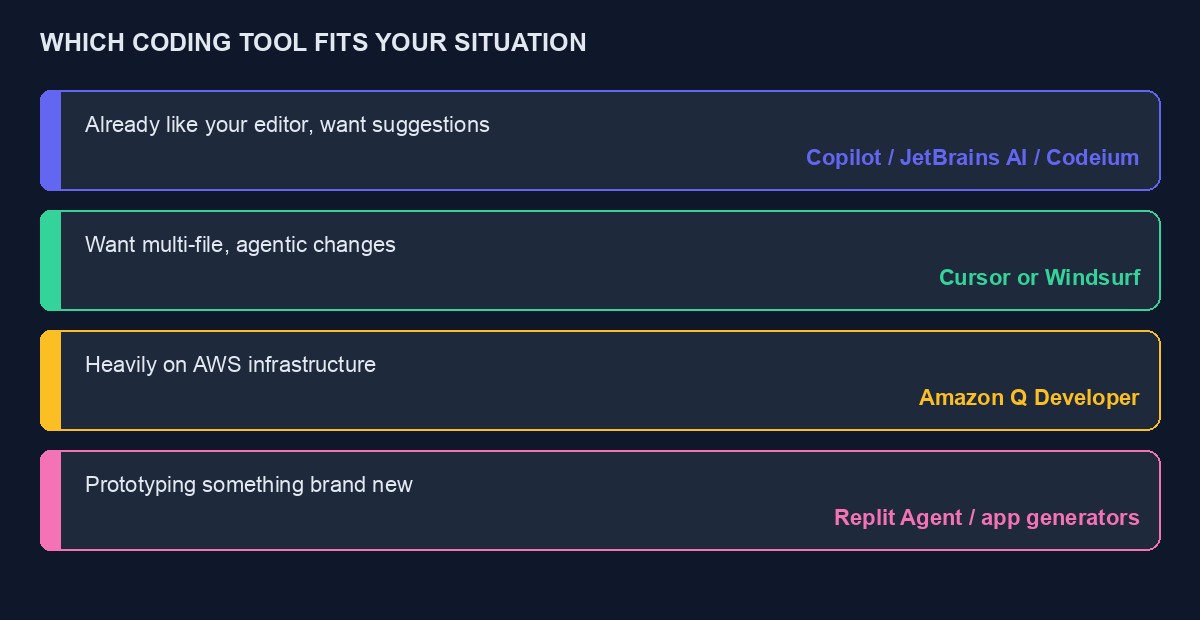
A quick comparison for making an actual decision
Already have an editor you like and just want inline suggestions: Copilot, JetBrains AI Assistant if you are in a JetBrains IDE, or Codeium's free extension for a no-cost inline option.
Want to lean into multi-file, agentic changes: Cursor or Windsurf, tried on the same real task from your own codebase before committing to either.
Heavily invested in AWS: Amazon Q Developer, for its specific cloud fluency rather than as a general-purpose alternative.
Prototyping something new rather than maintaining something existing: Replit's Agent, or the other AI app generators covered in our app-building guide.
What matters more than the tool: how you use it
Every tool on this list can produce excellent results in careful hands and quietly damaging results in careless ones, and the gap between those two outcomes is rarely about which specific product you chose. It is about whether changes are reviewed before merging, whether agentic tools are given small, specific instructions rather than vague, sweeping ones, and whether version control is committed before and after every significant automated change so nothing is ever unrecoverable. Our fuller guide to AI tools for developers covers this discipline in more depth, and it applies identically regardless of which named tool from this list you end up choosing.
Codeium and Tabnine: the privacy-conscious, budget-conscious options
Codeium (recently rebranded alongside Windsurf) offers a genuinely capable free inline completion extension that works across most popular editors, making it a reasonable choice for a solo developer or student who wants real functionality without a monthly bill. Tabnine takes a different angle, emphasising that it can run partly or fully on infrastructure your organisation controls rather than sending code to an external server, which matters specifically for teams working under strict data-handling requirements, regulated industries, government contracts, clients who contractually forbid their code touching third-party servers.
Who they suit: Codeium for anyone wanting a solid free option before committing to a paid tool; Tabnine specifically for teams where "our code never leaves our own infrastructure" is a real requirement rather than a nice-to-have.
Sourcegraph Cody: built around understanding a large, existing codebase
Cody's distinguishing feature is how it indexes and searches across an entire large codebase, not just the file you currently have open, which makes it particularly strong for the specific task of understanding an unfamiliar, large, established system: "where in this codebase is the logic that calculates shipping cost" is the kind of question it is built to answer well. This is a narrower, more specific strength than a general-purpose completion tool, and it shows most clearly on large, mature codebases with real history rather than small, fresh projects.
Who it suits: developers joining or maintaining a large, established codebase, more than developers starting something new from a blank folder.
How well each tool actually handles different languages
A detail that general comparisons often skip, and that matters enormously in practice: every one of these tools is meaningfully better at some languages than others, because their underlying models learned from however much code in each language was publicly available to train on. JavaScript, TypeScript, Python and Java are consistently the strongest across every tool on this list, simply because there is vastly more public code in these languages to have learned from. PHP, Ruby and Go sit in a solid middle tier, well supported but with occasionally noticeable gaps on less common libraries or framework-specific conventions. Niche or older languages, and unusual, less-documented frameworks even within a well-supported language, tend to produce noticeably weaker suggestions across every tool, more generic, more likely to reference an outdated version of a library's syntax.
The practical implication: if your work is heavily in a well-supported mainstream language, the differences between the tools on this list matter more, because all of them are competent enough that the gaps between them are what decides your experience. If your work is in a less common language or framework, temper your expectations for all of them equally, and lean harder on the "explain and verify" pattern rather than trusting generated code at face value, regardless of which tool produced it.
A worked example: choosing a tool for a specific, real project
Picture a solo developer in Abuja maintaining a five-year-old Laravel application for a client, mostly PHP, with a large, somewhat tangled codebase nobody has fully documented. The temptation is to reach for the newest, most talked-about agentic editor and let it loose on the whole thing.
A more sensible path: start with a tool strong on understanding large existing codebases, since the immediate need is comprehension before any change, not generation from scratch. A few weeks in, once the codebase's structure is genuinely understood rather than guessed at, introducing an inline completion tool for day-to-day small changes, and reserving an agentic, multi-file tool for specific, well-scoped tasks, "migrate this one module to use the newer validation pattern used elsewhere in the codebase", each committed and reviewed individually rather than let loose on the whole application at once. The order matters here: understanding before generation, small scoped changes before large sweeping ones, regardless of which specific named tool sits behind each step.
Mistakes developers make when evaluating these tools
Judging a tool by a demo task instead of a real one. Every tool's own marketing demo is chosen to make it look good. Test with a genuinely awkward piece of your own actual code, including the parts you are slightly embarrassed by, before deciding.
Switching tools every time a new one launches. Each switch has a real cost in relearning where things are and rebuilding the instinct for when to trust a suggestion and when to double-check it. A merely good tool used consistently for months usually beats an excellent tool abandoned every six weeks for the next excellent tool.
Assuming a tool's strength on one language predicts its strength on another. A tool that impresses you completing Python will not necessarily perform the same on Elixir or Fortran. Test specifically in the language you actually use most.
Ignoring the editor cost of switching. Moving your primary editor to try an AI-first tool like Cursor or Windsurf has a real, if temporary, productivity cost while you relearn keyboard shortcuts and workflow habits. Budget a genuine adjustment week before judging whether the switch was worth it.
Rolling this out across a team, not just yourself
Choosing a tool for yourself is a personal decision. Choosing one for a team of developers is a different problem entirely, because consistency now matters more than any individual's preference. A team where half the developers use Cursor's agent mode aggressively and half use nothing at all ends up with wildly inconsistent code review expectations, some pull requests arrive heavily AI-assisted and others do not, and reviewers need to calibrate differently for each without always knowing which is which.
A sensible team rollout starts smaller than most managers expect: pick one tool, run it as an opt-in pilot with two or three developers for a month, and specifically ask them to report where it helped and where it produced something that needed real correction, not just whether they liked it. Only after that pilot, with concrete examples in hand rather than general enthusiasm, is it worth deciding on a team-wide standard and, just as importantly, a shared expectation for disclosure and review depth on AI-assisted changes.
What tends to age quickly in a list like this
Every product named in this article will likely have shipped a meaningful update by the time you read it, and the specific gaps described here, Copilot's chat catching up to dedicated assistants, Windsurf and Cursor trading places on particular agentic capabilities, will keep shifting. What is more durable is the underlying shape of the market: a broadly supported default with the widest editor coverage, one or two AI-first editors pushing agentic capability hardest, a cluster of specialised tools for specific ecosystems like AWS or JetBrains, and privacy-focused options for regulated teams. If you are reading this well after it was written, look for which product currently occupies each of those roles rather than assuming the specific names have stayed fixed.
A thirty-minute test before you commit to any of these
Rather than trust any list, including this one, run the same short test across your top two candidates before choosing. Pick a real, moderately awkward task from your actual current project, not a toy example, something like "add validation to this form that matches the pattern already used three other places in this file." Give the exact same instruction to both tools. Compare not just whether the result works, but how much you had to read and correct before you trusted it, and whether the tool's explanation of what it changed was clear enough that you could describe the change to a colleague without re-reading the code yourself.
This thirty-minute test tells you more about which tool actually fits your specific codebase and habits than any amount of reading comparison articles, because it is testing against your real conditions rather than a generic benchmark chosen by whoever wrote the comparison.
Free tiers worth actually using before paying for anything
It is worth stating plainly that a meaningful amount of genuine value in this category is available without paying anything at all, at least to start. Codeium's free extension, the free tiers of general chat assistants used for coding through copy and paste, and free trial periods on most of the paid tools together cover a surprising amount of real work for a solo developer or student not yet ready to commit to a monthly bill. Exhaust what is genuinely free before assuming a paid tool is necessary, particularly if your usage is occasional rather than daily.
How this fits alongside the general-purpose assistants
Nothing on this list is mutually exclusive with the general chat assistants covered in our comparison of ChatGPT, Claude and Gemini. Plenty of developers use a dedicated inline or agentic coding tool for changes inside their editor, and separately keep a general chat assistant open in a browser tab for the kind of broader questions that fall outside any specific file, architectural decisions, understanding an error message from a service they do not personally maintain, drafting a technical explanation for a non-technical stakeholder. The two categories solve different problems, and there is no real cost to running both alongside each other beyond the subscriptions themselves.
A final, honest word on tool fatigue
New AI coding tools launch at a pace that can feel genuinely exhausting to keep up with, and it is worth explicitly permitting yourself not to try. A developer who picked one reasonable tool eighteen months ago and has simply used it consistently, building real fluency with its specific quirks and strengths, is very often more productive today than one who has spent that same eighteen months restlessly evaluating each new release without ever settling in anywhere long enough to genuinely benefit. Novelty is not the same as improvement for your specific workflow, and the discipline of sticking with a merely good tool, rather than chasing each newly announced excellent one, is itself a meaningful productivity advantage most comparison articles, including this one, do not spend enough time saying plainly.
Cost, in general shape
Most of these tools follow a similar pattern: a limited free tier or trial, and a paid monthly subscription in a broadly similar price range across the category, occasionally with a separate, pricier business tier for teams needing centralised billing and administration. Editor-native tools like JetBrains' assistant are sometimes bundled into an existing IDE subscription you may already be paying for, worth checking before adding a separate tool on top. As with every other subscription in this space, if you are paying from Nigeria, confirm your card is reliably accepted and keep a buffer, since a lapsed subscription mid-project is a worse interruption for a coding tool than for almost any other kind of software, given how quickly a workflow habit forms around it.
If you are building on our own platform rather than from scratch, our developer documentation covers the real API surface, per-project keys, payment webhooks and the VTU public API, that any of these tools would need accurate context about before generating an integration against it, since none of them have specific built-in knowledge of a particular platform's actual endpoints.



Comments
No comments yet. Be the first to share your thoughts.