How to Create a WhatsApp Bot
"Build me a WhatsApp bot" is one of those requests that sounds like a single, simple thing and turns out to hide several genuinely different projects underneath it. A bot that answers frequently asked questions is a different build from one that lets customers place orders, which is different again from one that sends automated delivery updates. Before writing any code or choosing any tool, it is worth being honest with yourself about which of these you actually need, because that choice drives almost everything else.
What "a WhatsApp bot" actually means, in practice
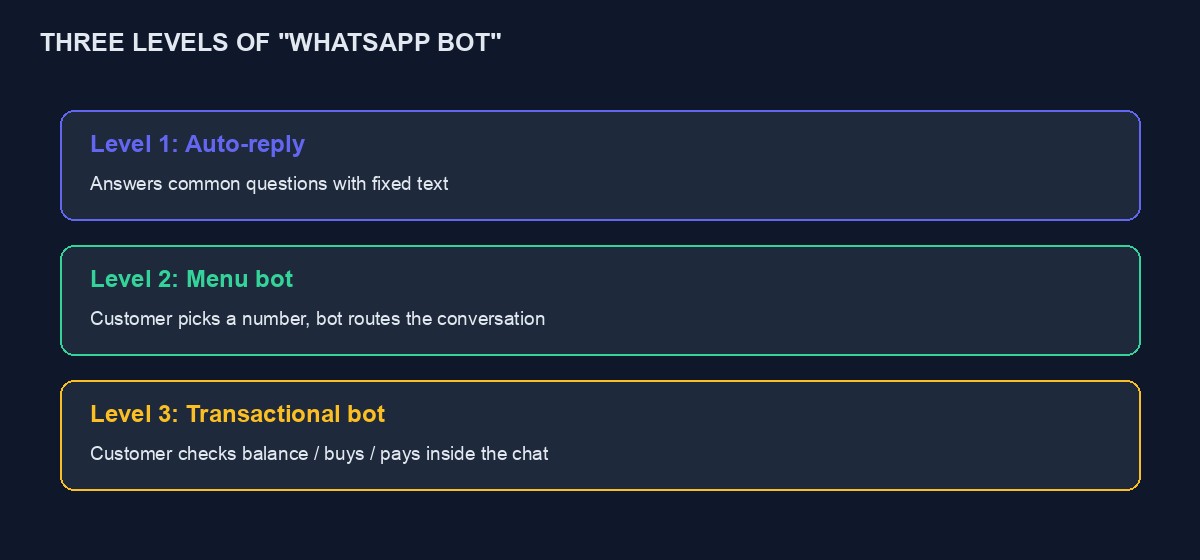
At the simplest end, a bot might just auto-reply to common questions, opening hours, prices, location, freeing you from typing the same answer dozens of times a day. A step up, a bot with a menu, where a customer types a number or taps a button to navigate options, works well for structured choices: "Reply 1 for Data Plans, 2 for Airtime, 3 to speak to a human." The most capable end lets customers actually complete a transaction inside the chat itself, checking a balance, placing an order, making a payment, which requires the bot to be properly connected to your actual business systems, not just answering with fixed text.
Each level is a real, legitimate choice depending on your business, and it is worth resisting the urge to jump straight to the most ambitious version before confirming the simpler one actually solves your problem.
The two technical routes: WhatsApp Business App automation versus the Cloud API
There are genuinely two different technical paths, and confusing them is a common source of frustration for people researching this for the first time.
The WhatsApp Business App, the free app most small businesses already use on a phone, supports basic automated greeting messages and away messages, and some third-party tools can add limited automation on top of it through less official means. This route is simple to start, familiar, and fundamentally limited: it is not designed for building a real, structured, scalable bot, and relying on unofficial automation layered on top of the consumer app carries a real risk of that number being restricted or banned, since it goes against WhatsApp's own terms for how the app is meant to be used.
The WhatsApp Cloud API, run directly by Meta, is the official, sanctioned way to build a genuine business-grade bot: sending and receiving messages programmatically, building menus, connecting to your own systems, at meaningful scale, without the fragility or risk of unofficial workarounds. This is the route worth taking seriously for any business planning to actually depend on the bot, and our dedicated guide to the WhatsApp Cloud API tutorial covers the technical details of using it directly.
Building it yourself versus using an existing platform
Once you have decided the Cloud API is the right route, a further choice: build the integration yourself from scratch, reading Meta's documentation and writing your own server to send and receive messages, or use a platform that has already built that integration and gives you a simpler interface on top of it.
Building it yourself gives you complete control and no ongoing platform fee beyond Meta's own messaging costs, at the price of real development time and ongoing maintenance, since Meta's platform and requirements do change periodically, and someone needs to keep the integration current. Using an existing platform trades some of that control and adds a subscription cost, in exchange for a working bot considerably faster and without needing to maintain the underlying technical plumbing yourself.
For a business without an in-house developer, an existing platform is almost always the sensible starting point. For a technical team building something with unusual, specific requirements a general platform does not support, building directly against the Cloud API may be worth the investment.
Designing the actual conversation before building anything
Whichever route you choose, the single biggest predictor of whether a WhatsApp bot actually helps your business, rather than frustrating customers, is whether you designed the conversation carefully before building it. Write out, on paper, the exact paths a real customer might take: what happens when someone messages for the first time, what happens if they type something the bot does not recognise, and critically, how and when a real human takes over, because almost every bot conversation eventually needs an escape hatch to a person, and a bot with no way to reach a human is one of the most common sources of genuine customer frustration.
Keep the bot's own menus and options short and specific. A menu with a dozen choices is harder to use on a phone than one with three or four, and customers abandon a confusing bot far faster than they abandon a slightly slower human reply.
What a bot should never be trusted to decide alone
Anything involving money deserves particular care. A bot that lets a customer check a wallet balance or place an order is genuinely useful. A bot that autonomously makes decisions about refunds, disputes, or unusual requests without a human reviewing them is a real risk, because a bot cannot exercise judgement the way a person can, and a mistake here costs real money or real trust. Build clear boundaries: the bot handles the routine, predictable parts, and hands anything unusual to a real person quickly and visibly, rather than trying to handle every possible situation automatically.
A worked example: an imagined pharmacy choosing the right level
Picture a small pharmacy in Enugu getting fifty near-identical WhatsApp messages a day asking about opening hours, whether a specific drug is in stock, and delivery within the city. The owner initially imagines needing a sophisticated bot that lets customers order prescriptions directly through chat. Working through the levels honestly changes the plan.
A transactional bot handling actual prescription orders raises real regulatory and safety questions, a bot cannot verify a prescription or catch a dangerous drug interaction the way a trained pharmacist reviewing an order can, so that level is set aside for now, correctly. A menu bot, however, fits well: "Reply 1 for opening hours, 2 to check if we stock a specific medicine, 3 to speak to the pharmacist directly," with option 2 giving a short list of commonly asked-about categories rather than attempting to search actual stock automatically, and option 3 immediately handing off to a real person. This modest version, built and tested within a week, cuts the fifty repetitive daily messages down to perhaps fifteen genuine ones needing a human, which is the actual business problem solved, without ever needing the far more complicated and riskier transactional version the owner originally imagined wanting.
Testing before customers ever see it
Before pointing real customers at a new bot, test it yourself deliberately and unkindly. Send it a message with no relation to any menu option and confirm it responds sensibly rather than going silent or looping confusingly. Try to reach a human from every point in the conversation and confirm that path genuinely works, not just in the flow diagram on paper but in the actual, live chat. Have two or three people who were not involved in building it try to use it without guidance, and watch specifically where they hesitate or type something the bot does not expect, since that friction is exactly what a first real customer will also hit, and it is far cheaper to find now than after launch.
Keeping the bot honest about being a bot
State plainly, early in the conversation, that the customer is talking to an automated assistant, and make reaching a real person easy and obvious throughout, not hidden behind an unclear command. Customers who feel tricked into thinking they were talking to a person, only to discover otherwise, tend to trust a business considerably less afterward, and that lost trust costs more than the momentary appearance of always having a person immediately available was ever worth.
What ongoing maintenance actually looks like
A bot is not a build-once, forget-forever project. Read through real conversation logs periodically, weekly at first, less often once stable, looking specifically for questions the bot handled badly or could not answer at all, and use those real, specific gaps to improve its menu or responses, rather than guessing in advance what customers might ask. Meta's own platform requirements and interface also change periodically, and a bot built directly against the Cloud API needs someone checking, every few months at minimum, that nothing has quietly stopped working the way it used to.
A closing thought on why the human handoff matters so much
Of everything covered in this guide, the single detail worth remembering above all others is the human handoff, because it is the one element that determines whether a customer's overall memory of interacting with your bot is positive or frustrating, regardless of how well the automated parts themselves performed. A bot that handles ninety percent of a conversation flawlessly and then traps a customer with no way to reach a real person for the remaining ten percent leaves that customer remembering the trap, not the ninety percent that worked. Build the exit first, test it obsessively, and only then invest further effort in making the automated portion more capable.
Choosing your first three menu options wisely
If you take one practical action from this guide, let it be this: before building anything, write down the three questions your business actually receives most often, not the three you imagine customers asking, and build your bot's first menu around exactly those. Check this against real evidence, a week of your own WhatsApp history, rather than assumption, since founders are often surprised by which questions actually dominate once they look honestly at the data rather than trusting memory. A bot built around your real top three questions, however unglamorous they turn out to be, delivers more genuine value in its first month than an ambitious, imagined bot built around what a business owner assumed customers would want to ask.
This applies just as much to the fixed, built-in bot covered above as to a custom build: even a purchase flow that has been tested and works reliably needs someone occasionally reviewing real conversation logs, watching for the specific question pattern nobody anticipated, and treating that discovery as a prompt to improve, not as an isolated inconvenience to shrug off.
Getting approved: WhatsApp's own requirements
Using the Cloud API for a real business requires going through Meta's business verification process, confirming your business is real and legitimate, which can take anywhere from a day to a couple of weeks depending on how complete your documentation is and how busy Meta's review queue happens to be. Start this process early, well before you plan to launch, since it is entirely outside your control once submitted, and a bot that is otherwise ready to go live but stuck waiting on verification is a common, avoidable delay.
What XpiriaTech's WhatsApp bot actually offers
Since this guide lives on our own blog, it is worth being specific and honest about what we provide rather than describing it vaguely. On a VTU project, XpiriaTech includes a built-in WhatsApp purchase bot, connected through the official Meta Cloud API, not an unofficial workaround. It is a fixed, tested conversation flow rather than a drag-and-drop menu designer: a customer messages your WhatsApp number, links their existing account with a short one-time code shown in their dashboard, and can then check their wallet balance or buy airtime and data directly in the chat, with the purchase actually processed by your real, live VTU platform, the same purchase logic that runs your website. The same underlying flow also powers a Telegram version, so both channels stay consistent rather than behaving differently from each other.
This capability sits behind a specific plan tier rather than the free one, and you can check exactly which tier includes it on the pricing page before planning around it. Because it is a fixed flow rather than a custom builder, it does not currently support an open-ended custom menu for a non-VTU business, a booking site or a store, for instance; for those, the general-purpose approach covered earlier in this guide, either an existing WhatsApp bot platform or your own build against the Cloud API, is the more accurate fit today. It also does not replace good customer service entirely. It handles the repetitive, predictable share of a conversation well, checking a balance, buying a plan, and a real, responsive person still matters for everything else.
Cost, in general shape
Meta itself charges per conversation once you exceed a free monthly allowance, with rates varying by country and whether the business or the customer initiates the exchange, worth checking on Meta's own current pricing page rather than trusting a number quoted here that may be outdated. If you use an existing bot-building platform on top of the Cloud API, expect a separate monthly subscription for the platform itself, layered on top of Meta's own messaging charges, and read the pricing page carefully for what counts toward any message limits before committing.
Building directly against the Cloud API yourself avoids the platform subscription entirely, in exchange for the development time to build and, importantly, maintain it, since Meta's requirements are not static. For a small business sending a modest volume of messages, the platform route is usually the more predictable cost; for a larger operation with genuine in-house technical capacity, building directly can be cheaper at scale.
Mistakes worth avoiding from the start
Launching without a tested human handoff. This is the single most common cause of a bot actively frustrating customers rather than helping them.
Trying to automate everything on day one. A modest bot that reliably handles three or four common questions well beats an ambitious one that handles twenty poorly.
Using an unofficial automation layer on a number you actually depend on. The risk of that number being restricted is real, and losing your established WhatsApp number, with every customer who already has it saved, is a genuinely painful way to learn this lesson.
Forgetting to update the bot when your business changes. New opening hours, a discontinued product, a changed delivery area, all need to reach the bot's own responses, not just your website, or it will confidently tell customers something that is no longer true.
A realistic build timeline
Using an existing platform: business verification can start immediately and typically takes up to two weeks, run in parallel with designing your conversation flows on paper, which should take a focused day or two for a first, modest version. Building the actual menus and automated replies inside a platform once approved typically takes another day or two. Testing with real colleagues, deliberately trying to confuse the bot, typically catches most of the obvious problems within a further few days. A realistic total, from starting business verification to a genuinely tested, live bot, is two to four weeks for most small businesses, most of which is waiting on Meta's review rather than active building time.
Where to go next
If you want the technical detail of building directly against the Cloud API yourself, our WhatsApp Cloud API tutorial walks through a real, working example. If you would rather have the bot ready-built and connected to a real VTU platform, you can start building free and explore the WhatsApp bot builder on a paid project tier, or talk to our team if you are unsure which route suits your business.



Comments
No comments yet. Be the first to share your thoughts.