
How to Prepare Your Website Requirements Before Hiring a Developer
"Just make it look professional" is not a requirement. It is a hope. And hopes are very expensive to build, because the developer has to guess what you mean, build it, and then hear that it is not what you pictured. A short written list of requirements turns your hopes into things a developer can actually quote, build and check. It does not need to be long or technical. It needs to be specific.
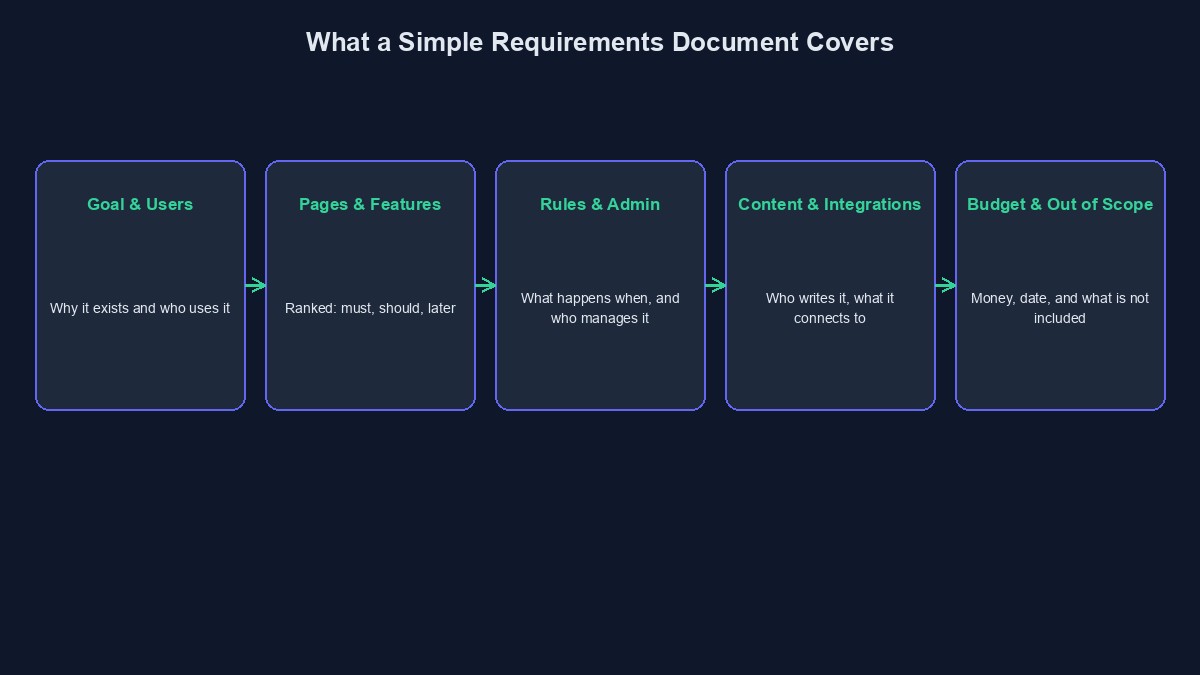
What a requirements document is, in simple terms
It is a document that answers one question: "When this website is finished, what must be true?" A developer reads it, estimates the work, builds from it, and at the end you both use it to check whether the work is done. Without it, "done" means whatever the loudest person says it means on the day.
Section 1: The goal, in one sentence
Start with why the website exists. "Get more people in Abuja to book our dental clinic online" is a goal. "Have a nice website" is not. The goal helps decide every other choice, because when two options compete, you pick the one that serves the goal.
Section 2: Who will use it
Describe your visitors in a couple of lines. Are they mostly on phones? On slow data? Older or younger? Do they speak English only, or also Hausa, Yoruba, Igbo or Pidgin? Knowing this changes real decisions, like how heavy the pages can be and what language the buttons use.
Section 3: The pages
List every page you expect: Home, About, Services, Contact, and so on. For each, write one line on what it must do. "Services: shows the five treatments with price and a Book button." This is also called a sitemap, and it is the quickest way to see the real size of the project.
Section 4: The features, ranked
Write what the site must do, and sort it into three groups. Must have means launch cannot happen without it. Should have means important, but you can launch without it. Later means a good idea for another day. For example: online booking is a must, an email newsletter is a should, a blog is later. This ranking is what lets a developer give you a smaller, faster first version, and a price you can afford.
Section 5: How it should behave
This is where most people forget details. Write simple "when this happens, that should happen" lines. When a customer books, they get an SMS. When they pay, you get an email. When they enter a wrong phone number, the form tells them. These small rules are where a lot of the real work hides, and they are the main reason a "simple" project turns out bigger than expected.
Section 6: Who manages it
Decide who will change things after launch. Can you edit prices yourself? Can your staff add a blog post? Do you need different logins for different people? If you need an admin area, say so now. It is a real piece of work, and it is often the thing that is missing from the first quote.
Section 7: Content and design
Say who will write the text and supply the photos, and by when. Add the three example sites you like, plus any brand colours and fonts. If you want it to feel "premium" or "friendly," show examples instead of using the words.
Section 8: Connections to other things
List the outside services you want connected: a payment gateway, WhatsApp, SMS, Google Maps, a booking calendar, your accounting tool. Each one adds work, and some have fees of their own. Naming them up front prevents surprises.
Section 9: The practical rules
Write anything that is a rule for the whole site. Must load fast on a phone with weak data. Must keep customer details safe. Must work on common browsers. Must be easy for a non-technical person to update. These are easy to forget, but they decide whether the site is pleasant to use.
Section 10: Budget, deadline and what is out of scope
Write your budget range and your date. Then add a short list titled "Not included in this project." For example: writing the content, product photography, ongoing marketing, a mobile app. This list prevents the most common argument in web projects, which is "I thought that was included."
A small example
Illustrative example: the people, businesses and numbers in this section are made up to show how this works. They are not real clients or real results.
Here is how a short version might look for a tailor in Ibadan: Goal: let customers see my styles and request a fitting. Users: women aged 25–45, mostly on phones. Pages: Home, Styles (gallery), Prices, Book a Fitting, Contact. Must have: gallery, booking form that sends me an SMS. Should have: WhatsApp button. Later: online payment. I will provide all photos and text by the end of week two. I can edit the gallery myself. Not included: logo design and photography. Budget range and launch date: written here. That is about a page, and any developer can quote from it.
Mistakes to avoid
Writing a wish list with no order. If everything is a must, nothing is, and the quote will be for everything.
Leaving out the admin side. The part you use every day is the part people forget to describe.
Treating the document as sacred. It will change. Just agree that changes go through a short, written step, so everyone knows what they cost.
Short glossary
Sitemap: the list of pages a website will have. Admin area: the private part of a site where you manage content and orders. Integration: a connection to another service, like payments or SMS. Out of scope: things deliberately not included in the project.
Where to go from here
With a requirements document in hand, you are ready to ask for prices. Read how to get an accurate software development quote next, and for typical Nigerian price ranges see how much a website costs in Nigeria. If you want help putting your requirements together, our quote builder is a gentle place to start.



Comments
No comments yet. Be the first to share your thoughts.