How to Turn Your Website Into an Android App
Search "turn your website into an Android app" and most results either oversell a shortcut that does not really exist, or push you straight toward hiring a native app developer for a job your actual situation might not need. There is a real, genuine middle path, and it deserves an honest explanation of what it actually is, what it is not, and when it is the right call versus when it genuinely is not.
What actually happens when you "turn a website into an app"
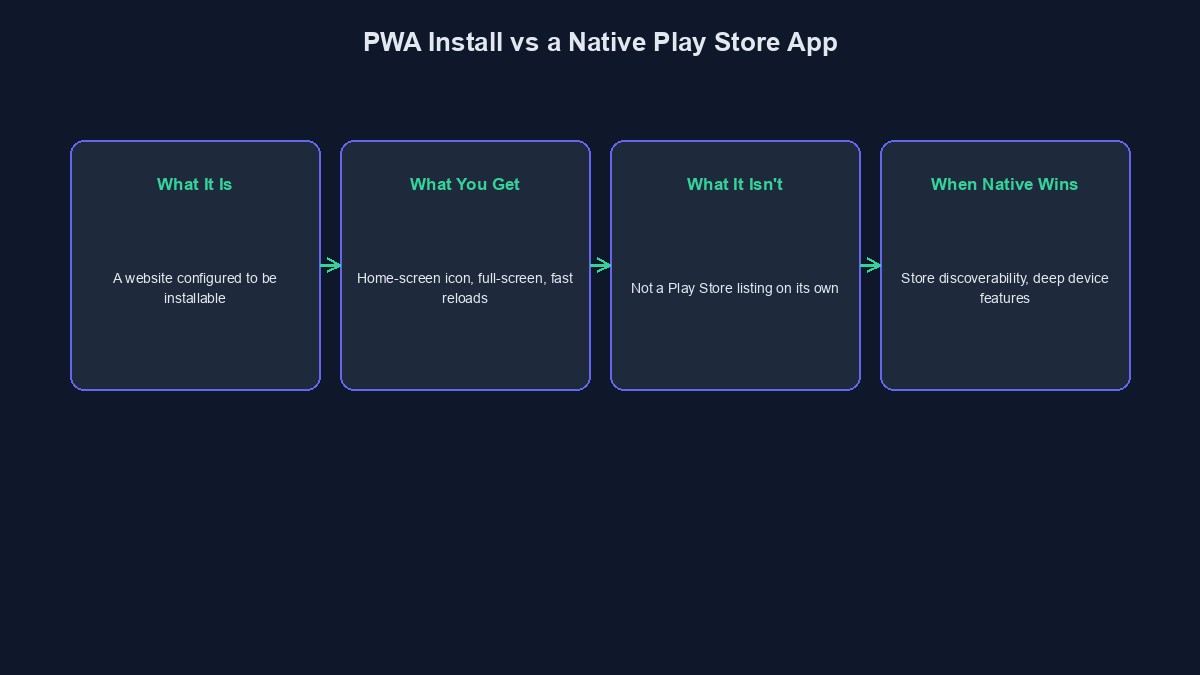
The realistic, widely-used version of this is a Progressive Web App, commonly shortened to PWA, and it is worth understanding precisely what it does rather than treating it as a vague buzzword. A small file called a web manifest describes your site as an installable app, name, icon, colours, and a service worker, a background script the browser runs, enables the site to load quickly and, to a real degree, work offline. Put together, a visitor's browser can offer to "install" your website, and once installed, it sits on their home screen with its own icon, opens without the browser's address bar visible, and genuinely feels like an app rather than a website in a tab.
What this genuinely is not, stated plainly
This is not a native Android application in the technical sense, and it is not something you submit to the Google Play Store through this method alone. A PWA is still, underneath, a website, running in a specialised browser context rather than compiled into a native Android package. For the large majority of business use cases, VTU platforms, ecommerce stores, booking sites, service businesses, this distinction rarely matters in practice, since what a customer actually experiences, an icon on their home screen, fast loading, a full-screen app-like interface, working notifications in many cases, is functionally very close to a native app. But if your specific requirement is genuinely "must be listed in the Google Play Store" or "must use a deep, native-only device capability," a PWA alone does not get you there, and knowing this before you start saves real disappointment later.
Why this approach exists, and who actually built it
PWAs are not a proprietary trick, they are an open web standard, supported directly by Chrome, Edge, and most modern Android browsers, built by the same browser vendors who build the browsers themselves. This matters because it means the capability is genuinely stable and widely supported rather than a fragile workaround that could stop working after some update, and it is the same underlying technology large, well-known consumer products use for their own "add to home screen" experience.
What a visitor actually sees, step by step
On a supported Android browser, a visitor to a properly configured site sees a prompt, either automatically after some engagement or via a visible "Install App" button, offering to add the site to their home screen. Accepting downloads the small manifest and icon, and from that point the site's icon sits alongside their other real apps, tapping it opens a full-screen experience with no visible browser bar, and the site can genuinely load faster on return visits since key assets are cached locally by the service worker rather than re-fetched every time. On iPhone, the mechanism differs slightly, Safari requires a visitor to use the share menu's "Add to Home Screen" option manually rather than offering an automatic prompt, a real, if minor, platform difference worth knowing about rather than being surprised by.
What you actually need to set this up properly
A valid web manifest file declaring your app's name, icons at the correct sizes, and theme colours. A registered service worker handling, at minimum, basic caching so the installed experience genuinely feels fast rather than identical to a normal page load. Your site served over HTTPS, which is a hard requirement for this entire mechanism to work at all, not an optional nicety. And, for the install prompt to actually appear rather than requiring a visitor to dig through a browser menu, meeting each browser's own specific engagement and configuration criteria, which vary slightly by browser but generally boil down to a genuinely complete, correctly configured manifest and service worker.
When a real native app is genuinely the right call instead
Being honest about the limits of this approach matters as much as explaining what it does well. If your product genuinely depends on deep native device integration, background location tracking, certain kinds of push notification reliability, complex offline data synchronisation, or if being discoverable specifically through Play Store search is a real part of your growth strategy, a genuinely native, or cross-platform-compiled, app is the correct tool, and building it is a meaningfully larger, more expensive undertaking than configuring a PWA, requiring real native development work rather than configuration on top of an existing website.
Notifications: a real capability, with a real platform difference worth knowing
A properly configured PWA can genuinely send push notifications on Android, order updates, a reminder about an abandoned cart, a promotion, working meaningfully close to how a native app's notifications behave. On iPhone, this capability arrived considerably later and, even now, works within real constraints Apple's own browser imposes, meaning notification behaviour on iPhone deserves its own specific testing rather than assuming it mirrors Android exactly. This is worth planning for honestly rather than promising customers a notification experience that then behaves differently depending on which phone they own.
A worked example: what changes for a real VTU business
Picture a VTU business owner whose customers currently visit a mobile browser, type the site's address, and complete a purchase, a workable but slightly clunky repeat-visit experience. With a properly configured PWA, a returning customer instead taps a real icon on their home screen, the page loads visibly faster since the service worker has already cached the core assets from their last visit, and the full-screen presentation removes the browser's own address bar, making the whole experience read, to the customer, as "the VTU app" rather than "a website I visit." Nothing about the underlying business logic changed, the same wallet, the same purchase flow, the same backend, only the delivery mechanism and the perceived experience did.
Mistakes that undermine this once it is set up
Shipping a manifest and service worker but never actually testing the install flow on a real device. Desktop browser dev tools can simulate parts of this, but the actual install prompt behaviour, and how the installed app genuinely feels, deserves a real check on an actual phone before considering this finished.
Promising customers "download our app" language that implies a Play Store listing when what is actually offered is a PWA install. This is a small wording choice with a real trust cost if a customer specifically goes looking for your app in the Play Store and cannot find it; "install our app directly from our website" is both more accurate and, for most customers, equally appealing.
An incomplete or incorrectly sized icon set. A missing or wrong-sized icon is one of the most common reasons an install prompt silently fails to appear at all, and it is worth checking against each platform's actual documented requirements rather than guessing.
Forgetting the HTTPS requirement entirely. This entire mechanism simply does not function over plain HTTP, and an otherwise perfectly configured manifest and service worker will not produce an install prompt without it.
A short glossary
PWA (Progressive Web App): a website configured to be installable and to behave like an app once installed, using open web standards rather than native compilation. Web manifest: the file describing your site's name, icons and appearance as an installable app. Service worker: a background script enabling caching and offline behaviour, central to the PWA experience. Native app: an application compiled specifically for a platform, Android or iOS, and distributed through that platform's own app store.
Where this stands on our platform
Every VTU site built on our platform includes this installable, app-like experience already, a working service worker and manifest configured automatically, with an "Install App" control available directly in the customer dashboard, not something you need to set up separately. This is genuinely a PWA, not a Play Store listing, exactly as described honestly throughout this guide. If your specific project needs a true native app beyond what this delivers, our mobile app development team is the right conversation to have, and you can start building free to see the PWA experience directly in your own project first.
Comments
No comments yet. Be the first to share your thoughts.