
How to Host Laravel on a VPS
At some point, most Laravel developers outgrow shared hosting, either because it cannot run the version of PHP their project needs, cannot handle background queue workers or scheduled tasks properly, or simply cannot give the performance and control a growing application needs. Moving to a VPS, a virtual private server you have full control over, solves all of this, at the cost of now being responsible for setting it up and keeping it running yourself. This is a practical walkthrough of that setup, covering the pieces that actually matter and the specific mistakes that most commonly bite a first-time deployment.
Choosing a server: what actually matters for a Laravel app
For most small to medium Laravel applications, a modest VPS, a couple of CPU cores and a few gigabytes of memory, is genuinely sufficient to start, and it is far easier and cheaper to upgrade a server's resources later than to have overpaid for capacity you did not yet need. Choose a data centre location reasonably close to your actual users, since physical distance adds real, measurable latency to every single request, and for a Nigerian audience specifically, a European or nearby data centre generally serves noticeably better than one in the Americas or Asia. Ubuntu is the most common, well-documented choice of operating system for this kind of deployment, and sticking with it, particularly if you are newer to server administration, means far more existing guides and community answers apply directly to whatever specific problem you eventually hit.
The core software stack a Laravel app needs
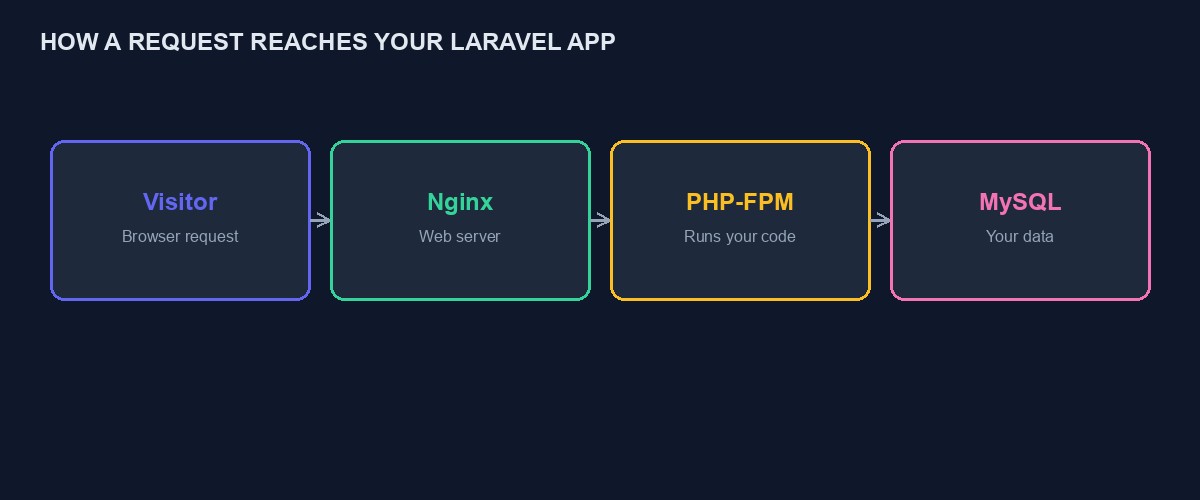
Beyond the operating system itself, a Laravel deployment needs PHP, at the specific version your application requires, since Laravel's own version compatibility with PHP matters and an outdated PHP version is a common, avoidable source of subtle bugs. A web server, Nginx is the most common modern choice, configured to route requests to PHP-FPM, the process manager that actually executes your PHP code. A database server, MySQL or PostgreSQL, depending on what your application was built against. Composer, for installing and managing your application's PHP dependencies. And, for many real applications, a queue worker process and a properly configured scheduler, both of which are commonly forgotten in a first deployment and quietly leave background jobs and scheduled tasks simply never running.
Initial server hardening before deploying anything
Before touching your actual application, take a few basic, genuinely important security steps. Create a dedicated, non-root user for day-to-day server administration rather than operating everything as the root account, since a mistake made as a limited user causes far less damage than the identical mistake made as root. Configure a firewall, allowing only the specific ports your server actually needs, typically web traffic and SSH, and blocking everything else by default. Disable password-based SSH login in favour of key-based authentication, which is considerably harder for an attacker to brute-force than even a strong password. These steps take perhaps twenty minutes and meaningfully reduce your server's exposure to the constant, automated scanning that every server on the public internet experiences.
Getting your application onto the server
Clone your application's code from your version control repository directly onto the server, rather than manually uploading files, since this gives you a clean, repeatable way to deploy updates later by simply pulling the latest changes rather than re-uploading everything by hand each time. Run composer install with the production flag to install dependencies without the extra packages only needed during development. Copy your environment configuration file, setting real production database credentials, your actual application key, and any other environment-specific settings, and never commit this file to your version control repository, since it typically contains genuinely sensitive credentials.
Database setup and running migrations
Create your production database and a dedicated database user with access limited specifically to that database, rather than a broadly privileged account, following the same principle of limiting what any single credential can do if it were ever compromised. Run your application's migrations to build out the actual database structure, and if you are moving an existing application with real data rather than starting fresh, plan your data migration carefully and test it against a copy of your real data before running it against production, since a migration that behaves correctly against an empty test database can still behave unexpectedly against real, messy production data.
Configuring Nginx correctly, and the mistake almost everyone makes once
Your Nginx configuration needs to point specifically at your application's public directory, not the project's root folder, and this single, specific mistake, serving from the wrong directory, is common enough among first-time Laravel deployments to deserve its own explicit warning: getting it wrong typically exposes your application's full source code and configuration files directly to the public internet, rather than only the intended public-facing files, which is a serious security exposure rather than a cosmetic bug. Double-check this specific detail carefully before considering your deployment complete, and if in doubt, verify by attempting to access a file you know exists outside the public directory directly through your browser and confirming it is genuinely inaccessible.
File permissions: the second most common early mistake
Laravel needs specific directories, particularly the storage and cache directories, to be writable by the web server process, and getting file ownership and permissions wrong here produces a category of confusing errors that often look unrelated to permissions at first glance, a blank page, a generic server error, rather than a clear "permission denied" message pointing directly at the actual cause. Set ownership of these specific directories to the web server's own user, and resist the temptation to solve a permissions error by making everything world-writable, which resolves the immediate symptom while introducing a genuine, unnecessary security weakness.
Securing your site with a real SSL certificate
A free, automatically renewing SSL certificate, most commonly obtained through Let's Encrypt using a tool like Certbot, is standard practice for any real, live application today, not an optional extra, since browsers now actively warn visitors away from sites without one, and Google's own search ranking has factored in secure connections for years. Set this up before directing any real traffic at your application, and confirm the automatic renewal is genuinely working, since a certificate that silently expires months later is a surprisingly common, entirely avoidable outage.
Queue workers and the scheduler: easy to forget, genuinely important
If your application uses Laravel's queue system for background jobs, sending emails, processing uploads, these will simply never run unless a queue worker process is actually running continuously on your server, and this is a genuinely common gap in a first deployment, where everything appears to work in initial testing simply because the developer never happened to trigger a queued job during that testing. Use a process manager like Supervisor to keep your queue worker running continuously and to automatically restart it if it crashes, rather than running it manually in a terminal session that will stop the moment you disconnect. Similarly, if your application uses Laravel's task scheduler, a single cron entry running the scheduler every minute is required on the server itself, and forgetting this specific, easy-to-miss step means scheduled tasks that appear correctly configured in your code simply never actually execute.
A worked example: diagnosing a blank white page after deployment
A genuinely common first-deployment experience: everything appeared to go smoothly, but visiting the site shows a completely blank white page with no error message at all. Working through this methodically rather than guessing randomly saves real time. First, check your application's own log file, typically found in the storage directory, which in most cases contains the actual underlying error even when the browser shows nothing useful, since production environments are correctly configured to hide detailed errors from visitors while still recording them for you to read directly.
If the log itself is empty or inaccessible, this often points specifically at the permissions issue covered above, since Laravel cannot write to its own log file if the storage directory lacks the correct ownership, which produces exactly this symptom, a blank page with no logged error, because the error about being unable to log the original error is itself silently swallowed. Fixing the storage directory's ownership and permissions, then reproducing the failure again, usually reveals a proper, specific error message the second time, which almost always points directly and unambiguously at the actual underlying problem, whether that is a missing environment variable, a database connection issue, or something else entirely.
Setting up a repeatable deployment process, not a one-time manual effort
Your very first deployment is understandably manual, working through each step directly on the server. Before your application has been live long, invest in making updates repeatable: a simple deployment script that pulls the latest code, installs dependencies, runs any new migrations, and restarts your queue workers, run consistently rather than remembering and manually repeating each individual step from memory every time you ship a change. This single habit meaningfully reduces the chance of forgetting a step, restarting a queue worker after a code change that affects queued jobs, for instance, which is a common, quietly confusing source of bugs that appear to be fixed in your code but are not actually running yet on the live server.
Zero-downtime deployment for a growing application
A simple deployment approach briefly interrupts your application while new code is being deployed, acceptable for a smaller application with modest, forgiving traffic. As real usage grows, this brief interruption becomes more noticeable and more costly, and tools that support atomic, zero-downtime deployment, keeping the previous version fully running until the new version is completely ready, then switching over instantly, become worth adopting. This is a genuine upgrade in deployment sophistication worth planning for once your application has real, meaningful traffic, rather than something a first deployment needs to solve on day one.
Backups: not optional, and worth testing, not just configuring
Set up automated, regular backups of both your database and any user-uploaded files, stored somewhere separate from the server itself, since a backup stored only on the same server it is protecting against provides no protection at all if that server fails entirely. Beyond simply configuring backups, actually test restoring from one periodically, since a backup process that has silently been failing for months, discovered only when you desperately need it, is a genuinely common and painful way to learn this lesson.
Performance basics worth setting up from the start
A few configuration changes, cheap to set up early and genuinely impactful, are worth building into your initial deployment rather than retrofitting under pressure once real traffic arrives. Enable Laravel's own configuration and route caching in production, which meaningfully speeds up how quickly your application starts handling each request. Configure a proper cache driver, Redis is a common, well-supported choice, rather than the file-based default, for anything beyond the smallest application, since caching genuinely reduces repeated, expensive database queries for data that does not change on every single request. And enable Gzip compression in your Nginx configuration, which shrinks the actual data sent to each visitor's browser, mattering more than it might seem for visitors on slower Nigerian mobile connections specifically.
Common deployment mistakes worth naming directly
Leaving debug mode enabled in production. Laravel's debug mode, useful during development, displays detailed error information, including sensitive configuration values, directly to any visitor who triggers an error, which is a genuine, serious security exposure if left enabled on a live, public application.
Forgetting to run new migrations after a code update. Deploying code that expects a database change without actually running the corresponding migration produces confusing errors that look like a code bug but are actually a simple, missed deployment step.
Not restarting the queue worker after deploying code changes. A running queue worker process has already loaded the previous version of your code into memory, and continues running that old version until explicitly restarted, even after new code has been deployed, a subtle, easy-to-miss gap between "the code is updated" and "the running process is using the updated code."
Storing uploaded files only on the server's local disk. This works until the server needs to be rebuilt or migrated, at which point locally stored files are easily lost unless a proper backup or a separate, dedicated storage service was used from the start.
No monitoring at all, discovering downtime only from a customer complaint. The gap between an outage starting and someone reporting it can be hours, actively damaging a business's reputation the entire time nobody at the business even knew something was wrong.
Monitoring, so you find out about a problem before your users tell you
Set up basic monitoring, checking that your application actually responds correctly, watching server resource usage, and alerting you if something goes wrong, rather than relying entirely on a customer complaint to reveal that your site has been down for the past two hours. Simple, free or low-cost monitoring tools exist specifically for this and are worth the modest setup time relative to the real cost of an unnoticed extended outage.
An alternative worth being honest about
Everything above is genuinely manageable by a competent developer, and plenty of Laravel projects run this way successfully for years. It is also real, ongoing responsibility: security patches, monitoring, the occasional server-level problem at an inconvenient hour. If your actual need is a working, reliable website or store rather than the specific experience of managing your own server, our platform's business, ecommerce and other templates run on infrastructure we manage entirely, security patches, monitoring, backups, all handled, and you can start building free without ever touching a server configuration yourself. For a genuinely custom application that does need this level of control, our DevOps service and cloud infrastructure service can set up and manage exactly this kind of deployment properly on your behalf.


Comments
No comments yet. Be the first to share your thoughts.