How to Secure a PHP Website
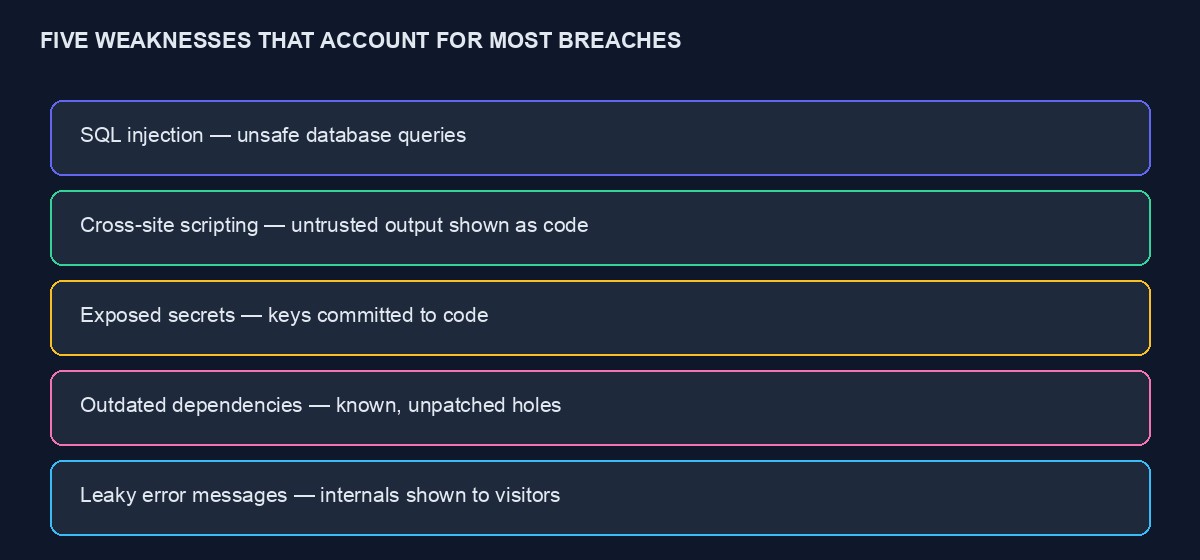
Most PHP websites that get compromised are not brought down by some sophisticated, novel attack. They fall to the same handful of well-known, well-documented weaknesses, repeated across millions of sites, that a modest amount of deliberate effort closes almost entirely. This guide covers those specific weaknesses, in plain language, with the actual fix for each, aimed at someone building or maintaining a real PHP site who wants a practical checklist rather than an abstract security lecture.
SQL injection: still the classic, still genuinely dangerous
SQL injection happens when a website takes something a visitor typed and puts it directly into a database query without properly separating it from the query's own structure, letting a malicious visitor craft input that changes what the query actually does, potentially reading, altering or deleting data they were never meant to touch. The fix is prepared statements, or parameterised queries, a standard feature in every modern PHP database library, where you write your query's structure separately from the actual values, and the database itself handles combining them safely.
If your code ever builds a database query by directly concatenating a visitor's input into a string, that is the specific pattern to eliminate everywhere it appears, not just in the one place you happen to be looking at, since attackers actively search for exactly this pattern, and a single overlooked instance anywhere on your site is enough for real damage.
Cross-site scripting: letting a visitor's input become someone else's code
Cross-site scripting, commonly abbreviated XSS, happens when a website displays a visitor's input back to other visitors without properly neutralising it first, letting a malicious visitor submit something that looks like text but is actually executable code, a comment, a review, a profile name, which then runs in every other visitor's browser who views that page. The fix is escaping output properly: any user-supplied content displayed back on a page needs to have special characters converted to their safe, literal equivalents before being shown, which most modern PHP templating systems do automatically by default, provided you use them correctly and do not deliberately bypass that protection for convenience.
Be specifically careful with any feature that deliberately allows some HTML formatting, a rich text comment box, for instance, since this is exactly where the automatic protection is often disabled to allow the formatting through, and it needs a proper, deliberate sanitisation library in its place, not simply trusting that visitors will only submit safe, well-formed HTML.
Cross-site request forgery: tricking a logged-in visitor into an action they never intended
This attack tricks a visitor who is already logged into your site into unknowingly submitting a request, changing their password, making a purchase, by visiting a different, malicious page that secretly triggers the action using their own, already-authenticated session. The fix is CSRF tokens, a unique, secret value included in every form your site generates and checked on submission, which a malicious external page has no way to know or include, causing the forged request to fail this check even though it appears to come from a genuinely logged-in visitor. Most modern PHP frameworks include this protection by default; if you are working without a framework, or have any form that was built to bypass the framework's default protection, verify explicitly that this check is genuinely in place.
Keeping secrets actually secret
Database passwords, API keys, and any other sensitive credential belong in environment variables or a dedicated, properly protected configuration file, kept entirely outside your version control repository, never hardcoded directly into a file that gets committed and potentially pushed to a public or semi-public location. If your site has ever had a credential committed to version control, even briefly and even if later removed, treat that credential as compromised and rotate it, since version control history typically retains the old, exposed value even after a file has been updated, and a scanner or a person browsing your history could still find it.
HTTPS everywhere, not just on the login page
Every page of your site should be served over HTTPS, not just pages that handle sensitive information, since an unencrypted connection anywhere allows anyone on the same network, a shared public wifi, for instance, to intercept and potentially alter traffic between a visitor and your site, including stealing session cookies that could then be used to impersonate that visitor elsewhere on the very same site. A free, automatically renewing certificate through Let's Encrypt makes this essentially cost-free, and there is no longer a good reason for any real, live site to run any page without it.
Session security: protecting a logged-in visitor's identity
Configure session cookies with the secure flag, ensuring they are only ever sent over an encrypted connection, and the HttpOnly flag, which prevents client-side scripts, including a successful XSS attack elsewhere on your site, from directly reading the cookie's value. Regenerate a visitor's session identifier immediately after they log in, which prevents a specific, well-documented attack where an attacker fixes a known session identifier before a victim logs in, then reuses that same identifier afterward to hijack the now-authenticated session.
File uploads: one of the most dangerous features to get wrong
Any feature letting a visitor upload a file deserves particular caution, since a maliciously crafted upload, disguised as an innocent image or document, is a common route to a genuinely serious compromise if handled carelessly. Validate the actual file content, not just the filename's extension, which can be trivially faked. Store uploaded files outside your web-accessible directory where possible, or configure your server to never execute code from the upload directory even if a malicious file somehow ends up there. And set a sensible maximum file size, both to prevent abuse and to protect your server's own resources from being exhausted by an oversized or repeated upload.
Keeping dependencies updated, deliberately, not accidentally
PHP applications typically depend on numerous third-party packages, and known vulnerabilities in outdated versions of common packages are a genuinely frequent, real-world source of compromise, since attackers actively scan for sites running specific, known-vulnerable versions of popular software. Use Composer's own tools to check for known vulnerabilities in your current dependencies, and build a habit of reviewing and updating dependencies regularly, rather than only touching them once every year or two, by which point a meaningful number of known issues may have accumulated unaddressed.
Error messages: what they should show a visitor, and what they should not
A production site should never display detailed technical error information, a database error, a full stack trace, directly to a visitor, since this routinely leaks genuinely sensitive details about your application's internal structure, exactly the kind of information an attacker uses to craft a more targeted attempt. Configure your application to log detailed errors somewhere only you can see, a proper log file or monitoring service, while showing visitors a generic, unhelpful-to-attackers message. This is a configuration setting worth explicitly verifying is correctly set before any real launch, since many frameworks default to detailed errors during development and require an explicit, deliberate change for production.
Rate limiting: slowing down an attacker without inconveniencing real visitors
Login forms, password reset requests, and any other sensitive action are common targets for automated, repeated attempts, guessing passwords, abusing a feature at scale. Rate limiting, restricting how many attempts a single visitor or IP address can make within a given period, meaningfully slows this down without noticeably affecting a genuine visitor who is simply typing their own password correctly on the first or second attempt.
Admin areas: extra scrutiny for the highest-value target
Your site's administrative area is, by definition, where the most consequential actions happen, and it deserves security measures beyond what a regular page needs: a genuinely strong, unique password, two-factor authentication where your platform supports it, and ideally restricting access to specific, known IP addresses if your team's access patterns allow it. A compromised regular user account is a real problem; a compromised admin account is often a complete compromise of the entire site.
A worked example: how one overlooked field led to a real compromise
Picture a small business website with a search feature added late in development, quickly, outside the pattern used everywhere else on the site, directly concatenating the visitor's search term into a database query rather than using the prepared statements correctly used on every other form. Months later, an automated scanning tool, one of thousands constantly probing sites across the internet for exactly this pattern, finds the search feature, confirms the vulnerability with a harmless test input, and within hours a real attacker has extracted the site's entire customer table, names, emails, hashed passwords, all through a single search box nobody thought to double-check because "it's just search."
Nothing else on the site was vulnerable. The other forms all correctly used prepared statements. This is precisely why "we mostly do it right" is not the same as "we are secure," since a real attacker needs to find exactly one overlooked instance, while a defender needs every single instance handled correctly, an asymmetry worth taking seriously rather than assuming good general practices elsewhere compensate for a single missed spot.
Content Security Policy: a further layer worth adding
Beyond properly escaping output, a Content Security Policy, set through a response header, tells the browser explicitly which sources of scripts, styles and other content are allowed to load on your page, providing a further, independent layer of protection even if an XSS vulnerability were somehow missed elsewhere. It requires some careful configuration to avoid breaking legitimate functionality your site actually needs, images or scripts loaded from other services you genuinely use, but it is worth the setup time for any site handling sensitive information, precisely because it protects you even in the specific case your primary escaping defence has a gap you have not yet found.
Logging security-relevant events, not just errors
Beyond logging application errors, build a habit of logging security-relevant events specifically: failed login attempts, password changes, admin actions, in a way you can actually review, not just accumulate. A sudden spike in failed login attempts against a specific account, or an admin action taken at an unusual hour by an account that normally logs in during business hours, are both things you want to notice from your own logs, ideally before real damage occurs rather than only during a forensic review after the fact.
A short, practical checklist to run through before any real launch
- Every database query touching user input uses prepared statements, with no exceptions anywhere in the codebase.
- All user-supplied content displayed back to other visitors is properly escaped, with any rich-text feature using a deliberate, dedicated sanitisation library.
- CSRF protection is active on every form that changes data, verified rather than assumed.
- No credentials of any kind exist anywhere in version control, past or present.
- Every page is served over HTTPS, with no exceptions.
- Session cookies are configured with the secure and HttpOnly flags, and the session identifier regenerates on login.
- File uploads are validated by actual content, not filename, and stored where they cannot be directly executed.
- Dependencies have been checked for known vulnerabilities within the last month, not the last year.
- Production error display is confirmed off, with detailed errors going only to a private log.
- Rate limiting is active on login, password reset, and any other sensitive, repeatable action.
Insecure direct object references: a subtler, easily missed weakness
This weakness has a technical name and a simple underlying idea: a page that shows an order, an invoice or a document based on an ID in the web address, like /invoice/482, without checking whether the currently logged-in visitor is actually allowed to see that specific invoice, lets any logged-in visitor simply change the number in the address and potentially view someone else's private information. This is a genuinely common gap because the page appears to work perfectly during normal testing, since a developer testing their own account naturally only ever requests their own records, and the missing check only becomes visible when someone deliberately tries a different number.
The fix is straightforward once you know to look for it: every page that displays a specific record based on an identifier in the address must explicitly verify that the current visitor actually owns or has permission to view that specific record, not just that they are logged in as someone. Test this deliberately yourself, logged in as one account, by trying to access a record you know belongs to a different account, rather than assuming the check exists simply because the feature otherwise appears to work correctly.
Third-party scripts: a risk that is easy to overlook
Every external script your site loads, an analytics tool, a chat widget, an advertising script, runs with meaningful access to your page and, by extension, to your visitors, and a compromise of that third-party service can become a compromise of every site that loads its script, including yours, through no fault of your own code at all. Load only scripts you genuinely need, from providers you have real reason to trust, and periodically review the list of external scripts your site actually loads, since it is common for this list to grow gradually over time as different features are added by different people, without anyone ever reviewing the accumulated total.
A realistic ongoing routine, not a one-time checklist
Security is not a box ticked once at launch and forgotten. Build a modest, realistic routine: check for dependency vulnerabilities monthly, review who has admin access quarterly, and stay aware of newly disclosed vulnerabilities in whatever framework or major packages your site depends on. This does not need to consume significant time each month, but it does need to genuinely happen, rather than being the kind of task that is always intended for "next week" indefinitely.
When to bring in a professional review
This guide covers the well-known, common fundamentals, and following it closes the large majority of how real sites are actually compromised. A site handling significant customer data, payments, or anything with genuinely serious consequences if breached deserves a proper, professional security review beyond a checklist, someone actively trying to find weaknesses specific to your application rather than only checking for generic, well-known patterns. Our code audit and rescue service exists specifically for this, and it is considerably cheaper to commission before a problem than to discover the need for one after a real incident.



Comments
No comments yet. Be the first to share your thoughts.