How to Send Bulk Payouts to Multiple Bank Accounts With Paystack and Flutterwave
Paying one recipient is a checkout. Paying fifty recipients, staff salaries, vendor commissions, affiliate payouts, refunds across a batch of orders, is a genuinely different operational problem, and doing it one transfer at a time through a dashboard is both slow and a real source of manual error at any meaningful scale. Both Paystack and Flutterwave support bulk transfers specifically for this, and this guide covers how to actually use them properly, safely, and without the specific mistakes that turn a bulk payout into a genuinely stressful afternoon.
Why bulk transfer exists as its own distinct feature
A single transfer, covered in our guide to verifying a bank account number before sending money, involves resolving one account, confirming it, and initiating one transaction. Doing this fifty times manually multiplies both the time required and the chance of a genuine mistake, a wrong amount typed for one recipient among many, an account number transposed under the fatigue of doing this repeatedly. Bulk transfer tools solve this by letting you prepare every recipient's details at once, in a structured file, and submit them together as a single, reviewable batch, with the platform handling the individual transactions behind the scenes.
Preparing your recipient data properly, before touching either platform
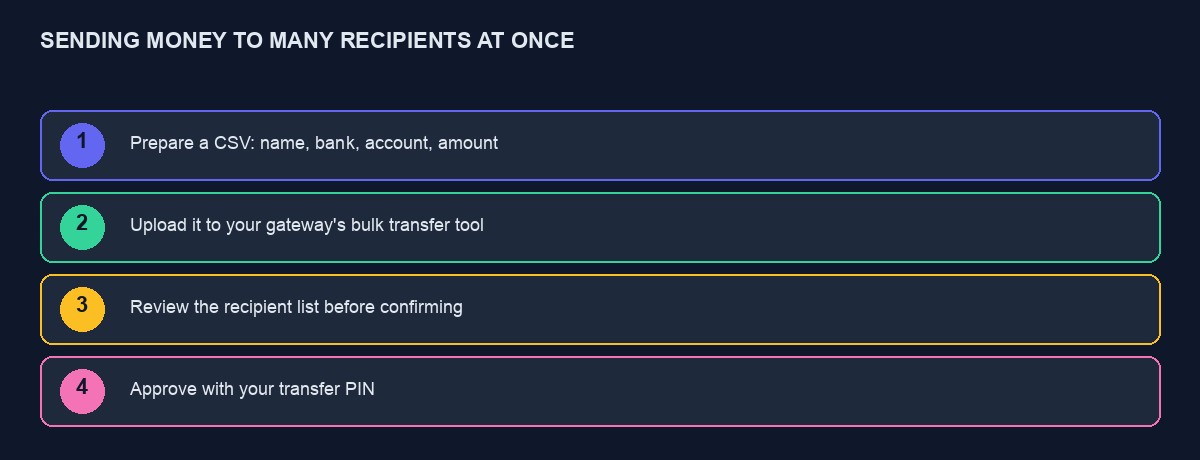
Both gateways expect a structured file, typically a CSV, containing each recipient's bank name or code, account number, the amount to send them, and usually a short narration describing the payment. Prepare this file carefully in your own system first: confirm every account number is the correct length for a Nigerian account, confirm amounts are in the correct format with no stray currency symbols or extra characters that could confuse the parser, and where practical, resolve each account number individually first, using the account verification approach covered in our dedicated guide, before including it in a bulk batch, since catching a wrong account number before submission is considerably less stressful than discovering it after a batch has already partially processed.
Uploading and reviewing before you approve anything
Both platforms show you the parsed, interpreted contents of your uploaded file before final approval, listing every recipient, their resolved bank details, and the amount they are set to receive. Treat this review step as genuinely mandatory, not a formality to click past quickly, since it is your last real opportunity to catch a formatting error, a misplaced decimal point turning a modest amount into a vastly larger one, or a recipient who should not be in this specific batch at all, before money actually moves and a mistake becomes considerably harder to reverse.
The transfer PIN or approval step: do not treat it as an obstacle
Both gateways require an additional confirmation step before a bulk transfer actually executes, typically a PIN or a one-time code, and it is worth understanding this as a deliberate, valuable safeguard rather than mere friction to route around. This step exists specifically to prevent a single compromised login session, or a single person's momentary mistake, from moving a large sum of money without any further check, and building internal habits, or systems, that bypass or automate past this confirmation defeats the actual purpose it serves.
Handling a partial failure within a batch
A bulk transfer batch does not always succeed entirely or fail entirely; individual transfers within a batch can fail independently, one recipient's account details turning out to be invalid, one recipient's specific bank experiencing a temporary issue, while the rest of the batch processes successfully. Design your own record-keeping to track each individual transfer's status separately within a batch, not just the batch as a whole, since treating an entire batch as "done" once submitted, without checking each individual line item's actual outcome, is how a single failed payment inside an otherwise successful batch goes unnoticed for weeks until the affected recipient eventually asks where their payment is.
Building a repeatable process, not a one-time manual effort
If bulk payouts are a recurring part of your business, monthly salaries, weekly vendor settlements, build a genuinely repeatable process around this rather than reconstructing your recipient file from scratch under time pressure each cycle: maintain your recipient list as a properly maintained record in your own system, generating the correctly formatted upload file directly from it each cycle rather than manually retyping details that rarely change, which both saves real time and removes a recurring source of manual transcription error.
A worked example: an imagined affiliate payout run
Picture a small business running an affiliate programme, paying out commissions to around thirty affiliates monthly, a process that began as individual manual transfers taking most of an afternoon each month, with two genuine misdirected payments in its first six months from simple copy-paste errors during that manual, repetitive process.
Moving to a bulk transfer process, generating the upload file directly from the business's own affiliate tracking spreadsheet rather than retyping figures by hand, and reviewing the parsed batch carefully before approval each time, cuts the monthly payout process from an afternoon to roughly twenty minutes, and the misdirected payment problem stops entirely, not because the business became more careful in the abstract, but because the specific, repetitive, manual re-entry step that had been causing the errors was removed from the process altogether.
A worked example: catching a formatting error before it becomes real money moved
Picture a developer preparing a bulk transfer file by exporting data directly from a spreadsheet, where one recipient's amount field had accidentally been formatted with a trailing space and an extra decimal point during a manual copy-paste from a different source document. Uploading this file to the gateway's bulk transfer tool, the parsed preview shows this specific recipient's amount as noticeably, obviously wrong, a hundred times larger than every other recipient in the same batch, immediately visible simply because the review step displays every recipient's amount side by side for comparison.
Catching this during the mandatory review step, rather than approving the batch without reading it carefully, takes moments and costs nothing. Missing it, and approving a batch containing that one dramatically incorrect amount, would have meant a genuinely serious, and considerably harder to reverse, mistake. This is precisely why the review step described above deserves to be treated as a real, deliberate check every single time, not a habitual click-through, since the batches where nothing goes wrong are exactly the ones that make skipping a careful review feel, wrongly, like a safe habit to develop.
Comparing Paystack's and Flutterwave's bulk transfer tools directly
Both platforms follow a broadly similar CSV-upload pattern, and the specific details worth checking before choosing, or before building against either's API directly rather than using the dashboard tool, include the maximum batch size each currently supports, since a very large payout run may need to be split across multiple batches if it exceeds a platform's limit, and the specific column format and required fields each expects in the uploaded file, which differ slightly between the two and are worth confirming directly against each platform's own current documentation rather than assuming an identical format works for both without adjustment.
Notification: telling recipients their payment is on the way
Beyond the mechanics of moving the money itself, consider whether your recipients, staff, vendors, affiliates, are actually told when a payment has been sent and roughly when to expect it to reflect in their account, rather than left to check independently and message you if they are unsure. A short, automated notification, sent once a batch is confirmed processed, sent by email, SMS or WhatsApp depending on what your specific recipients actually check regularly, meaningfully reduces the number of "has my payment gone out yet" enquiries you would otherwise field individually, and it is a small, low-cost addition once the underlying bulk transfer process itself is already working reliably.
Security considerations specific to bulk payouts
A bulk transfer capability, by its nature, can move meaningfully more money in a single action than an ordinary one-off checkout, which makes the access controls around it worth taking seriously. Limit who within your team has permission to actually initiate and approve a bulk transfer, following the general principle of limiting what any single credential or account can do, covered throughout our security guides, and where your gateway's dashboard supports it, consider requiring approval from more than one person for a batch above a certain size, a real, practical safeguard against both a single compromised account and a single person's genuine, honest mistake going unchecked by anyone else.
Building bulk transfer through the API rather than the dashboard
For a business running bulk payouts frequently enough that manually uploading a file through the dashboard each time becomes a genuine bottleneck, both gateways support initiating bulk transfers programmatically through their API, following the same authenticated, server-side pattern covered throughout our API integration guides. This lets your own application generate the recipient batch automatically from your actual internal records, submit it directly, and process the resulting confirmation or webhook notification without a human needing to manually export and upload a file each cycle at all. Build this incrementally: get the manual, dashboard-based process working reliably and well understood first, then automate it through the API once the underlying logic, including how you want to handle partial failures and recipient review, is genuinely proven and trusted.
Record-keeping that survives a dispute later
Keep a permanent, clear internal record of every bulk payout batch, exactly what was submitted, exactly what the platform confirmed processing, and the specific outcome of each individual recipient within it, retained well beyond the immediate transaction, not just relied upon as visible history within the gateway's own dashboard indefinitely. If a recipient disputes a payment months later, claiming it was never received or was for the wrong amount, having your own clear, independently retained record of exactly what was submitted and confirmed at the time resolves the disagreement considerably faster than needing to reconstruct history from memory or search back through a gateway dashboard's own historical records.
Timing: when bulk transfers actually process
A submitted and approved bulk transfer batch does not always complete instantly, particularly for a larger batch or one submitted outside normal banking hours, and it is worth understanding your specific gateway's typical processing timeframe before promising recipients a specific arrival time you cannot actually guarantee. If your payout schedule is time-sensitive, staff expecting salary on a specific date, submit meaningfully ahead of that deadline rather than at the last possible moment, giving genuine buffer time for the batch to process fully and for any individual failure within it to be caught and corrected before the actual expected payment date arrives.
A short checklist before running a real bulk payout
Resolve individual account numbers before including them in a large batch, rather than discovering an invalid account only after submission. Review the platform's parsed, interpreted version of your file carefully before approving, treating this as a mandatory check, not a formality. Track each individual transfer's outcome within a batch, not just the batch's overall status. Maintain your recipient list as a proper, ongoing record rather than reconstructing it manually each cycle. And limit and, where practical, require multiple approval for who can actually initiate a large payout batch.
Where this fits alongside our own platform
If your business needs bulk payout capability as part of a custom build on top of our platform, affiliate commissions, vendor settlements, our developer API gives you the underlying per-project credentials to build this against your connected gateway account directly, following the same discipline covered throughout this guide. You can start building free to see the platform, and our Paystack and Flutterwave tutorials cover the underlying single-transfer integration this bulk process builds on top of.



Comments
No comments yet. Be the first to share your thoughts.