
Flutterwave API Tutorial
This is the technical companion to our Paystack API tutorial, covering Flutterwave's own API directly, for developers building a custom payment integration rather than using an existing platform where a gateway connection is already built in. The underlying concepts, covered in our guides to what an API is and what a webhook is, apply identically here; this tutorial focuses on what is specifically different about Flutterwave's own implementation.
Getting your API keys
Flutterwave's dashboard provides test and live API key pairs, each with a public key for front-end use and a secret key that must only ever be used from your own server, never exposed to a visitor's browser, following the same architecture discipline covered in our guide to connecting an API to a website. A further key, the encryption key, is used for an older integration method involving client-side encryption of card details directly, largely superseded by the hosted checkout approach covered below for most new integrations, but worth knowing exists if you encounter it referenced in older documentation or example code.
Standard checkout: initiating a payment
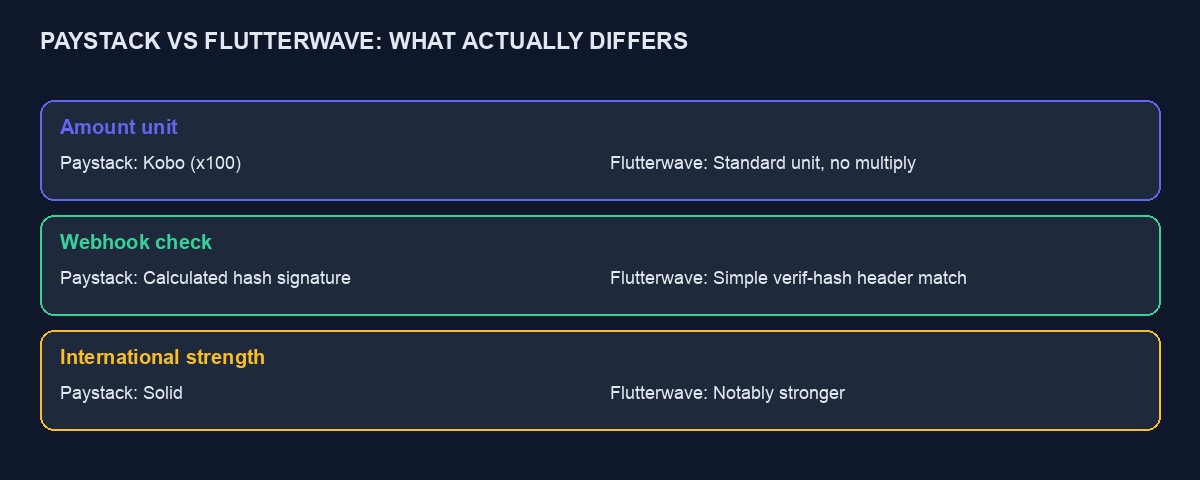
Flutterwave's standard integration sends a request from your server to their /v3/payments endpoint, carrying a transaction reference you generate yourself, called tx_ref, the amount, the currency, usually NGN for naira, the customer's details, and a redirect URL for after payment completes. Unlike Paystack's kobo-based amounts, Flutterwave's amount is specified in the currency's standard unit directly, five thousand naira as 5000, not multiplied by a hundred, which is a genuine, easy-to-miss difference if you have worked with Paystack before and assume the same convention applies.
The response includes a payment link, a hosted checkout page you redirect the customer to, where they complete payment by card, bank transfer, USSD or another supported method, entirely on Flutterwave's own secure page.
Verifying a transaction: the step that must never be skipped
Exactly as with Paystack, and worth repeating because it is exactly as consequential here: a customer being redirected back to your site after payment is not proof the payment succeeded, and treating it as such is a real security gap. Your server must separately call Flutterwave's verification endpoint, /v3/transactions/:id/verify, using the transaction ID Flutterwave provides, and only mark an order as paid once this call explicitly confirms a successful status and, critically, confirms the verified amount and currency actually match what you expected for that specific order, a detail Flutterwave's own documentation specifically emphasises, since without checking the amount, a technically successful but manipulated low-value payment could otherwise be mistaken for a full one.
Webhooks: signature verification specifics
Flutterwave sends webhook notifications to a URL you configure in your dashboard, and verifies its authenticity differently from Paystack: rather than a calculated hash signature, Flutterwave sends a simple secret hash value in a request header, called verif-hash, which you compare directly against a secret hash you configured yourself in your dashboard settings. If the two do not match exactly, discard the request without processing it, the same principle as Paystack's signature check, implemented through a slightly different, simpler mechanism specific to Flutterwave.
As with any webhook, following the general guidance in our webhook guide, respond quickly to acknowledge receipt, check whether you have already processed this specific event before acting to avoid duplicate handling, and defer any slower work, sending confirmation emails, updating several related records, to run after responding rather than before.
A complete, worked example: an order from pending to paid
A customer checks out for an order worth twelve thousand naira. Your server generates a unique tx_ref, creates a pending order record, and calls /v3/payments with the amount as 12000, the currency as NGN, and a redirect URL, receiving back a payment link. The customer is redirected there, completes payment by bank transfer, and is redirected back to your site carrying the transaction ID and status in the URL. Your server immediately calls the verify endpoint with that transaction ID, confirms the status is successful and that the verified amount and currency genuinely match the order, twelve thousand naira, NGN, not just any successful payment, and marks the order paid. Separately, Flutterwave's webhook also arrives reporting the same event; your code checks the verif-hash header matches your configured secret, checks whether this event was already processed through the redirect verification, and if not, marks it paid now, exactly mirroring the dual-path reliability pattern covered in the Paystack tutorial.
Payment methods and handling method-specific quirks
Flutterwave's hosted checkout supports a broad range of methods beyond cards, including bank transfer, USSD, mobile money for other African markets, and, notably, stronger native support for international cards and multiple currencies than some competitors, which is one of Flutterwave's genuine differentiators if a meaningful share of your customers pay from outside Nigeria. Bank transfer payments in particular can take a variable amount of time to confirm compared with an instant card payment, and your user interface should account for this, showing the customer a clear "waiting for your transfer to be confirmed" state rather than implying an instant result for a payment method that genuinely is not instant.
Testing with Flutterwave's test environment
Flutterwave provides test card numbers and test account details for triggering successful, failed, and additional-authentication-required outcomes in test mode, documented directly on their developer site. As with any payment integration, work through each documented test scenario deliberately before considering the integration complete, rather than only confirming the single case where a payment succeeds cleanly on the first attempt.
Refunds through the API
Flutterwave supports initiating a refund, full or partial, through their API or dashboard, referencing the original transaction. As with Paystack, build a deliberate process around this: a documented refund policy, a record kept against the original order for a clean audit trail, and clear communication to the customer that a refund typically takes a few business days to actually reflect in their account, rather than instantly upon your confirmation.
Split payments and multi-party transactions
For businesses needing to automatically divide a payment between multiple recipients, a marketplace or platform taking a commission before passing funds to individual sellers, Flutterwave's subaccount and split payment features handle this directly through the API, similarly in concept to Paystack's equivalent feature, letting you define how a payment should be divided at the point of initiating the transaction rather than handling payouts manually afterward.
A worked example: debugging a webhook that keeps arriving as "unverified"
Picture a developer whose Flutterwave webhook handler consistently rejects every incoming request, logging "signature mismatch" for every single one despite payments clearly succeeding on Flutterwave's own dashboard. Working through this systematically: the first thing to check is whether the secret hash configured in the Flutterwave dashboard actually matches, character for character, the value the code is comparing against, since a copy-paste error, an extra trailing space, a character lost when pasting between systems, produces exactly this symptom. The second thing to check, specifically for Flutterwave rather than Paystack, is that the comparison is reading the correct header, verif-hash, rather than a header name borrowed from a different gateway's convention, an easy mistake for a developer who has recently worked with Paystack's differently structured signature and is applying muscle memory from one integration to the other.
If both of those check out and the mismatch persists, the remaining likely cause is testing against the wrong environment entirely, a webhook configured for live mode firing against a handler still checking a test-mode secret, or the reverse, which is worth ruling out by confirming which specific secret hash is active for the specific mode currently being tested.
Currency conversion and settlement for international payments
When a customer pays in a currency other than naira, understand specifically how Flutterwave converts and settles that payment into your account: check whether your account settles in naira at the point of conversion, or offers holding a balance in the original currency for later settlement, since this affects your actual realised revenue when exchange rates move between the moment of sale and the moment of settlement. This detail is worth confirming directly against your own account's specific configuration in the Flutterwave dashboard rather than assuming a general answer applies universally, since settlement options can vary by account type and region.
Mobile money support beyond Nigeria
If your business serves customers in other African markets alongside Nigeria, Flutterwave's mobile money support, covering methods widely used in Kenya, Ghana, Uganda and several other countries, is a genuine differentiator worth knowing about specifically, since building separate integrations for each country's preferred payment method would otherwise be considerably more work than using a single gateway that already supports the regional variation directly through the same underlying API structure.
Common integration mistakes specific to Flutterwave
Sending amounts in the wrong unit. Unlike Paystack's kobo convention, Flutterwave expects the currency's standard unit directly; a developer moving between the two gateways, or copying example code from the wrong one, commonly makes this exact mistake in one direction or the other.
Skipping the amount and currency check during verification. Confirming only that the status is "successful" without also confirming the verified amount matches your expected order total is a genuine, documented security gap specific to how Flutterwave's verification response is structured.
Confusing the verif-hash webhook check with Paystack's signature method. The two gateways verify webhook authenticity differently, and applying one gateway's verification logic to the other's webhook will simply fail, or worse, silently pass incorrectly if implemented carelessly.
Not accounting for bank transfer's variable confirmation time. Building a user interface that assumes every payment method confirms instantly produces a confusing experience for the meaningful share of customers who choose to pay by transfer.
Recurring payments and tokenised cards
For subscription-style billing, Flutterwave supports tokenisation, where a customer's card is securely charged once with their explicit consent, and a token representing that authorised card is returned to you for future charges, rather than you ever storing the actual card details yourself. Subsequent charges use this token against a separate endpoint built specifically for recurring or repeat charges, and it is worth reading Flutterwave's own documentation on tokenisation directly if your business genuinely needs this, since correctly implementing consent, storage of the token, and handling a customer's later decision to cancel or update their payment method all deserve careful, deliberate design rather than an afterthought bolted onto a one-off checkout flow.
A note on staying current with a payment gateway's API
Payment gateway APIs evolve, occasionally deprecating an older approach in favour of a newer one, exactly as the encryption-key method mentioned earlier has largely been superseded by hosted checkout for new integrations. Whichever gateway you build against, subscribe to their developer changelog or announcements if one is offered, and revisit your integration's approach periodically rather than assuming a tutorial or piece of example code written at one point in time remains the current best practice indefinitely. This applies to this very tutorial too: treat it as accurate at the time of writing, and verify against Flutterwave's own current documentation before building anything that will run in production for years to come.
Choosing between Paystack and Flutterwave for a specific integration
Technically, both gateways solve the same underlying problem with broadly comparable reliability, and the choice often comes down to specifics: Flutterwave's stronger native international and multi-currency support if you serve customers meaningfully beyond Nigeria, against Paystack's often-praised documentation clarity and slightly simpler amount-unit convention for a purely Nigeria-focused business. Many established businesses eventually integrate both, giving customers a choice and themselves a fallback, though this roughly doubles the integration and testing work covered in these two tutorials.
A short glossary for Flutterwave's own documentation
tx_ref: the unique transaction reference you generate for each payment attempt. Payment link: the hosted checkout page URL returned when you initiate a payment. verif-hash: the header used to confirm an incoming webhook genuinely came from Flutterwave. Subaccount: the mechanism for automatically splitting a payment between multiple recipients. Keeping these specific terms straight, and noticing where they differ from Paystack's equivalent vocabulary, makes moving between the two gateways' documentation considerably less confusing than assuming the two speak an identical technical language throughout.
Where this is already built for you
If your goal is simply to accept payments rather than build the integration yourself, our platform already implements everything described above for Flutterwave, alongside Paystack, Stripe, PayPal and Payoneer, tested and working, connected through your project settings with your own account credentials. You can start building free to see this directly, or read our broader, non-technical guide to accepting online payments in Nigeria if you are still deciding which gateway suits your business.



Comments
No comments yet. Be the first to share your thoughts.