How to Build a Telegram Bot for Your Nigerian Business
Telegram bots have a specific reputation problem in Nigeria: most people associate them with signal-selling channels and crypto pump groups, not legitimate business tools, which is a shame, because the underlying platform is genuinely well suited to a real business need that WhatsApp, for all its dominance here, makes considerably harder to serve well. This guide covers what Telegram bots are actually good for, how the setup genuinely differs from WhatsApp's official business API, and a realistic build process, without pretending Telegram will ever match WhatsApp's sheer reach among Nigerian customers.
Why Telegram, when WhatsApp has almost everyone
WhatsApp's dominance in Nigeria is real and should not be understated, and it is also not the whole picture. A meaningful, often more technically engaged segment of Nigerian internet users maintains an active Telegram presence, drawn there by specific communities, channels, and, relevantly, a genuine appetite for automated, bot-driven services that Telegram has cultivated far more openly than WhatsApp has. If your specific customer base includes this segment, students, tech-adjacent professionals, crypto and forex traders, gamers, a Telegram bot reaches them on a platform where automated interaction is already a familiar, comfortable norm rather than something to be cautiously introduced.
The single biggest practical advantage: no business verification gate
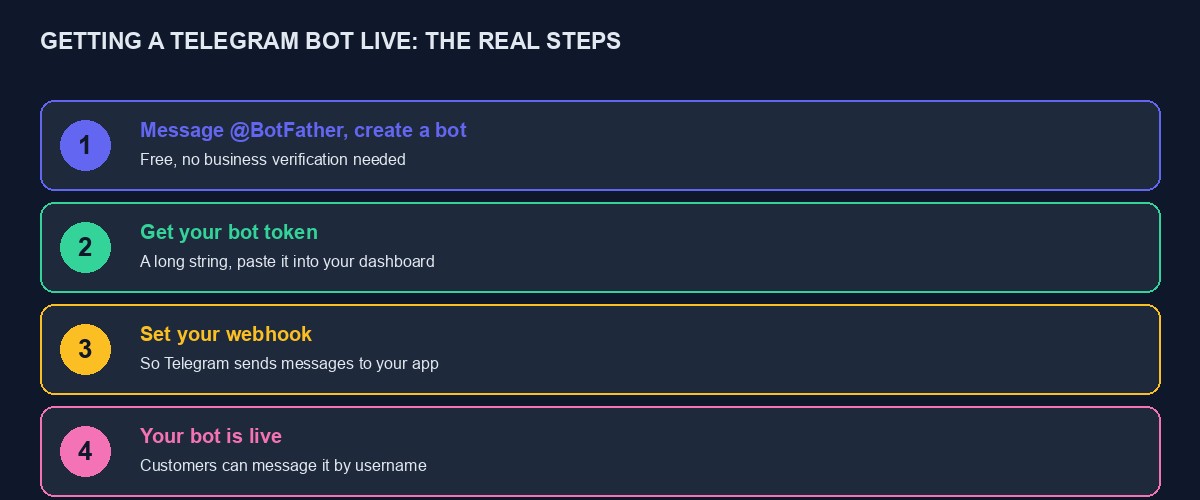
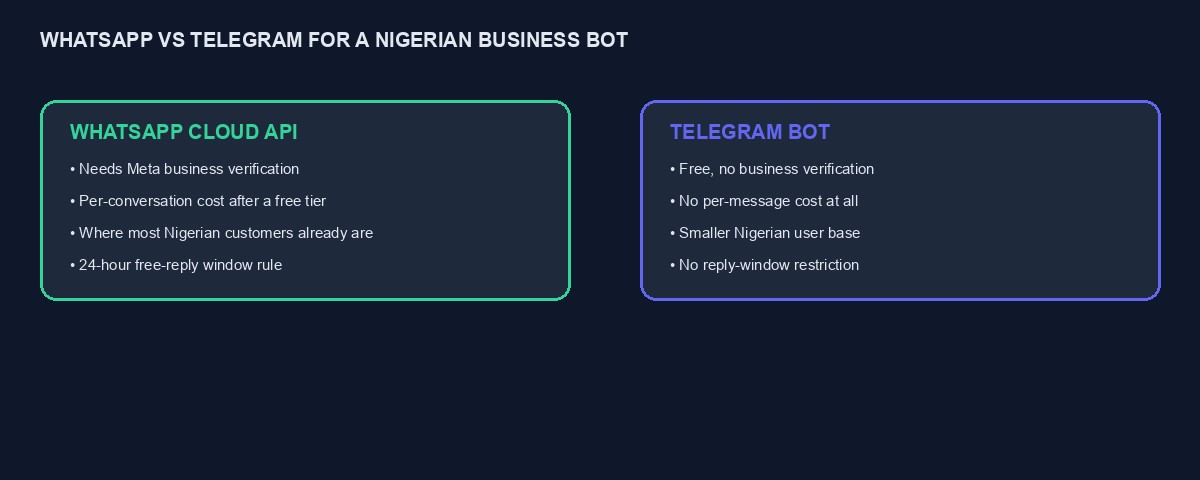
This is worth stating plainly, because it is the detail that makes Telegram genuinely accessible in a way WhatsApp's official Cloud API is not. Building a real WhatsApp bot, covered in our guide to creating a WhatsApp bot, requires going through Meta's business verification process, which can take anywhere from a day to a couple of weeks and depends on a review queue entirely outside your control. Building a Telegram bot requires none of this. You message Telegram's own official bot, called BotFather, choose a name, and receive a working bot token within minutes, with no business verification, no review queue, and no waiting period at all.
No per-message cost, ever
WhatsApp's Cloud API, once you exceed a free monthly conversation allowance, charges per message, with rates varying by message category and country, covered in our WhatsApp Cloud API tutorial. Telegram's bot platform is entirely free to use, with no per-message charge of any kind, regardless of how many messages your bot sends or receives. For a business sending a high volume of routine, automated messages, order confirmations, status updates, this is a genuine, ongoing cost saving worth factoring into your channel choice, particularly for a business whose message volume would otherwise sit meaningfully above WhatsApp's free tier.
No 24-hour reply window to work around
WhatsApp restricts free-form business replies to a 24-hour window after a customer's last message, requiring a pre-approved message template for anything sent outside that window, a real design constraint covered in depth in our WhatsApp Cloud API tutorial. Telegram imposes no equivalent restriction: your bot can message a customer who has previously interacted with it at any time, without a template approval process, which genuinely simplifies building things like a delayed follow-up, a scheduled reminder, or a proactive notification days after the original conversation, none of which require the template workaround WhatsApp's rule necessitates.
Setting up your first bot, step by step
Step 1: talk to BotFather
Open Telegram, search for the official BotFather account, and start a conversation. BotFather walks you through choosing a display name and a unique username for your bot, ending in "bot," and issues a bot token, a long string of characters that is your bot's credential, immediately, with no waiting period or approval step.
Step 2: keep the token genuinely secret
Your bot token functions exactly like an API key or a password: anyone who has it can send messages and take actions as your bot. Never paste it into a public code repository, a shared document, or a chat with an AI assistant, and if it is ever accidentally exposed, message BotFather to revoke and regenerate it immediately, exactly the same discipline covered in our general guide to what an API key actually is.
Step 3: set your webhook, so incoming messages actually reach your application
Telegram delivers incoming messages to your bot by sending them to a webhook URL you configure, a specific web address on your own server, following the same underlying pattern covered in our guide to what a webhook is. Setting this up is a single API call to Telegram, providing your bot token and your chosen webhook URL, after which incoming messages arrive at that address as they happen, and the local testing approach using ngrok, covered in our guide to testing webhooks locally, applies identically here during development, letting you test your bot's behaviour on your own laptop before deploying anywhere.
Step 4: design the actual conversation before writing extensive code
Exactly as with a WhatsApp bot, the single biggest predictor of whether a Telegram bot genuinely helps your business is whether you designed its conversation carefully before building it. Write out, on paper, what a customer can actually ask for, how the bot responds to something it does not recognise, and critically, how and when a real person takes over, since a bot with no clear path to human help frustrates customers regardless of which platform it runs on.
Step 5: build, test deliberately, and launch
Build the conversation flow, testing each specific path as you go rather than building everything and testing once at the end. Deliberately send it nonsense, unexpected input, and confirm it responds sensibly rather than breaking or looping confusingly, the same testing discipline covered throughout this series for any customer-facing automated system.
What Telegram genuinely cannot do as well as WhatsApp
It would be dishonest to present Telegram as simply superior. Its Nigerian user base, while real and engaged, is meaningfully smaller than WhatsApp's near-universal reach, and a business whose customers are not already active Telegram users gains nothing from a bot nobody in their actual audience will ever encounter. Building a Telegram bot alongside, rather than instead of, your existing WhatsApp presence, is usually the sensible framing, reaching the specific segment of your audience genuinely active there while keeping WhatsApp as your primary, broadest channel.
Interactive features Telegram supports that make a bot genuinely useful
Beyond plain text conversation, Telegram's bot platform supports inline keyboards, clickable buttons attached directly to a message, which let a customer navigate a menu by tapping rather than typing a specific word or number correctly, meaningfully reducing the number of confused or malformed replies your bot has to handle compared with a purely text-based flow. It also supports rich formatting within messages, bold text, clickable links, and organised lists, letting you present information like a price list or a set of options clearly rather than as an unformatted wall of text. For a business with a genuinely structured set of options, a data plan menu, a set of service categories, these features are worth building into your bot from the start rather than defaulting to the plainest possible text interaction.
Groups and channels: a Telegram-specific opportunity beyond one-to-one bots
Beyond a private, one-to-one bot conversation, Telegram supports public and private groups and broadcast channels, and a business can combine a customer-facing bot with a channel used for announcements, new product updates, or a community space for customers, something WhatsApp Business does not offer in an equivalent, well-supported form at scale. A VTU business, for instance, might run a channel announcing plan price changes or promotional offers, alongside its transactional bot, giving customers a passive way to stay informed without needing to actively message the bot each time, a genuinely distinct communication pattern from WhatsApp's more strictly conversational model.
Handling bot commands properly
Telegram bots conventionally support slash commands, short, specific instructions like /start or /balance, which BotFather lets you register with short descriptions that appear as suggestions to the user, making a bot's available actions genuinely discoverable rather than requiring a customer to guess what it can do. Design a small, clear set of commands matching your actual core use cases, registered properly with descriptions, rather than relying entirely on free-text interpretation, which is both more work to build reliably and less discoverable for a new customer encountering your bot for the first time.
A note on Telegram's own content and platform rules
Telegram is, fairly or not, associated with a meaningfully less strictly moderated environment than WhatsApp, and it is worth being aware that this reputation can, in some cases, affect how cautiously a new, unfamiliar customer approaches a business bot there, particularly one asking for any payment information. Being genuinely transparent about who you are, providing real, verifiable business details, and building the same trust signals covered throughout this series, real contact information, a real, findable website, honest reviews, matters at least as much on Telegram as on any other channel, precisely because the platform's own general reputation does not automatically lend your specific bot any borrowed credibility the way, for instance, an established listing platform's reputation might.
Testing your Telegram bot properly before real customers use it
Use the same ngrok-based local testing approach covered in our webhook testing guide during active development, watching real incoming messages arrive through the tunnel's inspector as you build and adjust your conversation logic. Beyond your own testing, recruit a few real, trusted people, ideally including someone who has never seen the bot before, to try using it without guidance, watching specifically where they hesitate or send something your bot did not anticipate, exactly the same testing discipline that matters for any customer-facing automated system regardless of which platform it runs on.
Cost, in genuine, complete terms
The platform itself, as stated, is entirely free, with no per-message charge from Telegram at all. Your actual costs are the development time to build the bot, whichever hosting your webhook-handling server runs on, likely already covered if you are running an existing application, and your own ongoing time maintaining and improving the conversation based on real usage. This makes a Telegram bot one of the genuinely lowest-cost channels available to a Nigerian business, worth trying even for a modest, uncertain audience segment, since the downside of it seeing limited use is simply some development time, not an ongoing per-message bill accumulating regardless of actual value delivered.
A worked example: an imagined VTU reseller adding a Telegram channel
Picture a small VTU business already running a WhatsApp-based purchase flow, noticing that a meaningful share of its customer enquiries come from university students, many of whom mention using Telegram actively for other things. Adding a Telegram bot, built quickly given the free, verification-free setup described above, replicates the same core purchase flow, checking a balance, buying data or airtime, on a second channel at essentially no additional cost beyond the initial development time. Within the first month, the Telegram bot captures a modest but genuine additional slice of purchases specifically from the student segment, at zero ongoing per-message cost, a clean addition to the existing WhatsApp channel rather than a replacement for it.
A quick reference for choosing your first bot feature
If you are unsure where to start, the highest-value first feature for most businesses is not the most ambitious one. Start with a single, clearly scoped capability, checking an order status, answering the most common question your business receives, and get that one thing working reliably, tested properly, before adding a second capability. A modest, genuinely reliable bot that does one thing well earns more customer trust, and teaches you more about what your specific audience actually wants next, than an ambitious first version that tries to handle everything and handles most of it poorly.
Mistakes to avoid building a Telegram bot
Assuming Telegram's reach matches WhatsApp's. It genuinely does not for most Nigerian audiences, and building a Telegram-only strategy, abandoning WhatsApp, would be a serious, costly miscalculation for almost any Nigerian consumer business.
Skipping the human handoff. Exactly as with a WhatsApp bot, a customer with no clear way to reach a real person once the bot cannot help is a frustrated customer, regardless of which messaging platform hosts the conversation.
Exposing the bot token. Treat it with the same seriousness as any other credential, never in code that gets shared or published.
Building the bot before designing the conversation. This remains the single biggest predictor of a genuinely useful bot versus a frustrating one, on any messaging platform.
Where this fits alongside our own platform
If you are running a VTU project on our platform, a Telegram bot can be connected directly alongside the WhatsApp purchase bot covered in our guide to creating a WhatsApp bot, sharing the same underlying purchase logic, so a customer can check a balance or buy data through either channel, with the same real, live transaction processing behind both. You can start building free to see it directly, and our guide to selling airtime and data through a Telegram bot covers this specific use case in more technical depth.

Comments
No comments yet. Be the first to share your thoughts.