How to Test Paystack Webhooks Locally With ngrok
There is an awkward gap in building any webhook-based integration, and it catches almost every developer the first time they hit it. Paystack needs to send a request to a real, public web address to notify you about a payment. Your application, while you are actively building and testing it, is running on your own laptop, at an address like localhost, which is invisible to the rest of the internet by design. You cannot properly test your webhook handling until you solve this gap, and pushing untested webhook code straight to a live production server is exactly the kind of shortcut that leads to the silent failures covered in our guide to why webhooks fail to arrive.
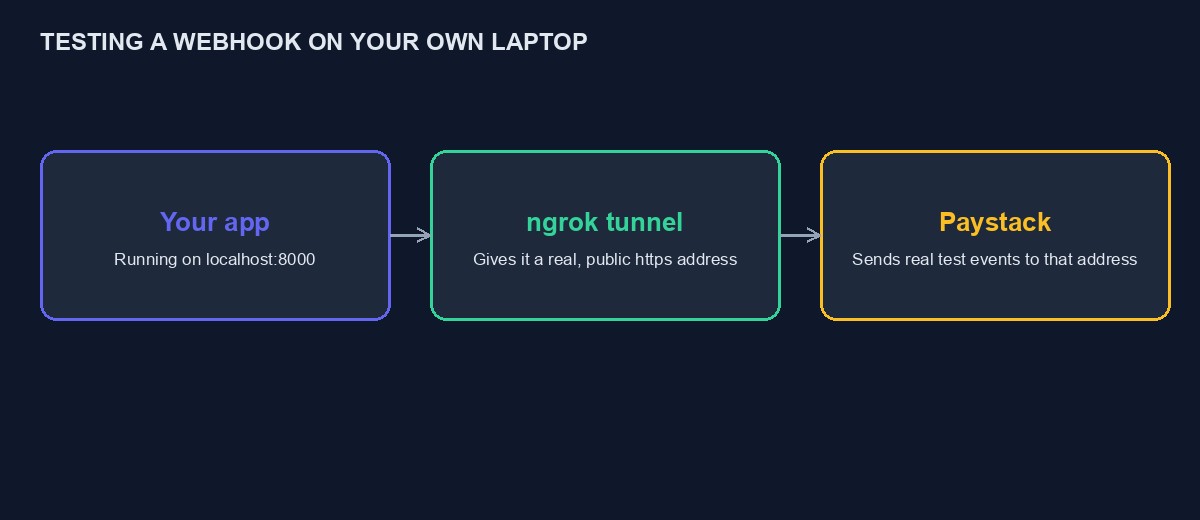
ngrok, and tools like it, solve this specific problem: they create a temporary, secure, public address that forwards incoming requests straight to your local machine, letting Paystack's real servers talk to your code while it is still running on your own laptop. This is a practical, step-by-step walkthrough of setting that up properly.
Why you genuinely need this, rather than skipping straight to production
It is tempting, especially under deadline pressure, to write your webhook handling code, push it to your live server, and simply wait to see if it works when a real payment comes in. This is a poor way to test something for several concrete reasons. You cannot easily set breakpoints or watch your code execute step by step on a remote production server the way you can locally. A bug discovered this way is discovered against a real customer's real payment, which is precisely the situation you want to avoid. And you cannot control when a real payment happens, so testing this way means waiting, often anxiously, for the next genuine transaction rather than triggering a test event on demand whenever you are actually working on the code.
Step one: install ngrok
ngrok is available as a straightforward download for every common operating system, and installation is typically a matter of downloading the binary and, on some systems, running one command to add it to your system's path so you can launch it from anywhere. Create a free ngrok account as well, since the free tier is genuinely sufficient for this kind of development testing, and an account lets you authenticate the tool, which removes some of the limitations placed on fully anonymous use.
Step two: get your own application running locally first
Before involving ngrok at all, confirm your application is running correctly on your own machine, reachable at whatever local address and port it normally uses during development, commonly something like localhost:8000 for a Django project or localhost:8080 for many others. Visit that address in your own browser and confirm the application actually responds, since there is no point tunnelling a broken local setup out to the internet and being confused about which layer the problem is actually in.
Step three: start the tunnel
With your application running, open a separate terminal window and run ngrok, pointing it at the same port your application is using, a command in the shape of ngrok http 8000, adjusted for whatever port your own application actually runs on. ngrok will display a public https address, something like https://a1b2c3d4.ngrok-free.app, along with a small live dashboard showing every request that passes through the tunnel as it happens, which becomes one of the most useful parts of this whole setup once you start actually testing.
Step four: register that address with Paystack, for testing only
In your Paystack dashboard, under your webhook settings, temporarily replace your webhook URL with the ngrok address ngrok just gave you, appending whatever specific path your application expects for its webhook route, matching the pattern you would use in production. This is a genuinely important word: temporarily. The ngrok address changes every time you restart the tunnel on the free tier, so this configuration is for active testing sessions, not a permanent setup, and forgetting to switch your dashboard back to your real production URL afterward is a common, easy mistake that quietly breaks your real, live webhook until someone notices.
Step five: trigger a real test event
With everything connected, use Paystack's dashboard feature for sending a test webhook event directly to your currently configured URL, which will now travel through the ngrok tunnel straight to your local application. Watch three places simultaneously as this happens: the ngrok dashboard, which shows the raw request arriving; your own application's logs or terminal output, which shows how your code actually processed it; and, if you have one, your database or admin interface, to confirm the expected change, an order marked paid, actually took place.
Reading the ngrok inspector, which is more useful than it first appears
Beyond simply confirming a request arrived, ngrok's local web interface, typically available at http://127.0.0.1:4040 while the tunnel is running, lets you inspect the complete, raw content of every request that passed through, including headers and the full body, and, critically, lets you replay a specific request again without needing to trigger a fresh one from Paystack's dashboard each time. This becomes genuinely valuable once you are iterating on a bug: capture one real, problematic request once, then replay that exact same request repeatedly while you adjust your code, rather than needing a fresh test event from Paystack for every single attempt.
Testing signature verification specifically
If your webhook handler includes signature verification, as it should, following the discipline in our Paystack API tutorial, test this deliberately rather than only testing the happy path where everything is correctly configured. Use ngrok's inspector to capture a genuine, correctly signed request from a real test event, then deliberately replay a version with an altered body or an incorrect signature, confirming your code correctly rejects it. A webhook handler that only ever sees correctly signed requests during testing has never actually proven its rejection logic works, and that is precisely the logic protecting you from a forged request in production.
Common problems when setting this up, and their actual causes
The tunnel starts but Paystack's test event never arrives locally. Confirm the address saved in your Paystack dashboard exactly matches the current ngrok address, including the correct path, since a stale or mistyped address will simply fail silently from your side with nothing obviously wrong to look at.
The request arrives but your application returns an error. This is often a genuinely useful discovery rather than a setup problem, since it means your webhook handling code has a real bug that ngrok has just successfully surfaced before it could affect a real customer. Read your application's own error output, which should point at the actual cause directly.
The ngrok address stops working after a while. On the free tier, a tunnel session has a time limit and will need to be restarted periodically during a long testing session, generating a new address each time, which then needs to be updated again in your Paystack dashboard.
A worked example: catching a bug ngrok makes visible that production testing would have hidden
Picture a developer building a webhook handler for the first time, confident it is correct after reading the documentation carefully, and using the setup above to test it before deploying anywhere. The first test event arrives through the ngrok tunnel, visible immediately in the inspector, and the application's own logs show it processing successfully, updating an order's status exactly as expected.
Satisfied, the developer sends a second test event, a different type this time, representing a failed rather than successful payment, to confirm the failure path also works correctly. This time, the ngrok inspector shows the request arriving, but the application's logs show nothing at all, no error, no sign it was processed. Using the inspector's replay feature, the developer resends the exact same request repeatedly while adding logging statements to narrow down where processing actually stops, quickly discovering the handler's code only checks for one specific event type and silently does nothing at all for any other, a gap that would have been invisible in production until a real failed payment occurred and nobody was notified. The fix, handling the additional event type explicitly, takes minutes once found, and finding it took minutes specifically because ngrok's replay feature allowed the same exact request to be sent repeatedly while debugging, rather than needing to trigger a fresh test event, or worse, wait for a genuine failed payment, for every single attempt.
Setting up a repeatable local testing routine, not a one-time session
Rather than setting up ngrok fresh every time a webhook needs testing, build it into your regular local development routine: keep a short note of the exact commands, your application's start command, the ngrok command with the correct port, and the specific path in your Paystack dashboard settings you need to update, so returning to test webhook behaviour after working on something else for a few days does not mean re-deriving the setup from memory each time. Some developers script this entirely, a single command that starts both the application and the tunnel together and prints the current ngrok address clearly, removing the friction that otherwise makes people skip proper webhook testing under time pressure.
Alternatives to ngrok, and when they matter
ngrok is the most widely known tool for this job, and it is not the only one. Cloudflare Tunnel offers a similar capability with a more permanent, named address if you are willing to set up a Cloudflare account and a small amount of additional configuration, which suits a developer who tests webhooks frequently enough that a stable, unchanging address is worth the extra setup time. LocalTunnel is a simpler, more minimal free alternative with fewer features than ngrok's inspector but a lower barrier to getting started for a very occasional need. For most developers testing Paystack integrations only occasionally, ngrok's free tier remains the most practical default, precisely because its inspector and replay features described above save real debugging time that a more minimal tool does not offer.
Testing WhatsApp and Flutterwave webhooks the same way
Everything in this guide applies identically to testing any other webhook-based integration during development, not just Paystack. Flutterwave's webhooks, covered in our Flutterwave API tutorial, and WhatsApp's Cloud API webhooks, covered in our WhatsApp Cloud API tutorial, both need the same public, reachable address during local development, and the same ngrok setup solves the problem identically for either, simply pointing the respective service's webhook configuration at your current ngrok address instead of Paystack's. If you are building an integration that touches several of these services at once, a single running ngrok tunnel can serve all of them simultaneously, since it is your application's address being exposed, not a service-specific one.
A note on security while testing this way
While an ngrok tunnel is active, your local application is, for that period, reachable from the public internet, not just from Paystack. Anyone who discovers or guesses your specific ngrok address during that window could, in principle, send requests to it. For a development machine running test data with test API keys, this is a modest, manageable risk, and it is precisely why the temporary nature of this setup matters: stop the tunnel once your testing session is finished, rather than leaving it running indefinitely in the background, and never point a testing tunnel at an application connected to live payment keys or real customer data.
Moving from local testing to a proper staging environment
ngrok is excellent for active, hands-on development, watching requests arrive in real time while you write and adjust code. It is not a substitute for a proper staging environment, a real, deployed, publicly reachable version of your application that mirrors production closely, for the later stage of testing before a genuine launch. Once your webhook handling passes the kind of deliberate testing described above locally, deploy it to a real staging environment and repeat a similar test there, confirming it behaves the same way outside the conditions of your own laptop, before ever pointing your live, production webhook URL at it.
A sensible testing routine, put together
Start your application locally, start the ngrok tunnel, and temporarily point your Paystack test-mode webhook settings at the ngrok address. Trigger a genuine test event, and watch it arrive through the ngrok inspector, your application's own logs, and your database, confirming all three tell a consistent story. Deliberately test failure cases too, not just success, an incorrect signature, a malformed payload, an event type your code does not specifically expect. Once satisfied, switch your Paystack webhook URL back to your real, permanent production address, and repeat a similar, if lighter, confirmation once the code is actually deployed there.
What good webhook testing actually proves, and what it does not
It is worth being precise about the limits of this kind of testing. Confirming your handler correctly processes a test event proves your code's logic works against the shape of data Paystack's test events send. It does not, on its own, prove your production environment is correctly configured, that CSRF exclusions covered in our webhook troubleshooting guide are actually in place on your real server, or that your production secret key matches what your code expects there. Treat local testing as proving your code is correct, and a separate, deliberate check on your actual production deployment, using the same test-event feature pointed at your real, permanent webhook URL once deployed, as proving your environment is correctly set up. Skipping the second check because the first one passed is a common way a webhook that worked perfectly in every local test still fails the moment it meets real production traffic.
Where this fits alongside our own platform
If you are running a project on our platform, our webhook handling for connected payment gateways is already built, tested and monitored, and you never need to set up ngrok or write this handling code yourself. This tutorial is aimed specifically at developers building a custom integration outside our platform, or building against our own developer API directly, where testing your own webhook endpoint properly, before it ever touches real customer payments, is exactly the discipline this guide describes. For the fuller integration this testing setup supports, see our Paystack API tutorial, and for what to do when a properly built, properly tested webhook still mysteriously stops working later, our guide to diagnosing a Paystack webhook that isn't firing covers that directly.

Comments
No comments yet. Be the first to share your thoughts.