How to Build an Ecommerce App for Android and iPhone
Wanting "an app" for your online store is a genuinely reasonable instinct, an icon on a customer's home screen feels more permanent and more trustworthy than a bookmarked website. But the honest technical reality is that "an ecommerce app for Android and iPhone" can mean two genuinely different things, with very different cost and effort involved, and most advice online blurs the two together in a way that sets the wrong expectation before you have even started.
The two real paths, named honestly
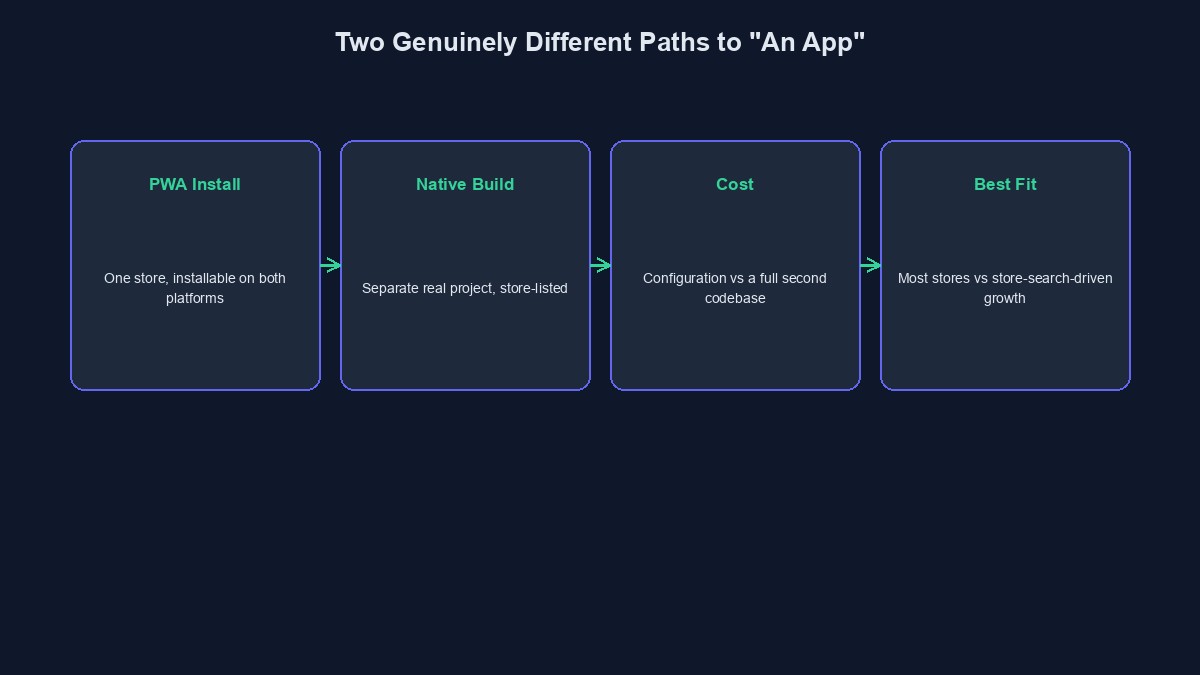
The first path is a Progressive Web App, your existing store configured to be installable directly from the browser, with a real icon, a full-screen app-like experience, and working offline caching, built on open web standards rather than a separate native codebase. The second path is a genuinely native, or cross-platform-compiled, application, built and submitted through Google Play and Apple's App Store, with access to the full range of native device capabilities and formal app-store discoverability. Both are real. They are not the same thing, they do not cost the same to build, and choosing between them deserves an honest look at what your specific store actually needs rather than defaulting to whichever term sounds more impressive.
What a PWA-based ecommerce app genuinely gives a customer
A properly configured store, installed this way, gives a returning customer a real home-screen icon, a full-screen browsing and checkout experience with no visible browser address bar, and meaningfully faster repeat loading since core assets are cached locally rather than re-fetched on every visit. For the large majority of ecommerce use cases, browsing a catalogue, adding to a cart, checking out through a real payment gateway, tracking an order, this genuinely covers what a customer actually does, and it works identically across Android and iPhone from a single underlying store, since it is fundamentally the same website presenting itself as installable on both platforms, not two separate codebases to build and maintain.
Where a genuinely native app pulls ahead, honestly
If discoverability specifically through Play Store or App Store search is a real part of your customer acquisition plan, a PWA alone does not deliver that, since it is not listed there through this method. If your store genuinely needs deep native capabilities, rich, reliable push notifications at the level native apps offer, certain camera or biometric integrations, offline functionality significantly beyond basic caching, a native build is the correct tool, and it is a meaningfully larger undertaking, real development time on top of your existing store, not a checkbox or a quick configuration step.
The cost and effort difference, stated plainly
A PWA is, at its core, configuration and enhancement of a store you likely already have, a manifest file, a service worker, correctly sized icons, genuinely achievable in a comparatively short amount of focused work once the underlying store already exists. A genuinely native or cross-platform app is a separate, real software project, its own codebase, its own testing across device variations, its own app-store submission and review process for each platform, and ongoing maintenance as a distinct thing from your website going forward. Neither is inherently "wrong," but conflating their cost and effort, expecting native-app-level results from PWA-level work, or the reverse, sets an expectation that will not match reality.
A genuinely reasonable way to decide between them
Start by asking, honestly, whether your actual customers' real behaviour, browsing a catalogue, buying, checking an order, genuinely needs anything a PWA does not already deliver. For the substantial majority of Nigerian ecommerce stores, it does not, and a PWA is both the faster and the more cost-effective path to a genuinely app-like customer experience. Reserve a native build specifically for the case where a concrete, specific requirement, app-store discoverability as a real acquisition channel, a genuinely deep native capability your store depends on, actually demands it, rather than building native because it sounds more serious.
A note on cross-platform native frameworks, for the businesses that do need native
When a genuinely native app is the right call, building two entirely separate codebases, one for Android and one for iPhone, is rarely the most sensible path today. Cross-platform frameworks let a real development team write the app once and compile genuinely native builds for both platforms from that single codebase, meaningfully reducing cost and ongoing maintenance compared to two fully separate native projects, while still delivering real app-store presence and real native device capability. This is worth knowing specifically so that "native app" and "two completely separate, double-cost projects" are not assumed to be the same requirement, since for most businesses genuinely needing native, they are not.
A worked example: choosing correctly for two different stores
Picture two Nigerian ecommerce businesses considering an app. The first sells fashion accessories, with customers who mostly discover the brand through Instagram and WhatsApp, and who, once they know the brand, simply want a fast, convenient, repeat way to shop, an icon on their phone, a quick browse, a familiar checkout. A PWA genuinely delivers everything this specific customer actually needs, at a fraction of the cost and time a native build would require, and correctly matches the real acquisition channel already in use. The second is a marketplace-style platform explicitly betting its growth strategy on new customer discovery through Play Store search and category browsing, a genuinely different acquisition channel a PWA cannot serve at all. For this second business, the native app's real cost is a justified investment tied directly to a specific, concrete part of the actual growth plan, not a default assumption.
Mistakes that show up repeatedly in this specific decision
Building or commissioning a native app by default, without a concrete reason the PWA path genuinely could not serve. This is consistently the most expensive avoidable mistake in this category, real money and real time spent on capability the actual business did not need yet.
Marketing a PWA using "download our app from the Play Store" language when it genuinely is not there. This creates a real, specific disappointment for a customer who goes looking for exactly that.
Assuming a native app is automatically better without weighing its real, ongoing maintenance cost. A native app is not a one-time cost; it is an ongoing second codebase requiring continued attention as both it and your underlying store evolve.
Not testing the actual installed PWA experience on real Android and iPhone devices before considering it finished. The two platforms genuinely differ slightly in how installation is triggered, and this is worth confirming directly rather than assuming.
A short glossary
PWA (Progressive Web App): a website configured to be installable and behave like an app, using open web standards rather than native compilation. Native app: software built specifically for a platform, Android or iOS, and distributed through that platform's own app store. Cross-platform framework: a development approach building one codebase that compiles into genuinely native apps for both Android and iOS. App-store discoverability: the ability for new customers to find your app by browsing or searching within Play Store or the App Store, available only to genuinely listed native apps.
Where this stands on our platform
Every ecommerce store built on our platform includes the PWA-based installable experience already, a working manifest and service worker configured automatically, giving your store a genuine, working app-like presence on both Android and iPhone from one underlying store, no separate build required. This is genuinely a PWA, not a Play Store or App Store listing, exactly as described honestly throughout this guide. If your specific store has a concrete, real reason to need a genuinely native app, our mobile app development team builds exactly that, and you can start building free to see the PWA experience working directly in your own store first.
Comments
No comments yet. Be the first to share your thoughts.