How to Use ChatGPT to Write Code for a Quick Business Setup
You do not need to be a developer to get ChatGPT to write you real, working code, and for a small, specific business need, an order form, a simple price list page, a basic booking form, that is genuinely one of the fastest ways to get something live today instead of next week. This guide is written for the business owner, not the developer, walking through exactly how to do this honestly, including where it genuinely stops working.
What "quick business setup" actually means here
This is specifically about small, genuinely simple things: a single page that lists your prices and takes an order, a basic form that collects a customer's details before you call them back, a simple calculator for a service you charge by size or distance. It is not about building a full, real business platform, a payment system, a proper database, real user accounts, from a chat window, and being honest about that distinction upfront saves you from a genuinely frustrating few hours later.
Step one: describe the actual thing you need, specifically
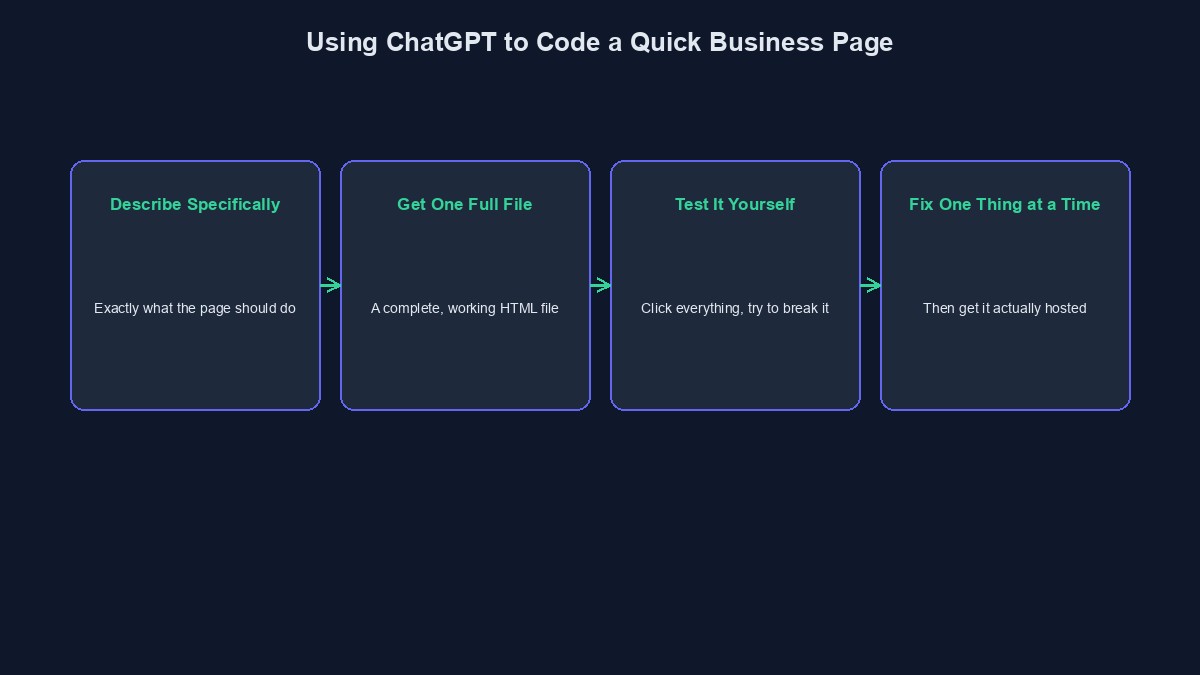
The difference between a useless result and a genuinely usable one almost entirely comes down to how specific your description is. "Build me a website for my business" produces something generic and only loosely useful. "Build me a single HTML page with a list of five hair styling services and their prices, a simple form asking for the customer's name, phone number, and preferred date, and a button that sends this information to my email address," produces something you can actually use today. Be specific about exactly what should be on the page, in what order, and what should happen when someone fills it in.
Step two: ask for one complete file, not a lecture about code
Ask explicitly for a single, complete HTML file you can open directly, rather than a general explanation of how you might build such a thing. A clear request like "give me the complete code in one file, I will copy and paste it" gets you something immediately usable. If it responds with several separate pieces, or with an explanation instead of code, ask again, specifically: "just give me the full, complete code in one block."
Step three: actually test it before trusting it
Copy the code it gives you into a plain text file, save it with a `.html` ending, and open that file in your browser. Click every button. Fill in every form field, including with obviously wrong information, a blank field, a very long name, and see what actually happens. This step is not optional, and skipping it is the single most common reason a "working" AI-generated page embarrasses someone the first time a real customer actually uses it.
Step four: fix what is broken, one specific thing at a time
When something does not work the way you expected, describe the specific problem clearly, "when I click submit with an empty phone number field, nothing happens and there is no message telling the customer why," not a vague "it's not working." Ask for one fix at a time, test that specific fix before asking for the next one, and save a working copy before making a bigger change. This disciplined, one-thing-at-a-time approach is the real difference between a smooth afternoon and the frustrating, circular loop that catches a lot of people new to this.
Step five: getting it actually live, not just working on your own computer
A page working on your own computer is not the same as a page a real customer can actually reach. You genuinely need real hosting, somewhere the file actually lives on the internet with a real address, and this is the part most non-technical guides quietly skip over. A handful of free and low-cost hosting options exist for a single simple page, but setting one up correctly, and pointing an actual domain name at it, is real, separate work beyond just getting the code to work locally.
Where this genuinely stops being the right approach
The moment you need customers to actually pay you through the page, not just leave their details, you need real payment integration, and getting that wrong, or building it insecurely from copied code you do not fully understand, is a genuinely serious risk, not a small one. The moment you need the page to remember information between visits, real customer accounts, saved orders, you need a real backend and a real database, which is meaningfully more than a single HTML file a chat window can hand you. And the moment you are relying on this page as your actual, ongoing business infrastructure, not a quick, temporary stopgap, a properly built, properly maintained platform is genuinely the more sensible choice, not a stubborn insistence on doing everything from a chat window.
A worked example: a real weekend launch
Picture someone starting a small home bakery who needs an order page live before the weekend. They describe their actual menu, prices, and a simple order form to ChatGPT, get a complete HTML page back, test it, fix the delivery-date field so it will not accept a date in the past, and get it hosted on a free, simple hosting service by Friday evening. Orders come in by email over the weekend. This is a genuine, honest success story for this approach, precisely because the scope stayed small, specific, and realistic, not because it somehow became a full business platform overnight.
Mistakes worth avoiding
Asking for something payment-related without real security knowledge. A copied payment integration you do not actually understand is a genuine, serious risk, not a shortcut worth taking for real money.
Skipping testing because it "looked right" in the chat. Code that reads correctly and code that actually works correctly are not the same thing, and the gap between them only shows up when you genuinely test it.
Asking for many changes at once instead of one at a time. This is precisely what causes the confusing, circular "fix one thing, break another" loop that frustrates most people trying this for the first time.
A short glossary
Hosting: a real, internet-connected place your page's files actually live, needed for anyone besides you to reach it. Backend: the part of an application that stores real data and runs real logic, beyond what a single page in a browser can do alone. HTML file: a single, complete web page file, the simplest real building block this whole approach is built around.
Where to go from here
If you are a developer wanting to go deeper on using ChatGPT specifically for coding, our guide to using ChatGPT for coding covers its different modes and real prompting techniques. Our honest look at what AI-assisted coding actually feels like covers the emotional and financial reality of this process in more depth. And once your quick setup has genuinely outgrown a single page, you can start building free on a real platform built for VTU, ecommerce, and booking businesses, rather than continuing to stretch a chat-generated page past what it was ever meant to do.

Comments
No comments yet. Be the first to share your thoughts.