How to Use ChatGPT for Customer Service on WhatsApp
"Just connect ChatGPT to our WhatsApp" is a sentence a lot of business owners said to a developer sometime in 2025, and it is a genuinely different request today than it was back then. Meta changed the rules for what is actually allowed on the WhatsApp Business API, and a straightforward "put ChatGPT on our WhatsApp number" is no longer something you can simply do. Here is what using ChatGPT for real customer service on WhatsApp actually looks like now, done properly and within the current rules.
Why "just connect ChatGPT" does not actually work anymore
Since Meta's policy change, a business cannot simply route WhatsApp messages straight into ChatGPT and let it answer anything, openly, the way you might chat with it directly on OpenAI's own site. That specific pattern, a general-purpose AI assistant acting as the core product experience on WhatsApp, is what the policy actually restricts. Our separate guide on what actually changed with ChatGPT on WhatsApp Business covers the policy itself in full, but the short version that matters here is simple: the open-ended assistant pattern is out, and a purpose-built business chatbot, one built for customer service, order tracking, appointment booking, and similar tasks, is explicitly still allowed.
What is genuinely still allowed, and how it actually works
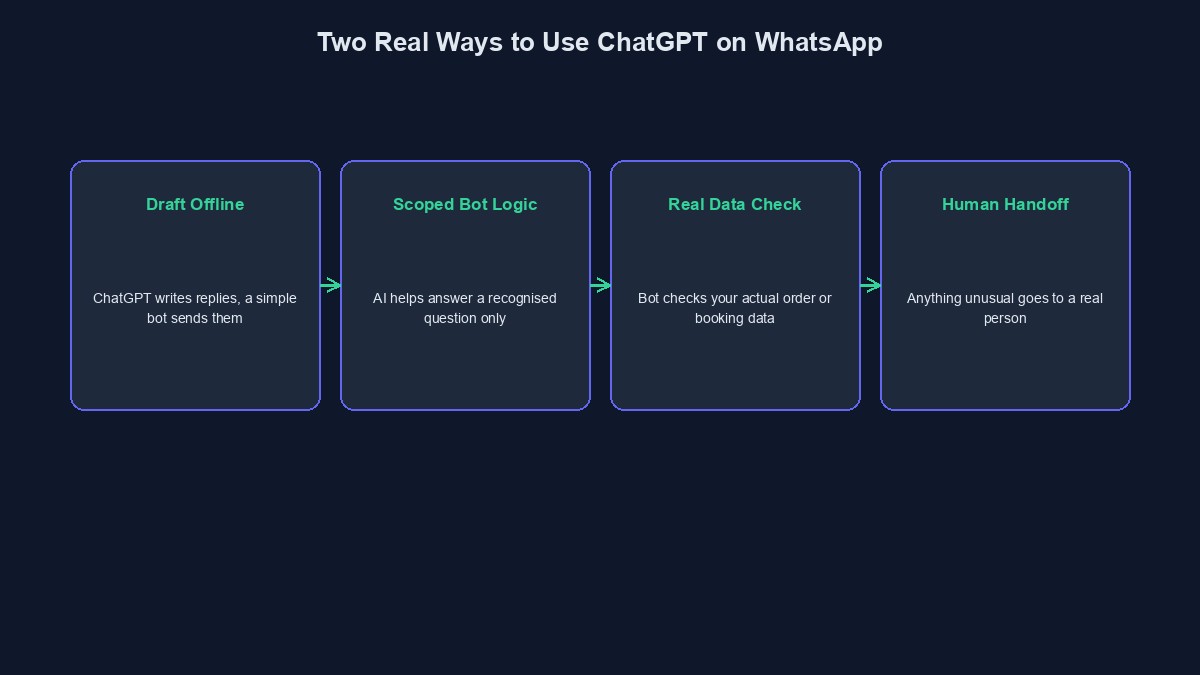
The real, compliant pattern is building your own business chatbot, one with a defined job, answering FAQs, checking order status, taking a booking, and using an AI model as a tool inside that chatbot's own logic, not as the entire, unrestricted experience itself. Practically, this means a real WhatsApp Business API connection, your own webhook or bot platform sitting in the middle, and an AI model called specifically to help draft a natural-sounding reply to a recognised, business-relevant question, rather than the AI freely handling absolutely anything a customer might type.
The simplest real starting point: using ChatGPT to prepare your bot's content, not run it live
You do not need any technical integration at all to get real value from ChatGPT here. Before building anything, use ChatGPT directly, through its normal chat interface, to draft your actual FAQ answers, your order-confirmation message, your appointment-reminder wording, your "we are currently closed" message, in a natural, on-brand tone. A simple, template-based WhatsApp bot, with no live AI connection at all, then sends these pre-written, human-approved messages automatically. This is fully compliant, genuinely useful, and the right starting point for most small businesses before considering anything more advanced.
The more advanced, genuinely compliant route: AI inside your own bot's logic
For a business that has outgrown fixed, template-based replies, a real technical integration connects your WhatsApp Business API account, your own bot logic layer, and an AI model called through its API, not through the public ChatGPT product itself, to help draft a specific, contextual reply to a recognised customer question. The AI's job stays scoped, helping phrase an answer about your actual order status, your actual return policy, your actual business hours, rather than being free to hold an open-ended conversation about anything at all. This is the pattern purpose-built business chatbots, including platforms genuinely allowed under the current policy, are built around.
What this actually requires, honestly
A real WhatsApp Business API account, not a personal WhatsApp number, is the starting point, and getting one set up properly involves Meta's own business verification process. A webhook, a piece of your own system that receives incoming messages and decides what happens next, sits in the middle. And if you are calling an AI model directly, an API key and a real, if usually modest, per-message cost enters the picture, on top of WhatsApp's own template-message pricing. None of this is free to set up from scratch, even though the idea sounds simple on paper.
Where a ready-made platform changes this calculation
Building the webhook, the bot logic, and the WhatsApp Business API connection from nothing is real, specific technical work, the kind most small business owners are not equipped to do themselves and would otherwise need to hire a developer for. Our own platform includes a purpose-built WhatsApp bot builder, already wired to the WhatsApp Business API, already built as the kind of scoped, business-specific chatbot the current policy explicitly allows, rather than something you assemble from separate pieces yourself. For a business whose real need is "customers should be able to message us on WhatsApp and get a genuinely helpful, fast reply," this is frequently the entire technical project, already done.
A worked example: a small store handling order status questions
Picture a small online store getting the same handful of questions on WhatsApp all day, "has my order shipped," "do you deliver to my area," "what is your return policy." A simple, compliant setup recognises these common questions, checks the real order status from the store's own system where relevant, and replies with a natural, ChatGPT-drafted template, sent automatically, day or night. A genuinely unusual question, something outside the bot's defined scope, gets handed to a real human instead of the bot guessing, which is both the safer choice and, as it happens, the compliant one.
Mistakes worth avoiding
Trying to route raw, unrestricted ChatGPT access directly into your WhatsApp number. This is specifically the pattern the current policy restricts, and building around it risks your WhatsApp Business account itself, not just the specific feature.
Assuming AI-assisted customer service on WhatsApp is banned entirely. It genuinely is not; a scoped, purpose-built business chatbot using AI internally remains explicitly allowed.
Skipping human handoff for questions outside the bot's real scope. A bot that confidently guesses at something it does not actually know creates more customer frustration than one that says plainly "let me get a real person for that."
A short glossary
WhatsApp Business API: the official, business-grade way of connecting WhatsApp to your own systems, distinct from the regular WhatsApp Business app. Webhook: the part of your own system that receives incoming WhatsApp messages and decides what should happen next. General-purpose assistant: an AI positioned as the core, open-ended product itself, the specific pattern the current WhatsApp policy restricts. Purpose-built chatbot: a bot built for a defined business task, customer service, bookings, order tracking, the pattern explicitly still allowed.
Where to go from here
Our guide to what actually changed with ChatGPT on WhatsApp Business covers the policy itself in full detail. If you are running a VTU or small business in Nigeria and want to see practical, everyday uses for ChatGPT beyond just WhatsApp, our guide to using ChatGPT for your VTU or small business covers that directly. And if you want a purpose-built WhatsApp bot already wired to the WhatsApp Business API, rather than building the integration yourself, you can start building free and see it directly in your dashboard.
Comments
No comments yet. Be the first to share your thoughts.