A Practical Two-Factor Authentication Guide for Your Nigerian Business
Two-factor authentication is one of the few genuinely high-value, low-effort security steps available to a small business, and yet a surprisingly large number of Nigerian business owners have never actually turned it on across the accounts that matter most, often simply because nobody has walked through exactly where to find the setting for each specific tool they actually use. This is that walkthrough: not a general explanation of what 2FA is, but a practical, tool-by-tool guide to the accounts a typical Nigerian online business genuinely depends on.
Start here: your email account, before anything else
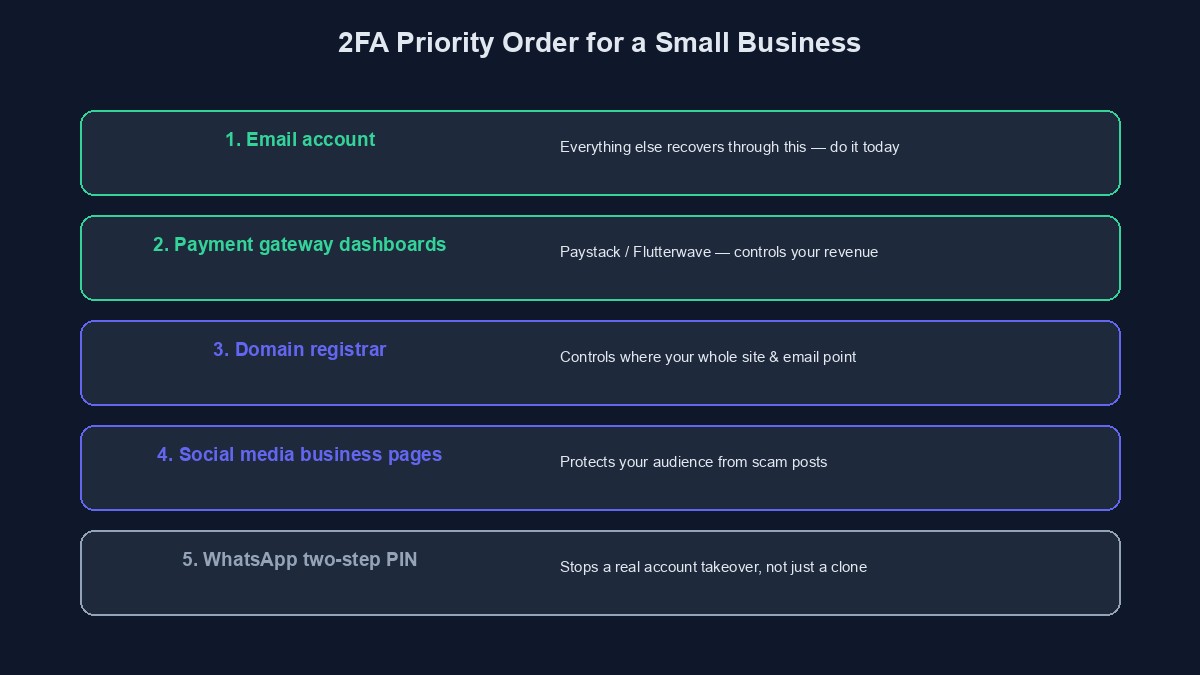
Your email account is the master key to almost every other account you have, since "forgot password" for nearly everything eventually routes back to it. If you protect exactly one account with proper two-factor authentication today, make it this one. Both Google and Microsoft, the two email providers the overwhelming majority of Nigerian businesses actually use, support authenticator-app-based two-factor authentication directly in their account security settings, a genuinely stronger method than an SMS code, since it is not exposed to the SIM swap risk covered in our SIM swap fraud guide. Set this up today if it is not already on; it takes under five minutes.
Your payment gateway dashboards
Paystack and Flutterwave, the two payment gateways most Nigerian online businesses actually integrate with, both support two-factor authentication on their merchant dashboard login, found in each platform's own account or security settings. This account controls, directly or indirectly, where your real revenue actually ends up, and leaving it protected by a password alone, especially one that might be reused anywhere else, is a genuinely disproportionate risk relative to the five minutes required to turn this on.
Your domain registrar and hosting or dashboard login
Whoever controls your domain name controls, ultimately, where your entire website and every email address built on it actually points, and a compromised domain registrar account is one of the more devastating, if less commonly discussed, business compromises, since it can redirect your entire business's online presence without touching your actual website or hosting at all. Check your specific registrar's account settings for a two-factor option, most major Nigerian and international registrars now offer one. If you are running your business on a platform like ours rather than managing hosting and DNS separately yourself, your platform account itself becomes the equivalent high-value target, and is worth the same level of care described throughout this guide.
Your social media business pages
A Facebook or Instagram business page, particularly one with an established following or ad account attached, is a real, valuable asset, and a compromised page is often used to post scam links or fraudulent promotions to your own existing, trusting audience before you even notice it is gone. Meta's Business Suite supports two-factor authentication at both the individual account level and, for larger operations, at the Business Portfolio level, worth checking specifically if more than one person has access to your pages.
WhatsApp, specifically its own two-step verification
WhatsApp's own two-step verification, a separate six-digit PIN required whenever your number is registered on a new device, is a specifically important, free setting for any business running customer communication through it, covered in more depth in our guide to WhatsApp impersonation targeting business owners. It is found under WhatsApp's own Account settings, and takes under two minutes to enable.
Your business banking app
Most Nigerian banking apps already require some form of additional verification for transactions, following the Central Bank's own payments security framework, but it is worth actively checking your specific bank's app settings for every additional security option genuinely available, transaction alerts sent immediately rather than in a daily summary, device-level biometric locks in addition to a PIN, and any optional additional transaction confirmation step, rather than assuming the default configuration is already the most secure one available.
An honest note on where XpiriaTech itself stands today
It is worth being precise rather than vague about our own platform specifically, since overclaiming here would be exactly the kind of dishonesty this guide is arguing against elsewhere. Account verification and password reset on our platform use email-based one-time codes rather than SMS, which meaningfully reduces exposure to SIM swap specifically, and the highest-value action on the platform, changing a project's settlement bank account, requires a dedicated fresh one-time code plus your account password re-entered at that specific moment, with a cooldown period before any new withdrawal can go out against a freshly changed account. What we do not yet offer is a standalone, authenticator-app-based two-factor login for the dashboard account itself, the specific mechanism described for your email and payment gateway accounts above. Until that specific feature ships, the strongest thing you can do for your XpiriaTech account today is use a genuinely strong, unique password, not reused anywhere else, and keep the email account tied to it properly protected with its own two-factor authentication, since that email account remains your account recovery path.
Hardware security keys: worth the extra cost, for a specific few
Beyond authenticator apps, a physical hardware security key, a small USB or NFC device you tap or plug in to confirm a login, offers an even stronger form of two-factor authentication, genuinely resistant to the kind of phishing that can occasionally trick a person into typing an authenticator app's code into a fake login page at exactly the wrong moment. For most small Nigerian businesses, an authenticator app is a perfectly sufficient, free, and dramatically better than nothing step, and the added cost and complexity of a hardware key is not necessary. It becomes worth genuine consideration specifically for a business's single highest-value account, often the email account this guide already recommends starting with, once the business itself has grown enough that the cost of a compromise there would be genuinely severe.
A note on shared devices and family or staff access
Two-factor authentication tied to a specific personal device works cleanly when one person owns one account. It gets genuinely more complicated on a shared family or office device, or when a business owner wants a trusted staff member to have emergency access to an account without sharing the primary owner's own phone. Most major services support this properly, generating separate backup codes, or allowing a second authenticator app entry for the same account, rather than requiring the literal same physical device every time, and it is worth setting this up deliberately in advance for any account more than one person may genuinely need to access, rather than discovering the gap during an actual emergency when the account's owner is unreachable.
A sensible order to actually do this in, not all at once
Trying to overhaul every account's security in one sitting is a common way this task gets started with enthusiasm and never actually finished. A more realistic approach: today, enable it on your email account, since everything else depends on that one. This week, do your payment gateway dashboards and your domain registrar. This month, work through social media pages, WhatsApp, and a genuine review of your banking app's own available security settings. Spread across a few sittings like this, the entire list takes under an hour of actual effort in total, and each individual step is small enough that it is unlikely to be abandoned partway through.
A worked example: a small business's actual rollout
Picture a small ecommerce business owner who has been meaning to "sort out security properly" for months without ever actually starting, precisely because the task felt large and undefined. Using the ordered approach above, they enable authenticator-app two-factor on their Google account in the first five minutes, immediately covering their single highest-value account. Later that same week, in a second short sitting, they enable it on their Paystack dashboard and their domain registrar account, the two next-highest-value targets. The following week, they turn on WhatsApp's two-step verification and review their Facebook Business page's own security settings, finding a former, long-departed staff member still listed with page access, which they remove at the same time, a genuine, separate security improvement they only noticed because they were finally looking properly.
Mistakes worth avoiding while doing this
Using SMS-based two-factor when an authenticator app option is genuinely available. SMS-based codes are better than no second factor at all, but they remain exposed to SIM swap fraud in a way an authenticator app, tied to a specific device rather than your phone number, is not.
Enabling two-factor authentication and then losing access to the authenticator app or device without saving backup codes. Every major service that offers this generates one-time backup recovery codes at setup; save them somewhere genuinely safe and separate from the device itself, not as a screenshot sitting in the same phone's camera roll.
Treating this as finished once your own personal login is covered, while other staff with access remain unprotected. If more than one person has real access to a business-critical account, each person's own login deserves this same protection, not just the owner's.
Assuming a strong password alone is sufficient and this extra step is unnecessary friction. A strong password protects against guessing; it does nothing against a password that leaks in an unrelated data breach and gets reused, which is precisely the scenario two-factor authentication is specifically designed to stop.
A short glossary
Two-factor authentication (2FA): requiring a second, separate proof of identity beyond just a password to log in. Authenticator app: an app like Google Authenticator or Authy that generates a rotating, time-limited code on your own device, not sent over SMS. Backup codes: one-time recovery codes generated when you set up two-factor authentication, used if you ever lose access to your normal second factor. SMS-based 2FA: a second factor sent by text message, better than nothing but exposed to SIM swap fraud in a way an authenticator app is not.
Where to go from here
This guide covers the accounts a typical Nigerian online business actually depends on; our broader VTU business security checklist and website security guide cover the wider practice this specific step sits within. If you are building your business on our platform, you can start building free, and the email-based account protections and settlement safeguards described honestly above are already active in your dashboard from day one.
Comments
No comments yet. Be the first to share your thoughts.