Why Your Paystack Webhook Isn't Firing (And How to Fix It)
You set up the webhook exactly the way the documentation described. You pasted the URL into the Paystack dashboard, saved it, and moved on with the rest of your integration. Weeks later, or sometimes hours later, you notice something wrong: a customer paid, the money is sitting in your Paystack balance, and your database still shows the order as pending. Nothing crashed. No error appeared anywhere you were looking. The webhook simply never arrived, or arrived and quietly failed, and nobody told you.
This is one of the most common, and most quietly damaging, gaps in a payment integration, because it does not announce itself the way a crashed page does. This article walks through why it happens, in the order you should actually check things, based on which causes are most common in practice, and how to fix each one properly rather than patching around the symptom.
First, confirm what actually happened, using Paystack's own record
Before touching your own code, open your Paystack dashboard and find the specific transaction. Paystack keeps a log of every webhook delivery attempt for that transaction, including whether it was sent, what response your server gave back, and how many times it retried. This single check, done first, tells you which of three very different situations you are actually in: Paystack never attempted delivery at all, Paystack attempted delivery and your server rejected or failed to respond, or Paystack attempted delivery, your server accepted it, and the failure is somewhere later in your own processing logic. Guessing at code before checking this log is the single most common reason people spend hours on the wrong problem.
Cause one: the webhook URL uses http instead of https
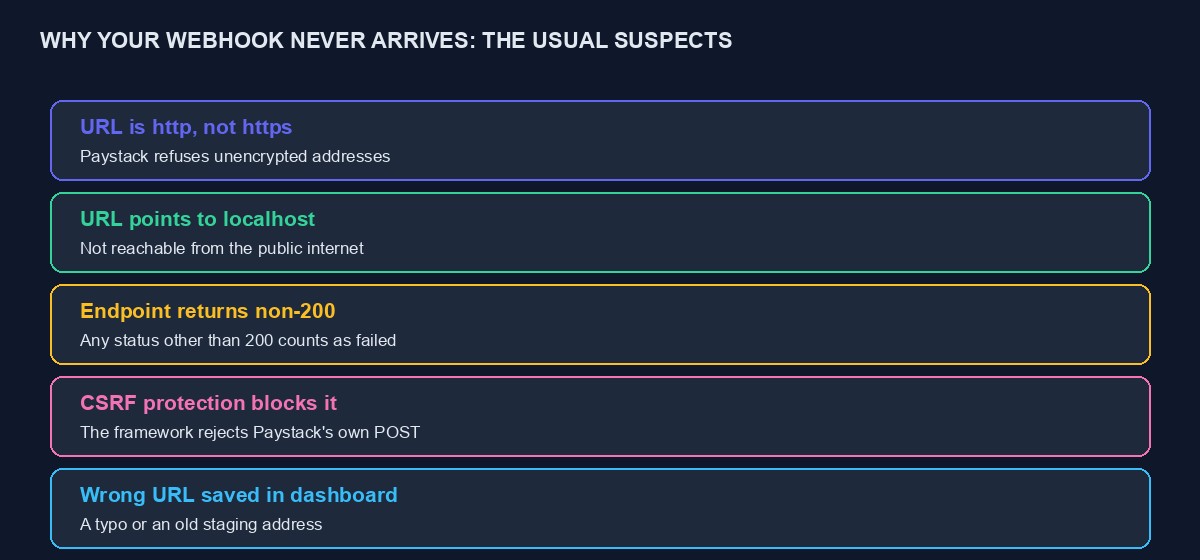
Paystack will not deliver a webhook to a plain http address, only to a properly secured https one. This sounds obvious once stated, and it is a genuinely common mistake during development, when a local or staging environment is running without a certificate and a developer pastes that http address into the dashboard to test something quickly, then forgets to update it once the real domain is ready. If your dashboard shows no delivery attempt at all for a transaction you know happened, this is the first thing to check: open the webhook URL saved in your Paystack settings and confirm it genuinely begins with https and that the certificate behind it is valid, not self-signed or expired.
Cause two: the URL points somewhere Paystack cannot reach
A webhook address that works perfectly when you visit it yourself, from your own laptop, on your own network, can still be completely unreachable from Paystack's servers if it points at a local address, an internal-only address, or a domain that has not yet propagated publicly. This is especially common right after a domain change or a new deployment, where DNS has not finished updating everywhere, and it can also happen if your server's firewall is blocking incoming traffic from unfamiliar IP addresses, which Paystack's servers will appear to be, since your firewall has never seen them before. Confirm the address is genuinely reachable from outside your own network, not just from your own browser, by asking a colleague on a different network to load it, or using an online "check if my site is reachable" tool.
Cause three: your endpoint returns anything other than a clean success
Paystack expects a response with a 200 status code to consider a webhook successfully delivered. If your endpoint returns anything else, an error, a redirect, even a 500 caused by an unrelated bug elsewhere in the same request, Paystack records that as a failure and will retry, and if the failures continue, eventually give up. A subtle version of this trips up more experienced developers too: an endpoint that does real, slow work before responding, sending an email, updating several database tables, calling out to another service, can time out and return an error even though the webhook technically "worked" in the sense that it started processing. Confirm your endpoint responds quickly with a clean 200, and move any slower work to run after that response, not before it.
Cause four: your framework's own protection is silently blocking Paystack
This is the single most common cause among developers using Laravel, Django, or a similar framework with built-in cross-site request forgery protection enabled by default. That protection exists to stop a malicious website from tricking a logged-in visitor's browser into submitting a request on their behalf, and it works by requiring a special token on every incoming POST request that did not come from your own site's own forms. Paystack's webhook is a legitimate POST request from an external server, and it has no way to know about or include your framework's CSRF token, so unless you have explicitly excluded your webhook route from this protection, your framework silently rejects it before your own webhook-handling code ever runs, typically with a 419 or 403 status code that Paystack logs as a failure and you may never see at all if you are not specifically checking framework-level logs.
The fix is specific to your framework, but the shape is the same everywhere: explicitly exclude your webhook route from CSRF protection, since this protection is meant for browser-submitted forms, not server-to-server API calls authenticated a different way, through signature verification, which is the correct protection for this specific kind of request.
Cause five: the wrong URL is saved in your dashboard
A surprisingly common, almost embarrassing cause: the webhook URL currently saved in your Paystack dashboard is an old one, pointing at a staging environment, a previous domain, or simply containing a typo introduced when it was first set up and never noticed since nothing appeared to be obviously broken at the time. Read the exact URL saved in your dashboard character by character against the actual, current, correct address, rather than assuming it is right because you remember configuring it correctly at some point.
Once delivery succeeds: checking your own processing logic
If Paystack's log shows a successful delivery, response 200, no retries, and your order is still showing as unpaid, the problem has moved from "the webhook did not arrive" to "the webhook arrived and something inside your own handling logic did not do what you expected." Common causes here: the code is checking for the wrong event type, since Paystack sends different event names for different kinds of transaction outcome, and a handler written to only look for one specific event name will silently ignore anything else. Or the code is correctly receiving the event but failing to match it to the right order in your own database, often because the reference used to look up the order does not exactly match the reference Paystack sent back, a subtle formatting difference, extra whitespace, a different case, being enough to break an exact-match lookup.
Signature verification: a frequent cause once you have added it properly
If you have correctly added signature verification, as you should, following the discipline covered in our Paystack API tutorial, a mismatched signature will cause your own code to correctly and deliberately reject the webhook, which is the system working as designed, not a bug, but it produces the exact same symptom as every other failure covered here: an order that never updates. The most common specific cause of a genuine signature mismatch is using the wrong secret key to calculate it, particularly mixing up your test and live secret keys after switching environments, or a whitespace character accidentally included when the secret was copied from the dashboard into your environment configuration.
A methodical way to actually debug this, step by step
Start with Paystack's own delivery log for the specific transaction, not your own code. If no delivery was attempted, check https, reachability, and the exact saved URL, in that order, since these are the three most common reasons delivery never starts. If delivery was attempted and failed, check your framework's CSRF exclusion first, since it is the single most common cause among developers using a modern framework, then check your endpoint's actual response time and status code. If delivery succeeded, move to your own handling logic: log the raw, complete payload your endpoint receives, before any parsing or filtering, and compare it directly against what you expected, rather than assuming your code's interpretation of the payload is correct without checking.
Temporary safety nets while you diagnose the real cause
While working through the causes above, do not leave real customers with unpaid-looking orders that were, in fact, paid. A simple, temporary manual process, checking your Paystack dashboard directly against your order list once or twice a day, catches the gap without requiring you to have already found and fixed the underlying cause. Longer term, the more robust fix is the dual-path pattern covered in our Paystack tutorial: verify a transaction's status directly through the API immediately after a customer returns from checkout, in addition to relying on the webhook, so a single point of failure in webhook delivery does not leave an order permanently stuck.
Testing your fix properly before trusting it
Once you believe you have found and fixed the cause, do not simply wait for the next real customer payment to confirm it worked. Paystack's dashboard includes a way to send a test webhook event directly to your currently configured URL, and using this deliberately, watching your own server's logs in real time as it arrives, is a far faster and more certain way to confirm the fix actually worked than waiting and hoping. Run this test more than once, and specifically test a failure-type event as well as a success event, if your handling logic treats them differently, since a fix that only addresses the success case can leave a related gap in how failures are recorded.
A worked example: tracing one real, imagined failure to its actual cause
Picture a developer who has just deployed a Laravel-based store to a new production server, moving from a staging environment where everything, including webhooks, had been working correctly for weeks. Two days after launch, a customer messages to say their payment went through but the order still shows as awaiting payment. The developer's first instinct is to assume something is wrong with the payment itself, and spends twenty minutes in the Paystack dashboard confirming, correctly, that the transaction genuinely succeeded and the money has settled.
Moving to Paystack's webhook delivery log for that specific transaction reveals the actual starting point: three delivery attempts, each returning a 419 status code. That status code, specific to Laravel's CSRF protection, immediately narrows the search. The webhook route, which worked correctly on staging, was never added to the CSRF exception list on the new production deployment, because the route exclusion had been added directly to a local configuration file during initial development rather than committed properly to version control, and the migration to production simply never carried that specific, easy-to-miss change across. Ten minutes to add the exclusion, redeploy, and send a test webhook from the dashboard confirms the fix, and a quick manual review of the two days since launch surfaces one other customer in the same stuck state, fixed by hand before the automated safety net described above is put in place to catch anything similar going forward.
Notice what made this fast: checking Paystack's own log first, rather than guessing at the code, immediately pointed at CSRF protection specifically, because the 419 status code is a distinctive, recognisable signature of that particular problem rather than a generic failure that could have meant anything.
A less common but genuinely tricky cause: a reverse proxy or load balancer in front of your server
If your application sits behind a reverse proxy, a load balancer, or a content delivery network, an additional layer of possible failure exists that a simpler setup does not have: the proxy itself might be configured to block or rate-limit requests it does not recognise as coming from a normal browser, or might be stripping or altering headers your signature verification depends on before your actual application ever sees the request. This is harder to diagnose because the request can appear, from your application's own logs, to have arrived correctly and simply failed verification, when the real cause is that the proxy modified something in transit. If you are running behind this kind of infrastructure and have ruled out every other cause in this guide, specifically check your proxy's own logs and configuration for anything that might be interfering with this one specific route, and consider explicitly allow-listing Paystack's published IP ranges if your setup supports it.
Mistakes that make this harder to diagnose than it needs to be
Not checking Paystack's own delivery log first. Every cause covered in this guide is diagnosed faster by starting there than by guessing at your own code, and skipping this step is the single biggest reason debugging a webhook issue takes hours instead of minutes.
Testing only in an environment different from where the real failure happens. A webhook that works correctly on your local machine or staging environment can still fail in production for reasons specific to that environment, a missing CSRF exclusion that only exists locally, a firewall rule that only applies in production, a certificate that is valid on one domain and not another.
Fixing the symptom for one order without finding the actual cause. Manually marking a single stuck order as paid solves that customer's immediate problem and leaves the underlying cause in place to repeat, quietly, for the next customer.
Assuming a working webhook today means it will keep working. A server migration, a framework upgrade, a certificate renewal that fails silently, or a change to firewall rules can each independently break a webhook that has worked correctly for months, which is exactly why the ongoing monitoring habit described above matters more than a one-time fix.
Preventing this from happening again, quietly, months from now
The uncomfortable truth about webhook failures is that they are often silent for a long time before anyone notices, because the symptom, a customer who paid but sees a pending order, does not always generate a loud, obvious complaint; sometimes the customer just messages you on WhatsApp asking what happened, and you manually fix that one order without ever investigating why it happened, then move on until it happens again to someone else. Building a small, deliberate check into your own routine, a weekly glance at Paystack's dashboard for any transactions with failed or missing webhook deliveries, or better, an automated alert that flags any order that has been in a paid-on-Paystack, unpaid-in-your-system state for more than a few minutes, closes this gap properly rather than relying on customers to notice and report it for you.
A short checklist to run through in order
Check Paystack's delivery log for the specific transaction before anything else. If no attempt was made, verify https, public reachability, and the exact saved URL. If an attempt was made and failed, check your framework's CSRF exclusion first, then your endpoint's response time and status code. If delivery succeeded, verify your secret key matches the correct environment, then log and inspect the raw payload against what your parsing logic actually expects. Test any fix with a real test webhook from the dashboard, not by waiting for the next live payment. And build the habit of checking for orphaned, unpaid-but-actually-paid orders regularly, rather than relying entirely on customers to notice and report the gap themselves.
Where this is already handled for you
If you are running a store, VTU platform or booking site on our own platform rather than a custom integration, this entire category of failure, webhook delivery, signature verification, the dual-path reliability pattern, retry handling, is already built, tested and monitored for you, and connecting your own Paystack account is a matter of pasting your keys into your project settings rather than building or debugging any of the above yourself. You can start building free to see this directly. If you are building a custom integration and want a second pair of eyes on a webhook setup that is still misbehaving after working through this guide, our code audit and rescue service can look at it directly, and our fuller Paystack API tutorial covers the complete integration this article assumes you have already built.


Comments
No comments yet. Be the first to share your thoughts.