Facebook & Instagram Ad Account Hijacking: A Recovery Guide
For a huge number of Nigerian small businesses, a Facebook or Instagram ad account is not a marketing accessory, it is the primary way real customers actually find them, often more so than a website. That makes it a genuinely serious loss when it gets hijacked, and it happens more often than most business owners assume, quietly, through a phishing message or an infected download rather than a dramatic, obvious break-in. Almost everything written about this is either global cybersecurity-news coverage of large-scale malware campaigns, or generic marketing-agency advice with no Nigerian context at all. This is the practical version.
How this actually happens, in the order it usually happens
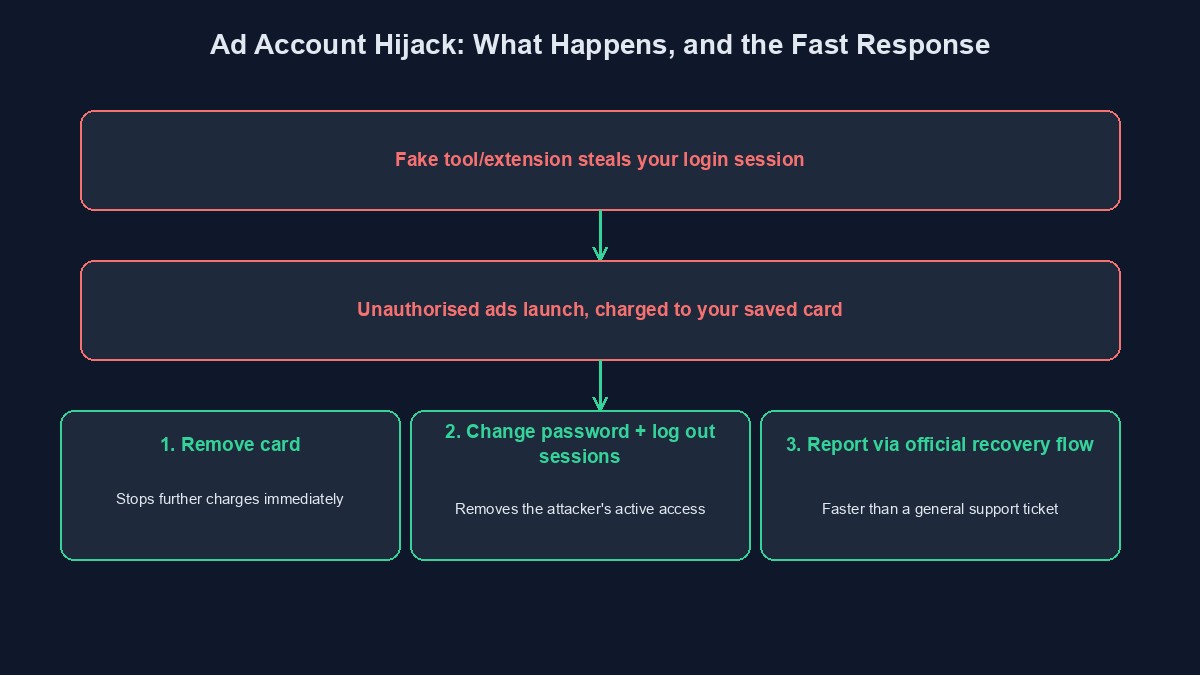
The overwhelming majority of business ad account hijacks do not involve a sophisticated, direct attack on Facebook or Instagram's own systems. They start with the business owner or a staff member with access being tricked into installing something they should not have, a fake "ad performance analyzer" tool, a cracked design or editing app, a browser extension promising some appealing shortcut, downloaded from an unofficial source rather than an official app store. That software quietly harvests saved login information and browser cookies, handing an attacker your actual, already-logged-in session, which is often enough to bypass a password entirely, since the attacker is effectively stepping directly into your existing, authenticated browser session rather than needing to guess or steal a password at all.
What an attacker actually does once inside
The goal is almost never to simply look around. An attacker with access to your ad account typically launches a wave of new, unauthorised ad campaigns immediately, charged to whatever payment method is already saved on the account, often running deliberately deceptive or outright harmful content, sometimes cycling through several different ad variations specifically to slip past the platform's own automated detection for as long as possible before it is caught. The financial damage from unauthorised ad spend can escalate to a genuinely significant sum within hours, not days, which is precisely why the speed of your own response matters as much as the eventual fix.
The warning signs worth actively watching for
An unexpected billing charge, or a payment method being charged a larger amount than your own normal, planned ad spend, is usually the very first concrete sign, and deserves an immediate check rather than a wait-and-see approach. Ads appearing in your account's own ad manager that you or your team did not create, sometimes for entirely unrelated products or promoting genuinely unfamiliar content, is an unambiguous, later-stage sign that access has already been lost. A sudden change to your page's own admin roles, someone unfamiliar being added, or your own account unexpectedly losing admin access to a page you manage, is a related, equally serious sign worth checking your page's role list for periodically rather than assuming it never changes on its own.
What to do the moment you notice this is happening
Remove or unlink your saved payment method from the compromised ad account immediately, through your account's payment settings if you still have any access at all, since this single step directly stops further financial damage even before the rest of the recovery process is complete. Change your password immediately, and specifically log out of all active sessions on all devices as part of that change, a setting most platforms make available precisely for this situation, since a password change alone does not remove an attacker who is already sitting inside an already-authenticated session. Report the compromise directly through the platform's own official hacked-account recovery flow, rather than a general support inbox, since this specific flow is built and prioritised for exactly this scenario and moves considerably faster than a generic support request.
Recovering a page or ad account you have already lost full access to
If an attacker has already removed your own admin access entirely, the platform's dedicated business account recovery process, built specifically for exactly this situation, is the correct and fastest path, not repeatedly trying old login credentials that likely no longer work. Have your business's own verifiable information ready before starting this process, government-issued business documentation, your domain's ownership details, past invoices or ad receipts, since a well-documented, promptly filed claim is resolved considerably faster than a vague one lacking real supporting evidence.
Preventing this before it happens, which is far cheaper than recovering from it
Only ever install ad-related tools, extensions or "helper" software from a platform's own official app marketplace or a genuinely well-known, reputable source, never a link received through an unsolicited message or a tool promoted specifically for bypassing some restriction or shortcutting some cost, since that specific promise is almost always the actual bait. Enable two-factor authentication on the personal account tied to your business page and ad account, covered in more depth in our 2FA guide, since this single step defeats the large majority of credential-based takeover attempts even when a password alone has already leaked. Review who has admin access to your business page and ad account periodically, removing anyone, a former staff member, an old agency contact, who no longer genuinely needs it, since an unnecessarily long list of admins is simply a longer list of accounts an attacker only needs to compromise one of.
A note on agencies and freelancers managing your ad account
Many small Nigerian businesses hand ad account management to an outside agency or freelancer rather than running campaigns themselves, which is a completely reasonable choice, and one that introduces its own specific version of this same underlying risk: the access you have granted them remains active for exactly as long as you leave it active, regardless of whether your working relationship with them has actually continued. Review this specifically and deliberately once a relationship ends, removing their admin access at that point rather than assuming it quietly expires on its own, and ask any agency or freelancer you currently work with directly how they themselves protect the login credentials they use to manage your account, since their own security practice is, at that point, functionally part of yours.
A worked example: a fast recovery after a genuine hijack
Picture a small Nigerian business owner who receives an unexpected notification: their monthly ad spend limit has been reached, days earlier than it normally would be, and considerably higher than their own planned budget. Checking the ad manager directly reveals several ad campaigns they never created, live and actively spending. They immediately remove their saved card from the account's payment settings, stopping further charges on the spot, then change their password and specifically log out every other active session, before reporting the compromise directly through the platform's dedicated hacked-account flow with clear screenshots of the unauthorised campaigns attached. The unauthorised ads are removed within a day, and, because the payment method was disconnected within minutes of discovery rather than hours, the total unauthorised spend is kept to a genuinely small, recoverable amount rather than a devastating one.
Mistakes that turn a hijack into a much larger loss
Not noticing an unusual charge promptly because ad spend notifications are muted or routinely ignored. A charge meaningfully outside your normal, expected pattern deserves an immediate look, not a glance days later during a routine review.
Changing only the account password without also ending all other active sessions. An attacker already inside an authenticated session is not automatically removed by a password change alone; ending all sessions is the specific step that actually locks them out.
Installing an unfamiliar "ad management" tool or browser extension because it promises a genuinely appealing shortcut. This specific bait, a tool promising to save time or beat some restriction, is exactly what the majority of real hijacks documented against business ad accounts actually rely on.
Never reviewing who still has admin access to your business page and ad account. A list that only ever grows and never gets pruned is simply a widening, unnecessary attack surface that costs nothing to shrink periodically.
A short glossary
Session hijacking: an attacker gaining access to an already-logged-in session, bypassing the need to know your actual password. Ad manager: the dashboard where a business's active and past ad campaigns are created and controlled. Admin role: a level of access granted to a specific account over a business page or ad account, worth periodically reviewing and pruning. Account recovery flow: a platform's dedicated, official process for regaining control of a compromised account, distinct from general customer support.
Where this fits alongside your wider account security
Ad account hijacking is one more entry in the same broader pattern covered across our guides to two-factor authentication, SIM swap fraud, and WhatsApp impersonation: an attacker borrowing an account's existing trust and access rather than breaking in through some exotic technical exploit. The same core habits, strong unique passwords, two-factor authentication, caution around unfamiliar tools and links, defend against nearly all of them at once.
Comments
No comments yet. Be the first to share your thoughts.