How Someone Fakes an Email From Your Business (And What to Do About It)
Search "email spoofing protection" and you will land almost entirely on content built by DMARC monitoring vendors, dense with technical DNS terminology, SPF records, DKIM signatures, DMARC policies, written for an IT department, not a Nigerian small business owner trying to understand why a customer just received an invoice that looks exactly like it came from their business, asking for payment to an account that was never actually theirs. This guide skips the DNS deep-dive and focuses on what email spoofing actually means for a small business, how to recognise it happening to you, and the practical, achievable steps that matter most, without requiring you to become an email infrastructure specialist.
What email spoofing actually is, without the jargon
Email was built, decades ago, without any built-in way to verify that a message claiming to be from a specific address genuinely came from it. Spoofing exploits exactly this gap: an attacker sends a message with your business's actual email address, or one deliberately made to look nearly identical to it, in the visible "from" field, even though it was never sent through your real email account or your real systems at all. To a recipient glancing at their inbox, it looks completely genuine, same name, same address, sometimes even matching your usual writing style if the attacker has seen previous real messages from you.
Why a small business is a specifically attractive target for this
Business email compromise, the formal name for fraud built on this technique, works because it exploits an existing, established relationship rather than trying to build trust from nothing. A spoofed message pretending to be an invoice from a supplier you already genuinely work with, asking for payment to a "updated" account, is far more convincing, and far more likely to actually be paid without question, than an identical message from a stranger would ever be. A small business, often without a dedicated finance department double-checking every payment instruction against a separate, verified source, is frequently an easier target than a larger organisation with more formal, layered approval processes in place.
The two directions this actually runs in, for a small business
Your business's own email address can be spoofed to defraud your own customers or suppliers, a message appearing to come from you, asking them to pay a "new" account or click a link to "verify" a payment, damaging trust in your business even though your actual email account and systems were never technically compromised at all. Separately, and just as commonly, a supplier's or partner's address you already trust can be spoofed to defraud you directly, an invoice that looks exactly like the ones you normally receive from a genuine, existing supplier, arriving with new, fraudulent payment details at exactly the moment you are expecting a real one.
The single habit that defeats the overwhelming majority of this
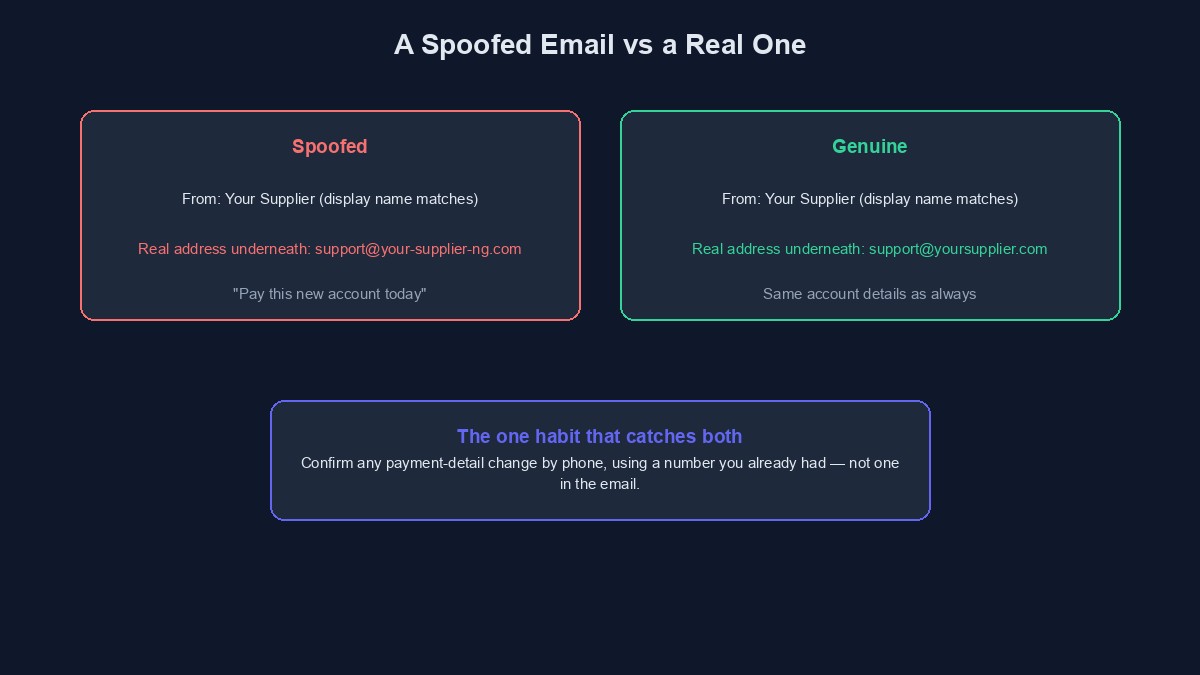
Never change payment details for an existing supplier, or send payment to a new account for the first time, based purely on an emailed instruction, however official it looks, however urgent it sounds, without confirming it through a separate, independently known channel first, a phone call to a number you already had on file, not one provided in the email itself. This one habit, confirm before you pay, defeats nearly every version of this scam that a small business is realistically likely to encounter, because the entire scam depends specifically on you acting on the email's instruction without that separate check.
Spotting a spoofed message, since the signs are usually there if you look
The visible display name often matches perfectly while the actual underlying email address, visible if you tap or hover to reveal full sender details rather than only the friendly display name your inbox shows by default, is subtly different, an extra character, a different domain extension, a look-alike substitution. An unusual, uncharacteristic sense of urgency, pay this today, respond immediately, is a very common feature of a fraudulent message, since urgency is specifically designed to short-circuit the kind of careful, separate verification that would otherwise catch it. A request to change payment details specifically, rather than an ordinary invoice for an amount and account you already recognise, deserves particular scrutiny, since changing where money goes is precisely the outcome this entire category of fraud is built to achieve.
What a small business can actually, practically do about its own domain being spoofed
Without needing to become a DNS specialist yourself, there is a real, achievable middle ground worth knowing about. Most domain registrars and website hosting providers now offer a straightforward way to add basic email authentication records, often through a simple, guided setting in your own hosting or domain management dashboard rather than requiring you to construct DNS records manually. If you manage this yourself, ask your hosting provider directly whether they offer a simple, guided way to enable this, phrased exactly that way, rather than assuming you need to research and implement the underlying technical standard from scratch. If your website or email was built or is managed by a developer or an agency, ask them directly whether basic sender authentication is already configured for your domain, since this is a reasonable, standard question to ask, and a professional developer should have a clear, direct answer rather than needing to investigate it as if hearing about it for the first time.
A related, distinct risk worth knowing about: a genuinely compromised account, not a spoofed one
It is worth distinguishing spoofing, a faked "from" address with no actual access to the real account, from a genuinely compromised email account, where an attacker has actually gained real login access to your, or a supplier's, real inbox. The practical warning signs differ slightly: a compromised account often shows messages in your own sent folder that you did not write, or replies to conversations you do not recognise starting, since the attacker is operating from inside the real account rather than merely imitating its outward appearance. If you suspect a genuine compromise rather than simple spoofing, changing that account's password immediately and enabling two-factor authentication, covered in our 2FA guide, is the correct, urgent response, distinct from the domain-level defences that address spoofing specifically.
A worked example: catching a spoofed supplier invoice before paying it
Picture a small business that regularly pays a specific printing supplier through the same bank account every month, an established, routine relationship. One month, an email arrives, apparently from that same supplier's usual contact, apologising for a "banking issue" and providing new account details for that month's payment, with a plausible, unhurried explanation attached. Rather than paying based on the email alone, the business calls their usual contact at the supplier directly, using the phone number already saved from previous, genuine dealings, not any number in the email itself. The supplier confirms, confused, that they sent no such message and their account details have not changed at all. The fraudulent email is deleted, no payment is made to the fraudulent account, and the entire verification costs a single two-minute phone call.
Mistakes that let a spoofed email actually cause real damage
Paying or acting on any request to change payment details based purely on an email, without a separate, independent confirmation. This is, without exception, the single point of failure in nearly every version of this fraud, and the one habit above defeats nearly all of them at once.
Only glancing at the friendly display name rather than checking the actual underlying email address. Most email apps show a simplified name by default specifically for convenience; tapping or hovering to reveal the real address is a small habit worth building for anything involving money or sensitive information.
Assuming your business is too small to be worth targeting this way. This fraud is cheap and easy to attempt at real scale, and a small business with less formal financial process in place is frequently an easier, not a less attractive, target than a larger one.
Never asking your own hosting provider or developer whether basic email authentication is already set up for your domain. This is a reasonable, standard question with a straightforward answer, and it is worth asking once rather than never finding out either way.
A short glossary
Email spoofing: sending a message with a "from" address that is faked or closely mimicked, without genuinely having access to the real account or domain. Business email compromise (BEC): fraud built on spoofed or genuinely compromised business email, typically aimed at redirecting a real payment. Display name: the friendly name shown by default in most inboxes, which can differ from, and mask, the actual underlying email address. Sender authentication: the general category of technical settings a domain can enable to help receiving mail servers verify a message genuinely came from where it claims to.
Where this fits alongside your wider security practice
Email spoofing is close cousin to the impersonation patterns covered in our guides to WhatsApp impersonation and how VTU business owners actually get scammed, all built on the same underlying trick: borrowing an already-trusted identity rather than breaking into anything directly. The same core habit, verifying anything involving money through a separate, independent channel before acting, defends against all of them at once, and is worth building as a standing practice across your entire business, not just for email specifically.

Comments
No comments yet. Be the first to share your thoughts.