Paystack Signature Verification Failed: Common Causes
You did the right thing. You added signature verification to your webhook handler, following the documentation carefully, because you understood, correctly, that trusting an unverified incoming request is a real security risk. And now every single webhook, including ones you can see clearly succeeded on Paystack's own dashboard, is being rejected by your own code with a signature mismatch. This is one of the more frustrating problems in a payment integration, precisely because it happens to developers who did the careful, correct thing and are now being punished for it by a bug in the details.
This guide walks through why signature verification actually fails in practice, in order of how common each cause genuinely is, and how to fix each one properly.
What signature verification is actually checking, in plain terms
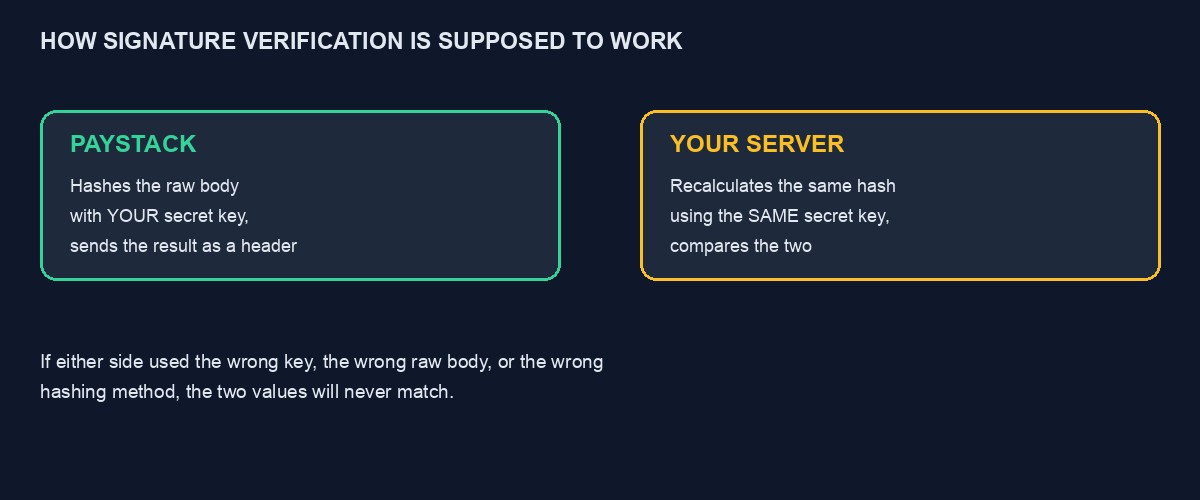
Before debugging this, it helps to understand exactly what is being compared. Paystack takes the raw content of the webhook message it is about to send you, and combines it with your secret key using a specific, standard hashing method, producing a long string of characters, the signature, which it includes as a header alongside the actual message. Your own code, on receiving the message, performs the identical calculation, the same raw content, the same secret key, the same hashing method, and compares its own result against the signature Paystack sent. If the two match exactly, the message is proven genuine. If they do not match, even by a single character, something in that calculation differed between the two sides, and your code correctly refuses to trust the message.
This means every single cause of a signature mismatch is, fundamentally, one side of that calculation using a different input than the other side. The debugging task is finding which specific input differs.
Cause one: using the wrong secret key
This is, by a wide margin, the most common cause. Paystack gives you separate test and live secret keys, and the signature Paystack calculates always uses whichever environment actually sent the webhook. If your application is configured with your test secret key while a live webhook arrives, or the reverse, mixed up after a deployment or an environment variable that was not updated correctly, the two sides will never match, because they are genuinely using different keys, and no amount of correctly written verification code fixes a fundamentally mismatched key. Check, explicitly and directly, which secret key your running application actually has configured right now, not which one you believe you set weeks ago, and confirm it matches the environment, test or live, that is actually sending the webhook you are debugging.
Cause two: a stray character copied along with the key
Secret keys are long, and copying them from a dashboard into an environment configuration file is a moment where an easy, invisible mistake happens: a trailing space, a line break accidentally included at the end, an extra character from a browser's copy behaviour. These are invisible when you glance at the key, since a trailing space does not visibly change how the key looks, and they are enough to break the hash calculation completely, since the calculation treats the key as an exact sequence of characters, not as a value a human would recognise as "close enough." Delete and retype the key directly from the dashboard, or use a tool that shows invisible characters, rather than trusting a visual comparison.
Cause three: verifying against the parsed body instead of the raw one
This is the cause that trips up experienced developers most often, because it is subtle and framework-specific. Many web frameworks automatically parse an incoming request's body into a convenient object as soon as the request arrives, before your own code even runs. Signature verification, however, must be calculated against the exact raw bytes Paystack originally sent, before any parsing, reformatting, or reordering happened. If your framework has already parsed the body by the time your verification code runs, and you calculate your hash from a reconstructed or re-serialised version of that parsed object rather than the genuinely original raw bytes, the two will not match, even though the actual content looks identical to a human reading it, because the exact byte-for-byte representation has changed, whitespace, key ordering, formatting, in ways invisible to the eye but significant to a hash calculation.
The fix is framework-specific but the principle is universal: capture and verify against the genuinely raw request body, before your framework's normal parsing takes place, which usually means accessing a specific raw-body property your framework provides for exactly this situation, rather than the convenient, already-parsed object you would normally use.
Cause four: using the wrong hashing algorithm
Paystack specifies a particular hashing algorithm, SHA512, for this calculation, and using a different one, even a superficially similar one, produces a completely different result regardless of how correct everything else is. This usually happens when code is copied from an example written for a different service, or from an outdated piece of sample code that used a different algorithm in an earlier version of the documentation. Confirm the algorithm your code actually uses matches Paystack's current documentation exactly, rather than trusting that a working-looking piece of code found online is necessarily correct or current.
Cause five: comparing the two values incorrectly
Even with a genuinely correct calculation, a bug in how the two resulting values are compared can still produce a false mismatch, or worse, a false match. Comparing them as if they were regular text strings, using a standard equality check, is usually fine functionally, though security-conscious implementations often use a constant-time comparison specifically to avoid leaking timing information that could theoretically help an attacker guess the correct value incrementally. Whichever comparison method you use, confirm it is comparing the two full values completely, not accidentally truncating one, and not comparing the signature against something other than what you actually calculated.
A debugging technique that isolates the actual cause quickly
Rather than guessing at which of the causes above applies, log both values, your calculated signature and the signature Paystack actually sent, side by side, in full, during a test webhook delivery, using the ngrok-based local testing setup covered in our guide to testing Paystack webhooks locally. If the two values are wildly different in length or structure, suspect the algorithm, cause four. If they are the same length but different content, suspect the key or the raw body, causes one through three. Compare your calculated value specifically against a signature you calculate independently, using a separate, simple script with the raw body and key hardcoded, outside your main application entirely, which lets you rule out framework-specific quirks and confirm whether your core hashing logic is correct in isolation before suspecting anything more complex.
A worked example: chasing this down through a Django integration
Picture a developer whose Django-based webhook handler rejects every single incoming Paystack event with a signature mismatch, despite the code appearing, on a careful read, to follow the documentation correctly. Logging both the calculated and received signatures shows they are the same length, ruling out an algorithm mismatch, but consistently different in content. Testing the secret key directly, printing it at application startup and comparing it character by character against the dashboard, confirms the key itself is correct, ruling out cause one.
The actual cause turns out to be Django's request body handling: the framework's request object had already been accessed once earlier in the same request-handling chain, for an unrelated logging middleware that logged a parsed version of every incoming request for debugging purposes, and in Django, accessing certain request properties can affect how the raw body is subsequently available to code running later in the same request. The webhook verification code, running after that middleware, was calculating its hash against a body that had already been touched and altered by an earlier step it did not know about. The fix involved capturing and caching the genuinely raw body at the earliest possible point in the request-handling chain, before the logging middleware or anything else had a chance to touch it, and using that cached, untouched value specifically for signature verification.
Testing your fix with genuine confidence
Once you believe you have found and fixed the cause, test with a real webhook event through the local testing setup described above, watching both the calculated and received signature values directly in your logs to confirm they now match exactly, rather than simply confirming the request was accepted, since a verification bug that happens to accept everything, a serious security problem in its own right, would also produce a passing test if you are only checking for acceptance rather than genuine, correct verification.
How the same problem shows up differently on Flutterwave
Flutterwave uses a genuinely simpler verification mechanism than Paystack's calculated hash: rather than computing a signature, Flutterwave sends a plain secret hash value in a header called verif-hash, which you compare directly against a value you configured yourself in your Flutterwave dashboard settings, no hashing calculation required on your side at all. This removes causes three, four and five above entirely, since there is no raw-body sensitivity, no algorithm choice, and no complex comparison logic, but it introduces its own specific failure mode: the value configured in your Flutterwave dashboard and the value your code is comparing against must be identically, exactly the same string, and a mismatch here is usually either a straightforward copy-paste error, the same trailing-whitespace problem covered in cause two above, or confusion between your test and live dashboard's separately configured values.
If you are integrating both gateways, keep this difference clearly in mind: applying Paystack's hash-calculation verification logic to a Flutterwave webhook, or the reverse, simply will not work, since the two services verify authenticity through genuinely different mechanisms, not just different specific values.
A checklist to work through in order
Confirm your secret key matches the environment, test or live, that actually sent the webhook you are debugging. Retype the key directly from the dashboard rather than trusting a copied value, checking specifically for invisible trailing characters. Confirm your code is hashing the genuinely raw request body, captured before any framework middleware or parsing has touched it. Confirm the hashing algorithm matches Paystack's current documentation exactly. Log both the calculated and received signature values side by side during a real test event, and compare them directly rather than only checking whether verification passed or failed. And if all of this checks out and the mismatch persists, isolate the calculation entirely, outside your main application, in a small standalone script with the key and a captured raw body hardcoded, to rule out anything framework-specific interfering with an otherwise correct calculation.
Mistakes that make this harder to fix than it needs to be
Assuming the documentation's example code is wrong rather than checking your own implementation first. Official example code for a widely used, actively maintained API is far more likely to be correct than a subtle bug in how it was adapted into your own specific framework and codebase.
Testing only against your own hardcoded example rather than a genuine webhook. A verification function that passes against a payload you constructed yourself can still fail against a genuinely different real payload if your example payload does not accurately represent the real, raw format Paystack actually sends.
Changing several things at once while trying to fix it. Adjusting the key, the raw-body handling, and the algorithm simultaneously, under frustration, makes it far harder to identify which specific change actually mattered, and increases the risk of introducing a second bug while chasing the first.
Disabling verification "temporarily" and forgetting to re-enable it. A temporary bypass added under deadline pressure has a real, documented tendency to quietly become permanent once the immediate frustration passes and the underlying cause is never actually found.
A note on webhook secrets versus API secret keys
Some Paystack integrations, depending on which endpoint or method you are using, distinguish between your general API secret key and a value specifically labelled for webhook signing, and confusing these two, using the wrong one in your verification calculation, produces exactly the same symptom as every other cause above: a calculation that looks correct and never matches. Confirm, directly against Paystack's current documentation for the specific integration method you are using, which exact value is meant to be used for signature verification, rather than assuming your general secret key is automatically the correct one for this specific purpose.
Why this category of bug is worth the careful debugging, not a workaround
Signature verification exists specifically to answer one question with certainty: did this message genuinely come from Paystack, or could it have come from anyone pretending to be Paystack. Every workaround that avoids properly fixing a verification bug, disabling the check, loosening the comparison, trusting the message anyway, answers that question with "we assume yes" instead of "we have confirmed yes," and the entire value of the protection depends on that distinction holding. A payment integration handling real customers' money deserves the extra hour of careful debugging this guide describes over a workaround that quietly reopens exactly the vulnerability the check was built to close.
What happens if you never fix this, and simply remove verification instead
Under time pressure, it is tempting to simply delete or bypass the signature check once it is causing more frustration than it seems worth, especially since the webhooks are, after all, genuinely coming from Paystack and being wrongly rejected. Resist this. Removing verification entirely means your webhook endpoint will now accept any request from anyone claiming to be Paystack, with no way to distinguish a genuine payment confirmation from a forged one, which is precisely the vulnerability signature verification exists to close. Fix the actual cause of the mismatch rather than removing the protection meant to catch a genuinely malicious request.
Where this is already handled correctly for you
If you are running a project on our platform, signature verification for every connected payment gateway is already implemented, tested, and kept current with each provider's requirements, and you never need to debug this category of problem yourself. You can start building free to see this directly. If you are building a custom integration and are still stuck after working through this guide, our code audit and rescue service can review the specific code directly, and our fuller Paystack API tutorial covers the complete integration this guide assumes you have already built.

Comments
No comments yet. Be the first to share your thoughts.