AI Code Review for React Projects
React bugs have a particular personality. The code often looks completely reasonable, it compiles, it even works while you are testing it, and then breaks in a way that only shows up under specific conditions, a particular re-render, a particular piece of stale state. This is exactly the kind of bug an AI code reviewer is genuinely well suited to catching, because these patterns are recognisable in the code itself, before anyone ever clicks the button that actually triggers the problem.
The missing dependency, React's most common quiet bug
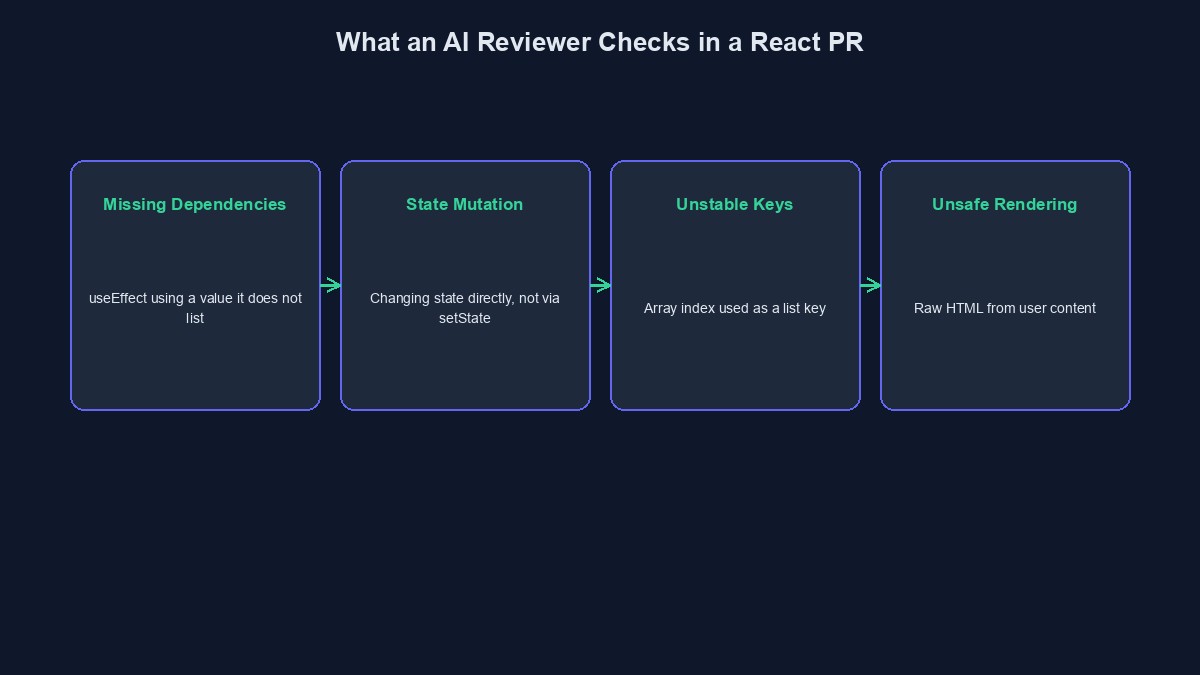
A `useEffect` hook that uses a variable from outside itself, but does not list that variable in its dependency array, is one of the single most common real bugs in React applications, and one of the easiest to miss while reading through a pull request quickly. The effect runs using a stale, outdated value instead of the current one, and the bug often only shows up intermittently, exactly the kind of thing that is genuinely hard to catch just by reading code and imagining how it behaves. An AI reviewer checks this specific pattern directly, comparing what a hook actually uses against what it declares as a dependency, and flags the mismatch before it ships.
State mutation that looks like it should work, and does not, reliably
Directly changing a piece of state, pushing into an array instead of creating a new one, changing a property on an object instead of spreading it into a new one, often appears to work immediately, because the underlying data did genuinely change. The real problem is that React did not necessarily notice, since it often checks whether the reference itself changed, not whether the contents did, and a component can silently fail to re-render even though the data underneath it is now different. An AI reviewer flags direct state mutation specifically, since it is a well-known, well-documented pattern that causes exactly this kind of confusing, intermittent bug.
Keys in a list that are not actually stable
Using an item's array index as its React key works, briefly, and breaks in specific, confusing ways the moment that list can be reordered, filtered, or have an item removed from the middle. Items can visually swap state with each other, a form field's typed value jumping to the wrong row, in a way that looks like a completely unrelated bug to whoever first encounters it. An AI reviewer checks whether a list's key comes from a genuinely stable, unique piece of the actual data, an ID, rather than the array's own position, and flags the ones that do not.
Rendering raw content in a way that opens the door to an attack
`dangerouslySetInnerHTML` is named the way it is for a real reason, and using it with content that ultimately comes from a user, a comment, a bio, a message, without properly sanitising it first, is a genuine, recognisable cross-site scripting risk. An AI reviewer flags this pattern specifically when it can see the content did not clearly pass through a sanitisation step first, since this exact mistake has caused real, documented vulnerabilities across a large number of real React applications.
Expensive work repeated on every single render
A heavy calculation, or a new function or object created fresh inside a component's body, runs again every time that component re-renders, even when the actual inputs have not changed at all. This does not usually break anything outright, but it genuinely slows an application down in a way that is easy to miss during development and painfully obvious once real users, and real data, are actually involved. An AI reviewer flags an expensive operation that is not wrapped in `useMemo` or `useCallback` where the pattern clearly calls for it, catching a performance problem while it is still cheap to fix.
What an AI reviewer genuinely will not catch
It will not know that your specific checkout flow's actual business logic charges the wrong shipping fee for a particular real combination of country and weight, since nothing in the code's pattern reveals that the number itself is wrong. It will not catch a visual layout bug that only a human eye, actually looking at the rendered page, would notice. And it cannot replace genuine testing of how your specific application actually behaves for a real user clicking through it, which is exactly why these catches, useful as they are, are a first pass, not the final word.
A worked example: the bug that only showed up sometimes
Picture a component that fetches a user's notifications inside a `useEffect`, using the currently selected `userId` from a prop, but the dependency array is left empty. It works perfectly the first time the component loads. The bug only appears when a user switches between two profiles without the page fully reloading, since the effect never re-runs, and the notifications silently stay stuck on the first user's data. An AI reviewer catches this immediately by comparing the hook's actual dependencies against what it genuinely uses, long before a real, confused user ever reports "my notifications show someone else's."
Mistakes worth avoiding
Silencing a dependency-array warning without actually understanding why it appeared. The warning exists because the code genuinely behaves differently depending on this, and suppressing it does not remove the real underlying bug.
Assuming a component "works" because it looked fine during a quick manual test. Several of these bugs only appear under specific, less obvious conditions a quick click-through will not naturally trigger.
Treating performance flags as optional polish. An unnecessary re-render is invisible with ten test items and genuinely painful the moment a real page has a few hundred.
A short glossary
Dependency array: the list of values a `useEffect` hook declares it depends on, controlling when it actually re-runs. Stale closure: when a function keeps using an old, outdated value from before a re-render, instead of the current one. Memoisation: caching the result of an expensive calculation so it is not repeated unnecessarily on every render. Cross-site scripting (XSS): a security flaw where untrusted content is rendered in a way that lets it run as active code in another user's browser.
Where to go from here
Our wider guide to what AI code review actually is covers how these tools work in general, and how they actually detect bugs goes deeper into the underlying mechanics. If your React application has grown into something a quick read-through can no longer properly cover, our code audit and rescue service is built for a real, thorough, human look.


Comments
No comments yet. Be the first to share your thoughts.