How Do APIs Work? API Requests, Responses and Endpoints Explained
You have probably heard a developer say "we just call the API and get the data back" as if that sentence explains everything. It does not, not until you have actually watched it happen. This guide walks through what genuinely occurs, step by step, when one piece of software asks another for something over the internet, using a request you make every day as the example.
Start with something you already understand: asking someone a question
Imagine you call a restaurant to ask if they deliver to your area. You ask a specific question, the person on the phone checks something, and they give you a specific answer, yes or no, maybe with a delivery fee attached. An API request works the same way. One piece of software asks a very specific question of another, waits, and gets a specific answer back. The only real difference is that instead of a phone call, it happens over the internet, in a format both computers already agree on.
What an endpoint actually is
An endpoint is simply the specific address you send your question to, the same way a restaurant has one phone number for orders and possibly a different one for complaints. A weather service might have one endpoint for "give me today's forecast for this city" and a completely different endpoint for "give me the seven-day forecast." Each endpoint exists to answer one particular kind of question, not everything the service can possibly do. A real API is usually made up of many endpoints, each with its own specific job.
What a request is actually made of
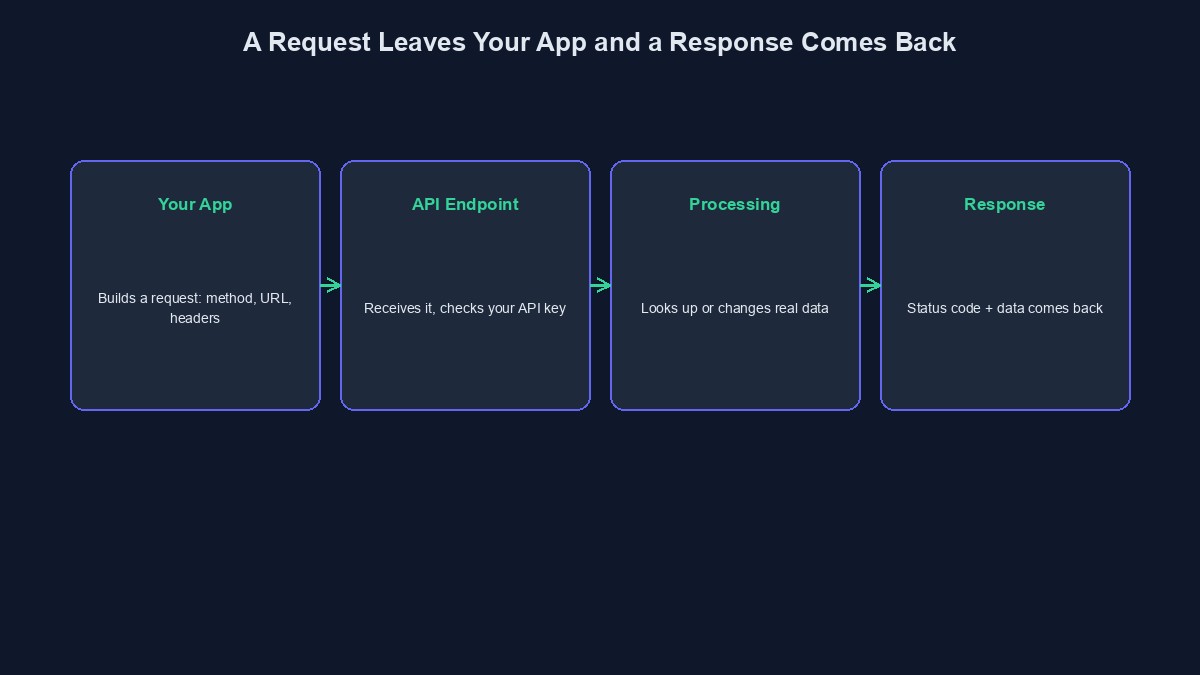
A request is not just "please send data," it carries several real parts, each doing a specific job. The method says what kind of action you want, GET to ask for something without changing anything, POST to create something new, PUT or PATCH to update something that already exists, DELETE to remove something. The URL points at the specific endpoint you are asking. Headers carry extra information the server needs before it even looks at your actual question, commonly including your API key, proving you are allowed to ask at all. And for actions like POST or PUT, a body carries the actual data you are sending, the new order details, the new user information, whatever the action genuinely requires.
What comes back: the response
The server does not just send back "yes" or "no" in plain words. A response carries a status code, a short number telling you broadly what happened, 200 for success, 404 for "that specific thing does not exist," 401 for "you are not allowed to see this," 500 for "something broke on our end, not yours." Alongside the status code comes the actual data you asked for, almost always formatted as JSON today, a structured, predictable way of writing information that both a human and a computer can read without much trouble. A weather endpoint's response might carry today's temperature, the chance of rain, and the wind speed, each clearly labelled, not just a paragraph of text you would have to guess your way through.
A real, concrete example, start to finish
Picture a VTU app checking whether a customer's data purchase went through. The app sends a GET request to a specific "check transaction status" endpoint, with the transaction's own ID in the URL and the business's API key in the headers, proving the app is allowed to ask this question at all. The vending provider's server receives this, looks up that specific transaction in its own real records, and sends back a response: a 200 status code, plus a body reporting the transaction is "successful," including how much data was actually delivered and exactly when. The app reads this response and shows the customer a real confirmation screen, not a guess, an actual answer sourced directly from the provider that processed the purchase.
Why status codes matter more than beginners usually realise
A common early mistake is only checking whether a request "worked" by looking at the data that came back, and ignoring the status code itself. This breaks in a specific, painful way: a 401 "not authorised" response often still carries a body, just one saying something like "invalid API key," and code that blindly tries to read data out of that body, expecting a real answer, fails confusingly instead of failing clearly. Checking the status code first, before trying to use the data inside the response, is the difference between an error message that tells you exactly what went wrong and one that leaves you guessing for an hour.
Synchronous versus waiting for something slower
Most simple requests, checking a balance, fetching a user's profile, get a response back within a second or two, and your app can simply wait for it before doing the next thing. Some actions genuinely take longer, sending a bulk SMS campaign to thousands of numbers, generating a large report, and a well-designed API often responds immediately with "request accepted, here is a reference ID," then expects you to check back later, or notifies you separately once the real work finishes through a webhook. Confusing these two patterns, expecting an instant answer from something that was always going to take minutes, is a common source of real, confusing bugs for developers new to working with APIs.
Mistakes worth avoiding
Assuming a fast response always means success. A quick response can just as easily be a quick failure. Always check the actual status code and body, not just how fast the answer came back.
Hardcoding a full URL instead of building it from a base URL and an endpoint path. Providers occasionally change parts of their infrastructure, and code built around one fixed, hardcoded address breaks in ways that are harder to track down than code that clearly separates the base address from the specific endpoint.
Ignoring the headers a provider explicitly documents as required. A missing header is one of the most common reasons a request fails in a way that looks, at first glance, like a completely unrelated problem.
A short glossary
Endpoint: a specific address within an API, built to answer one particular kind of request. Status code: a short number in a response summarising broadly what happened, success, a client error, or a server error. JSON: a structured, widely used format for writing data that both computers and humans can read reasonably easily. Webhook: a way for a provider to send you information on its own, once something finishes, rather than you repeatedly asking whether it is done yet.
Where to go from here
If the whole idea of an API is still new territory, our guide to what an API actually is covers the concept from the very start. Once requests and responses make sense, our piece on REST APIs explained for beginners goes deeper into the specific conventions most modern APIs, including our own, actually follow. And if you are building something that needs to call real APIs, payment, SMS, or VTU vending, you can start building free and see documented, working endpoints directly in your own dashboard.

Comments
No comments yet. Be the first to share your thoughts.