
What Is an API? A Plain-English Explanation
You have probably heard the word API a hundred times without anyone ever properly explaining it, usually in a sentence like "we integrated with their API" or "you'll need an API key," said with the assumption that everyone in the room already knows what that means. If you nodded along and quietly did not know, this article is for you, and there is no reason to feel behind. It is one of those ideas that sounds intimidating mainly because of the acronym, not because the underlying concept is actually complicated.
The plain-English version
API stands for Application Programming Interface. Strip away the jargon and it means: a defined way for one piece of software to ask another piece of software to do something, or to hand over some information, without either side needing to know how the other one works internally.
The most useful analogy, and one that holds up better than most technical ones, is a restaurant. You, the customer, do not walk into the kitchen and cook your own food. You do not need to know how the stove works, where the ingredients are stored, or what order the chef does things in. You look at a menu, a fixed, agreed list of what you are allowed to ask for, and you tell a waiter what you want. The waiter carries that request to the kitchen, the kitchen prepares it, and the waiter brings back the result. The menu and the waiter together are the interface. You get exactly what you asked for, in a predictable form, without ever touching the machinery that actually produced it.
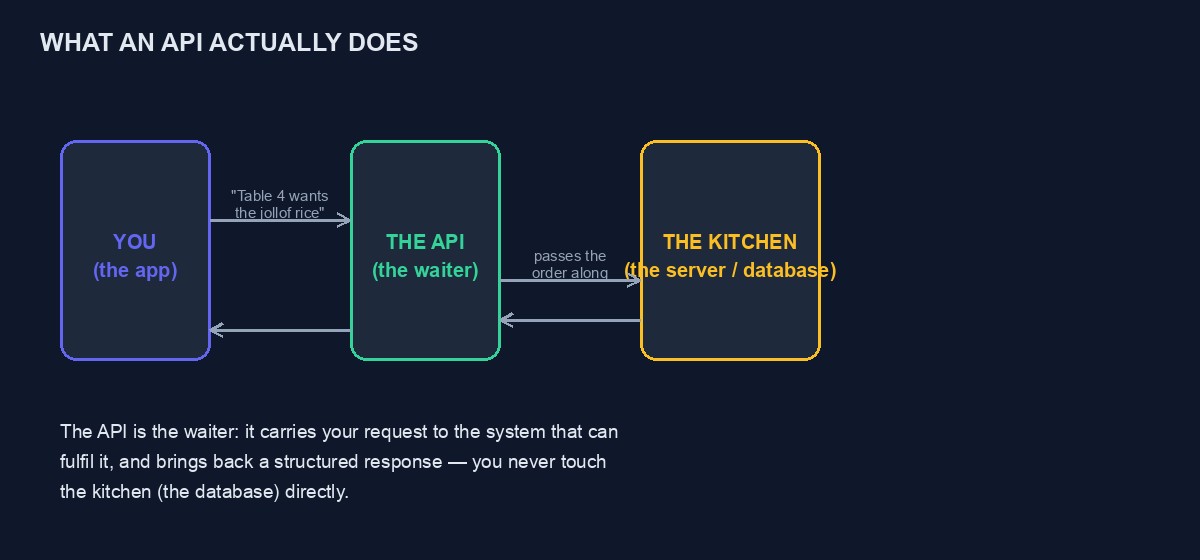
Turning the analogy into what actually happens on a computer
When an app on your phone shows you today's weather, it did not calculate the weather itself. It sent a request to a weather service's API: "give me the current weather for this location." The weather service's own systems, satellites, sensors, forecasting models, none of which your phone app knows or needs to know anything about, produced an answer, and the API handed back a clean, predictable package of information: a temperature, a description, maybe a forecast for the next few hours. Your app then displays that information in whatever way it wants.
Notice what the API actually did here. It did not give your app direct access to the weather service's internal databases or servers, which would be both unsafe and unnecessary. It gave your app a specific, limited, agreed way to ask for one particular thing and get back one particular kind of answer. That limited, defined nature is the entire point.
Why this separation actually matters
The waiter analogy explains what an API is. It is worth spending a moment on why this indirection is useful rather than everyone just directly accessing everyone else's systems, because the reasons are practical, not just tidy engineering habit.
Safety. A restaurant does not let customers wander into the kitchen with knives near the stove, and a company does not want every app in the world reaching directly into its database, where a mistake or a malicious request could delete or expose everything. An API acts as a controlled gate: only specific, permitted requests get through, and everything else is refused.
Change without breaking things. The kitchen can reorganise itself, buy a new stove, rearrange the shelves, and as long as the same dishes still come out the same way, customers never notice. Similarly, a company can completely rebuild what happens behind its API, and as long as the API itself, what you can ask for and what you get back, stays the same, every app already using it keeps working without any changes on their end.
Letting outsiders build on your system without giving them the keys. A company that publishes an API is effectively saying: you cannot see or touch our internal systems, but you can ask for these specific things, in this specific way, and we will hand back a specific, predictable answer. This is how thousands of apps can accept payments through Paystack without any of them having access to Paystack's actual banking infrastructure, and how a weather app on your phone can show you a forecast without owning a single satellite.
What a request and response actually look like
Under the plain-English version, an API request is genuinely just a structured message, and most modern APIs on the web follow a style called REST, which our companion guide, REST API explained for beginners, covers in detail. For now, the shape is simple enough to describe directly: a request usually says which specific thing you want, at a specific address, sometimes carrying a few pieces of information along with it, such as your account's identifying key, or the details of an order you want to create. The response comes back in a structured, predictable format, extremely commonly a format called JSON, which is really just a tidy, nested way of writing down information that both computers can agree on how to read, values paired with labels, lists of things, and so on.
You do not need to memorise the exact syntax to understand APIs conceptually, in the same way you do not need to understand a restaurant's internal ticket system to understand what ordering food means. What matters is the shape of the idea: a specific, agreed request goes out, a specific, structured response comes back.
What an API key actually is, and why it matters
Most APIs that do anything meaningful, especially anything involving money, personal data, or sending messages on your behalf, require an API key: a long, unique string of characters that identifies who is making the request. Think of it as a members' card rather than a room key: it does not open a specific door by itself, it tells the API "this request is coming from this particular, known account," which lets the API apply the right permissions, the right pricing tier, and the right usage limits to that specific request, and lets the company revoke access for one misbehaving account without affecting anyone else.
This is also why API keys need to be treated as genuinely sensitive, closer to a password than to a username. Anyone who has your API key can make requests as if they were you, which, depending on what the API controls, could mean sending messages under your name, charging your account, or reading data you are not meant to share. Never paste a real API key into a public forum, a public code repository, or a chat conversation with an AI assistant, and if one is ever accidentally exposed, revoke it and generate a new one immediately rather than hoping nobody notices.
Public APIs, private APIs, and the difference that actually matters to you
Some APIs are public and documented, meaning any developer can sign up, read the documentation, and start using them, weather services, payment gateways like Paystack and Flutterwave, messaging platforms like WhatsApp's Cloud API. Others are private, built for a company's own internal use, connecting their own different systems together without any outside developer ever touching them. And some sit in between, available to approved partners only, requiring an application or a business relationship before access is granted.
As someone building or running a website or an app, the public, documented kind is almost always what you will actually work with directly, and the quality of that documentation, how clearly it explains what you can ask for and what you will get back, is often the single biggest factor in how painful or pleasant it is to build something on top of a given API.
A concrete, everyday example, put together end to end
Picture an online store's checkout page. When a customer clicks "pay," the store's website does not process the actual card payment itself, that would require handling extremely sensitive card details directly, which carries serious security and regulatory obligations most businesses rightly avoid taking on themselves. Instead, the website sends a request to a payment gateway's API, Paystack's or Flutterwave's, essentially saying "charge this amount, for this order, using the payment details this customer just entered." The payment gateway's own systems, which specialise in handling this safely and are built and certified specifically for it, do the actual work of talking to the customer's bank, and send back a response: success or failure, along with a reference number for that specific transaction. The store's website reads that response and shows the customer either a confirmation or an error, without ever having directly handled the sensitive parts of the payment itself.
This single pattern, your system asking a specialised system to do something it should not attempt itself, and getting back a clean, trustworthy answer, is what almost every API interaction on the modern internet actually is underneath, however elaborate the specific product built on top of it looks.
The handful of terms that unlock most API documentation
Once you know a small vocabulary, API documentation stops looking like a foreign language and starts looking like a menu with slightly formal item names. Here are the terms that come up constantly, explained without jargon.
Endpoint. A specific address you send a request to, for a specific purpose, the way a restaurant menu has separate sections for starters and mains. A payment API might have one endpoint for "start a payment" and a completely different one for "check whether a payment succeeded."
Request method. A word describing what kind of action you are asking for at that endpoint. GET generally means "give me information" without changing anything, the way asking a waiter what today's soup is does not affect the kitchen at all. POST generally means "create or do something," like actually placing an order. There are others, but these two cover the large majority of what you will encounter as a beginner.
Headers. Extra pieces of information sent alongside a request that are not the main content itself, most commonly your API key, proving who is asking, plus details like what format you want the response in. Think of it as the small talk and identification you give before stating your actual order.
Status code. A short number the response comes back with, telling you broadly what happened before you even look at the details. 200 broadly means success. Codes starting with 4, like 404 or 401, mean something was wrong with your request, a typo in the address, a missing or invalid API key. Codes starting with 5 mean something went wrong on the other system's end, not yours. Learning to glance at this number first saves enormous amounts of confused debugging time.
Rate limit. A cap on how many requests you are allowed to make in a given period, protecting the API's system from being overwhelmed, the way a restaurant kitchen can only handle so many orders at once regardless of how many waiters are taking them. Exceeding it usually returns a specific error telling you to slow down and try again shortly.
Documentation, often just called "the docs." The menu itself: a page or set of pages describing every endpoint, what information each one needs, and what it sends back. Reading the documentation properly before writing any code is, without exception, the single habit that separates a smooth integration from a frustrating one.
Reading real documentation for the first time, without panicking
The first time you open an API's documentation page, it can look dense and overwhelming, full of unfamiliar formatting and technical shorthand. A calmer way to approach it: find the specific endpoint for the one thing you are actually trying to do right now, ignore everything else on the page for the moment, and look for three things only, the address, what information you need to send, and what you will get back. Most good documentation includes an actual example request and an actual example response, in real text you can read directly, which is worth finding and reading before attempting to write any code yourself, since it turns an abstract description into something concrete you can compare your own attempt against.
A genuinely useful habit for beginners: many APIs offer a "sandbox" or "test mode," a separate, safe version of the system where you can send real requests and get real responses without any real money or real messages actually moving. Use it deliberately to get comfortable with the shape of requests and responses before ever touching the real, live version.
Common beginner mistakes, and why each one happens
Sending a request to the wrong environment. Most payment and messaging APIs have separate test and live modes, often with separate keys, and accidentally using a live key while testing, or a test key while trying to do something real, is one of the most common early mistakes. Always double-check which mode you are actually in before assuming a failure or a success means what you think it means.
Not reading the actual error message. A failed request almost always comes back with some explanation of what went wrong, and the instinct to immediately search the internet for the error rather than reading the specific message first often wastes more time than it saves, especially since the message frequently names the exact missing or malformed piece of information.
Assuming an API remembers previous requests. Most APIs treat each request as entirely independent unless you explicitly send something that ties them together, an order reference, a customer identifier. Forgetting this leads to confusion when a second request does not automatically know about the first one.
Hardcoding a real API key directly into code that gets shared or published. This is how keys end up exposed publicly, sometimes within minutes of being pushed to a public code repository, where automated scanners actively look for exactly this mistake. Keys belong in a separate, private configuration, never directly typed into a file that might be shared, committed to version control, or shown to anyone else.
How this connects to what you can actually build
Understanding APIs is not an abstract computer-science exercise, it is the specific, practical skill that lets a website or app do almost anything beyond simply displaying static pages: taking a payment, sending a WhatsApp confirmation, checking a customer's delivery address, verifying a document. Every one of those real, everyday features is, underneath, an API request and a response, following exactly the waiter-and-kitchen pattern described above, just with a different specific menu each time.
If you are running a project on our own platform, this same idea applies directly and practically: your project's own developer settings include real, working API keys you can use to connect your systems to ours, and our platform in turn connects out to other APIs, payment gateways, vending providers, on your behalf, so that a customer's purchase on your site actually results in real airtime, a real product order, or a real booking, without you needing to build any of those underlying connections yourself.
A quick glossary to keep nearby
A short reference for the terms that come up constantly once you start reading real documentation, gathered in one place for quick lookup rather than scattered through the guide above.
Endpoint: a specific address you send a request to. Request/response: what you send, and what comes back. API key: a credential proving who is asking. JSON: the common, readable format responses are written in. Rate limit: a cap on how many requests you may make in a period. Sandbox/test mode: a safe version of the API for practising without real consequences.
None of these terms are complicated once demystified, and keeping this short list nearby the first few times you read unfamiliar documentation turns what looks like a wall of jargon into something you can work through calmly, one familiar piece at a time.
Beyond the glossary above, two habits carry more weight than any specific term: always check the status code before reading further into a response, and always test against a sandbox before touching anything live. Both take seconds to build into your routine and prevent the large majority of confusing, avoidable early mistakes.
Where to go next
If this makes sense, the natural next steps are our guides to REST API explained for beginners, which covers the specific structure of the most common kind of API in more technical detail, and what a webhook is, which covers the reverse situation, a system contacting you, rather than you asking it something. If you are building something that will actually connect to a payment gateway or a messaging platform, our tutorials on the Paystack API, the Flutterwave API and the WhatsApp Cloud API walk through real, working examples. And if you are building on our own platform, our developer documentation covers the actual API available to your own projects, per-project keys, payment webhooks and the VTU public API, ready to use once you create an account.



Comments
No comments yet. Be the first to share your thoughts.