REST API Explained for Beginners
If you read our companion guide to what an API actually is, you already have the core idea: one system asking another to do something, through a defined, agreed interface, the way a customer orders through a waiter rather than walking into the kitchen. REST is simply the most common set of house rules that APIs on the modern web tend to follow for how that ordering actually happens. Understanding REST specifically is what lets you go from "I understand the concept" to "I can actually read documentation and make a real request myself."
What REST actually stands for, and why the name barely matters
REST stands for Representational State Transfer, a name coined in an academic paper that describes a set of principles for how web-based systems should be organised. You do not need to remember what the letters stand for to use REST APIs competently, in the same way you do not need to know the etymology of the word "menu" to order food. What matters practically is the pattern REST establishes: everything you might want to interact with is treated as a "resource," given its own specific address, and you interact with that resource using a small, standard set of actions.
Resources: the nouns of a REST API
A resource is simply a thing the API lets you work with, a customer, an order, a product, a payment. Each kind of resource gets its own address, called a URL or endpoint, usually written in a readable, predictable pattern: an address like /orders represents the collection of all orders, and /orders/482 represents one specific order, the one with the identifying number 482. This predictability is deliberate and genuinely useful: once you understand the pattern for one resource in a well-designed API, you can usually guess the pattern for others without needing to look each one up separately.
The standard actions: the verbs of a REST API
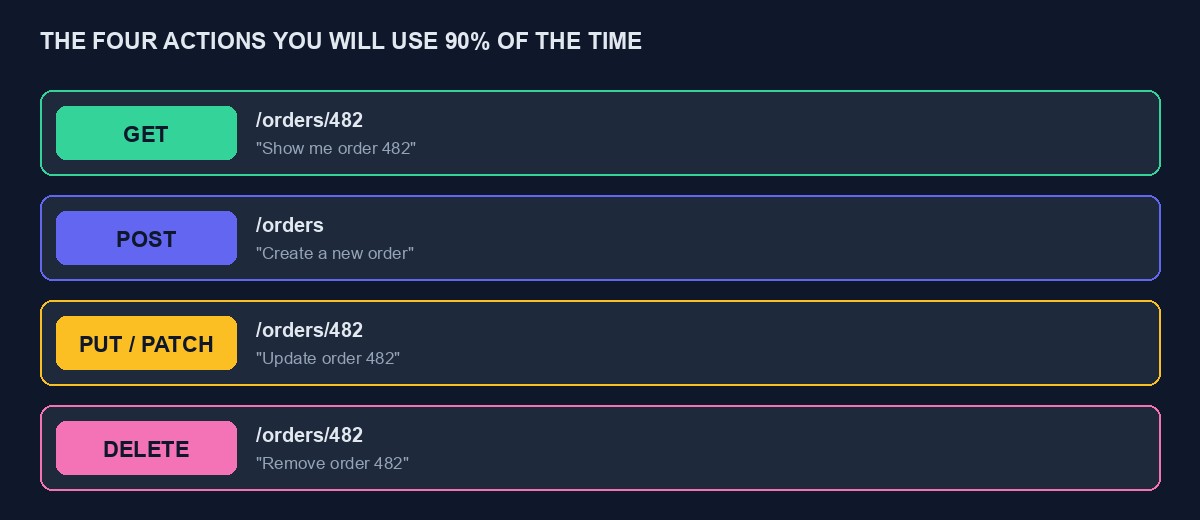
REST APIs use a small, standard set of request methods, borrowed from the same underlying technology that powers ordinary web browsing, to say what you want to do with a given resource. Four cover the overwhelming majority of what you will encounter.
GET means "show me this," without changing anything. A GET request to /orders/482 asks for the details of that specific order. A GET request to /orders asks for a list of orders. Nothing is created, changed, or deleted by a GET request, it is purely a question.
POST means "create a new one." A POST request to /orders, carrying the details of a new order, a customer, some items, a delivery address, asks the system to create that order and, typically, hands back the newly created order's own details, including its new identifying number.
PUT or PATCH mean "update this existing one." A request to /orders/482 using one of these methods, carrying whatever needs to change, asks the system to update that specific, already-existing order, changing its status from pending to shipped, for instance, rather than creating a new one.
DELETE means, unsurprisingly, "remove this." A DELETE request to /orders/482 asks the system to delete that specific order.
Notice the pattern: the same address, /orders/482, means something different depending on which action you pair it with, look at this order, update this order, or delete this order. This is the core elegance of REST: a small, consistent vocabulary of actions, applied to a clear, predictable set of addressable things.
Status codes: how the response tells you what happened, at a glance
Every response from a REST API arrives with a status code, a short number that tells you broadly what happened before you even read the details. Codes in the 200s broadly mean success, 200 for a successful GET, 201 specifically for a successfully created resource after a POST. Codes in the 400s mean something was wrong with your request: 400 for a malformed request, 401 for a missing or invalid API key, 404 for a resource that does not exist, perhaps because you asked for order 482 and there is no such order. Codes in the 500s mean something went wrong on the other system's end, not something you did incorrectly.
Learning to check this number first, before diving into the detailed response, is one of the fastest ways to build real fluency with REST APIs, because it immediately tells you which category of problem, if any, you are actually dealing with.
A complete, worked example: creating an order
Rather than describe this abstractly, here is roughly what a real request to create an order might look like, simplified for clarity. A POST request goes to an address like https://api.example.com/orders, carrying a header with your API key proving who you are, and a body containing the order's details in JSON format, something like a customer's identifying number, a list of items with quantities, and a delivery address. The system processes this, creates the order in its database, and sends back a response with status code 201, meaning "created successfully," along with the full details of the new order, including the identifying number it was just assigned, which you would then store on your own side so you can refer to that specific order in any future request, checking its status, updating it, and so on.
If something was wrong, say the customer's identifying number did not actually exist in the system, the response would instead come back with a 400-series status code and, in a well-designed API, a clear message explaining specifically what was wrong, which is exactly the detail worth reading before assuming you need to search the internet for the problem.
JSON: the format almost everything comes back in
Nearly all modern REST APIs send and receive information in a format called JSON, JavaScript Object Notation, which despite the name is used far beyond JavaScript specifically and has become close to a universal standard for structured data on the web. JSON is genuinely simple once you see a real example: information is written as labelled pairs, a label and its value, nested inside curly braces, with lists written inside square brackets. An order's JSON representation might have a label called "status" with a value of "pending," a label called "items" holding a list of individual item entries, each with their own labelled details. It is designed to be readable by a human glancing at it and reliably parseable by a computer, which is a large part of why it became so dominant.
Authentication: proving who is making the request
Almost every REST API that does anything meaningful requires you to prove who you are with every single request, most commonly by including your API key in a header, a piece of accompanying information sent alongside the main request rather than mixed into the main content. A common pattern looks like sending an "Authorization" header carrying your key, and a request missing this, or carrying an invalid key, is rejected immediately with a 401 status code before the system even looks at what you were actually asking for. This is worth understanding specifically because it is the single most common source of confusion for beginners: a request that looks correctly formed in every other way will still fail entirely if this one detail is wrong or missing.
Pagination: why you do not always get everything at once
Asking for a list of resources, all your orders, for instance, rarely returns everything in a single response, especially once there are thousands of them, because that would be slow and unwieldy for both sides. Instead, REST APIs commonly return a limited page of results at a time, along with information about how to request the next page, a pattern called pagination. Learning to expect and handle this, rather than assuming a first response contains literally everything, saves real confusion later, particularly the first time your own code appears to be "missing" data that was simply on a page you never requested.
Idempotency: a slightly technical word worth actually knowing
One more concept genuinely worth understanding, especially for anything involving payments: an idempotent request is one that produces the same result no matter how many times you accidentally send it. A GET request is naturally idempotent, asking to see an order twice does not create it twice. A POST request to create an order generally is not, sending it twice could create two separate orders, which becomes a real, costly problem if a network hiccup causes your own code to accidentally retry a payment request that actually succeeded the first time. Well-designed payment APIs address this with a mechanism, often called an idempotency key, a unique reference you generate and attach to a request, letting the system recognise "this is the same request being sent again" and safely avoid processing it twice. If you are building anything that creates orders or processes payments, this single concept is worth deliberately understanding rather than discovering the hard way.
A worked example: reading a real error and fixing it
Suppose you send a POST request to create an order and get back a 401 status code with a message reading something like "invalid or missing API key." Walking through this the way an experienced developer actually would, rather than panicking: a 401 specifically means authentication failed, not that anything about your order data was wrong, so the first thing to check is not your order details at all, it is whether the API key you sent is correct, current, and actually included in the right header. Perhaps you copied an old, revoked key from a previous project, or a test key when you meant to use a live one, or simply forgot to include the header entirely. Fixing this specific class of error rarely involves anything to do with the order itself, and recognising that from the status code alone saves you from the common beginner mistake of rewriting perfectly correct order data over and over while the actual problem sits untouched in the authentication header.
Now suppose instead you get back a 400 with a message like "items: this field is required." This is a different category entirely, your authentication succeeded, the system understood who you are, but something about what you sent was structurally wrong or incomplete. The fix here is reading the message literally: it is telling you, specifically, which field it expected and did not receive, which is usually enough to fix the request directly without needing to guess.
API versioning: why you might see a "v1" or "v2" in an address
You will often see an address like /v1/orders or /v2/orders rather than simply /orders. The version number exists because APIs change over time, and a company that wants to improve or restructure its API without instantly breaking every existing app already using it will publish a new version alongside the old one, giving developers time to move over deliberately rather than being broken without warning. When you start a new project, always use the most current version documented, and if you are ever debugging an integration that mysteriously behaves differently from the documentation you are reading, checking whether you are actually pointed at the version the documentation describes is a worthwhile first check.
Common mistakes beginners make with REST APIs specifically
Confusing PUT/PATCH with POST. Accidentally using POST when you meant to update an existing resource commonly creates a brand new, duplicate resource instead of changing the one you intended, since POST's entire job is creating something new.
Forgetting that JSON needs to be well-formed. A missing comma, an extra bracket, or a value that should be in quotes and is not will cause an entire request to be rejected, often with a fairly unhelpful low-level error rather than a friendly explanation, since the system could not even parse what you sent well enough to evaluate it properly. Using a tool or library that constructs the JSON for you, rather than writing it by hand as raw text, avoids the large majority of this category of mistake entirely.
Not checking the response at all. Sending a request and assuming it worked because your own code did not crash is a common and risky habit. A request can fail cleanly, with a proper error response, while your code carries on as if nothing went wrong, simply because nobody checked the status code that came back. Always check it explicitly.
Treating documentation examples as exact copy-paste templates without reading them. Example requests in documentation are illustrations of the pattern, not literal code to paste unchanged into a real project, complete with placeholder values like "your_api_key_here" that need to be replaced with your actual, real values, and this sounds obvious until it is the actual cause of a confusing failure at two in the morning.
Ignoring rate limits until hitting one. A sudden run of 429 status codes, "too many requests," usually means exactly what it says, and the fix is slowing down or batching requests more sensibly, not something more mysterious.
Where REST fits alongside other approaches
REST is not the only way APIs can be built, GraphQL and other approaches exist and solve some problems differently, but REST remains by far the most common pattern you will encounter across payment gateways, messaging platforms, and most business software, which is exactly why it is worth understanding properly rather than treating as an intimidating technical detail to work around. Once the pattern, resources, standard actions, status codes, JSON, clicks into place, reading a new, unfamiliar API's documentation stops feeling like learning a new language each time and starts feeling like recognising a familiar shape with different specific labels.
Testing a REST API without writing any code first
Before writing a single line of code, it is worth using a tool built specifically for exploring APIs by hand, Postman and Insomnia are the two most widely used, free options. These let you construct a request, set the address, the method, the headers, the body, and send it with a click, seeing the real response immediately, which is an excellent way to genuinely understand how a specific API behaves before committing to writing actual integration code around it. Many companies' documentation pages even provide a ready-made collection of example requests for exactly this kind of tool, letting you import them and start experimenting within minutes rather than constructing everything from scratch.
This step is worth taking seriously rather than skipping, because it separates two very different kinds of confusion when something eventually goes wrong: "is this a problem with my understanding of the API itself" versus "is this a problem with my own code." Having already confirmed the API behaves as expected using a manual tool removes the first possibility entirely, leaving you to debug only your own code with much more confidence about where the actual problem lives.
A quick reference to keep nearby
GET reads, without changing anything. POST creates something new. PUT or PATCH updates something that already exists. DELETE removes it. Status codes starting with 2 mean success, 4 mean your request had a problem, 5 mean the other system had a problem. Authentication happens through a header, almost always required, checked before your actual request is even considered. Pagination means a list response may not contain everything at once. These few facts, kept in mind, cover the overwhelming majority of what you will actually encounter reading real REST API documentation for the first time.
Print this list out, or keep it open in a tab, the first few times you build against a new REST API. Within a handful of real integrations, it stops being something you need to consciously recall and simply becomes how you read any new API's documentation.
Putting it into practice
The genuinely fastest way to make this concrete is to actually try it, using a real API's sandbox or test mode, where mistakes cost nothing. Our tutorials on the Paystack API and the Flutterwave API walk through real, working REST requests against genuine payment platforms, and our guide to connecting an API to a website covers the practical side of actually wiring one of these into a real project. If you are building on our own platform, our developer documentation describes the real REST API available to every project, including the VTU public API and payment webhooks, built on exactly the patterns described in this guide.



Comments
No comments yet. Be the first to share your thoughts.