
What Should a Developer Hand Over When a Website Is Finished?
The website looks great. The developer says it is finished and sends the final invoice. This is the moment where many clients pay, say thank you, and only discover three months later that they cannot log into the hosting, nobody has the source code, and the one person who knows how it works has stopped replying. A website is not finished when it looks finished. It is finished when you can run it without the person who built it.
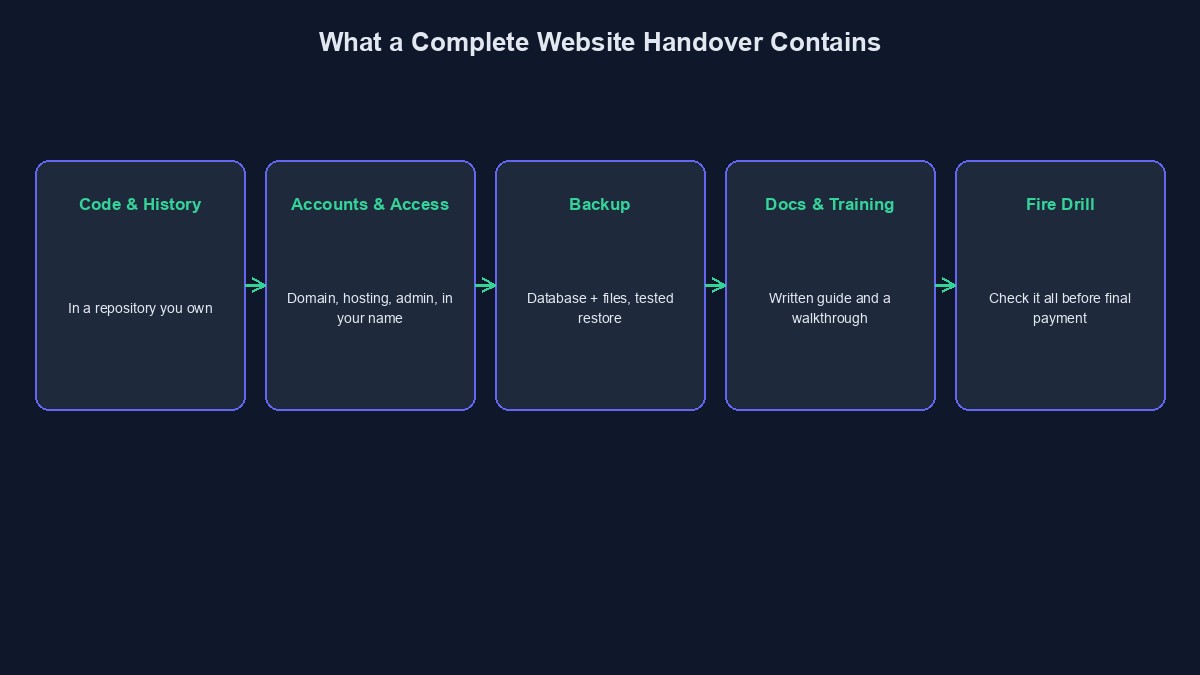
What a proper handover is
A handover is the moment the developer passes everything you paid for into your hands: the site, the keys to it, and the knowledge of how it works. A good one means you, or any other developer you hire later, can take over without starting from zero. It should be agreed in your contract from the beginning, and the final payment should depend on it.
1. The source code, with its history
You should receive the full project code, kept in a repository (a code storage service such as GitHub) that you own or that is moved into your account. Ask for the full history of changes and not just a zip file of the final version. The history shows what was changed and why, and it is very valuable to the next person.
2. The working, live website and admin access
You should be able to open the live site and log into the admin area with an account that has the highest level of access. You should also have the credentials for any other admin or test users that exist. Check that you are an owner and not only a "guest" or editor.
3. Hosting, domain and other accounts, in your name
Every account the site depends on should be in your name or your company's: domain registrar, hosting, DNS, email service, payment gateway, SMS provider, analytics, and any other tool. Ask for a list showing each service, what it does, who pays for it and how much. Credentials should be moved to you through a safe route, such as a password manager, and not left in an old email thread.
4. A full backup
You should get a copy of the database and all uploaded files (images, documents) as of launch day, stored somewhere you control. And someone should check that the backup can actually be restored, because a backup that has never been tested is only a hope.
5. Written instructions
This does not have to be a thick manual. A short document should explain how the project is organised, how to run it, how it is put online, what the settings are (not the secret values themselves), and which outside services it uses. A short video of the developer walking through the admin area is also very helpful for you and your staff.
6. Licences and keys
If the project uses paid themes, plugins or tools, the licence keys should be in your name, so you can keep receiving updates. Also ask which parts were made with free, open-source software, so the next developer knows.
7. Training and a support period
Ask for a short session where the developer shows you how to edit content, view orders, and handle the common daily tasks. Also agree on a period after launch, often a few weeks, during which they fix bugs at no extra cost. After that, any new work or ongoing care is priced separately, and you should know how.
Test the handover before you sign off
Do a small "fire drill" on the last day. Can you log into every account on the list? Can you add a product or post a blog entry yourself? Can the backup be restored on a test copy? Can someone else, even just the developer's colleague, put a tiny change online using only the instructions? If any answer is no, the handover is not complete. Pay the final instalment after this check, not before.
A sample handover message
A good developer will end the project with a simple message: a list of what was delivered and where each item lives, who owns each account, what is included in the support period, and who to contact. If yours does not send one, ask for it. Writing it down forces the loose ends into the open.
What goes wrong when it is skipped
The hosting is on the developer's private account. If the relationship ends, your site can disappear with it.
Nobody has the code. You can see the website, but you cannot change or move it. The only way forward is a rebuild.
The domain is registered to the developer. Legally, they may hold your business name.
Short glossary
Repository: a place where project code and its history are stored. Credentials: usernames, passwords and keys that give access to an account. Support period: a set time after launch when bugs are fixed free of charge.
Where to go from here
To understand which of these things are legally yours, read what you should own after paying a developer. If you are moving an existing site to someone new, this guide walks through it step by step. And if you are unsure whether a delivered project is in good shape, our code audit service can review it independently.



Comments
No comments yet. Be the first to share your thoughts.