Why Your API Key Isn't Working (And How to Actually Find Out)
Almost every "invalid API key" error looks identical from the outside: a 401 response, a short, unhelpful message, and no obvious clue which of several genuinely different problems actually caused it. Search for help and you land on platform-specific pages, OpenAI's own forum, Zoho's own help center, each one written for that one specific service rather than the general pattern. This guide covers the general pattern, in the order worth actually checking, then the specific checklist for the kind of platform-issued reseller API key you get from a VTU or bill-payment platform.
Start with the boring, most common cause: the key itself
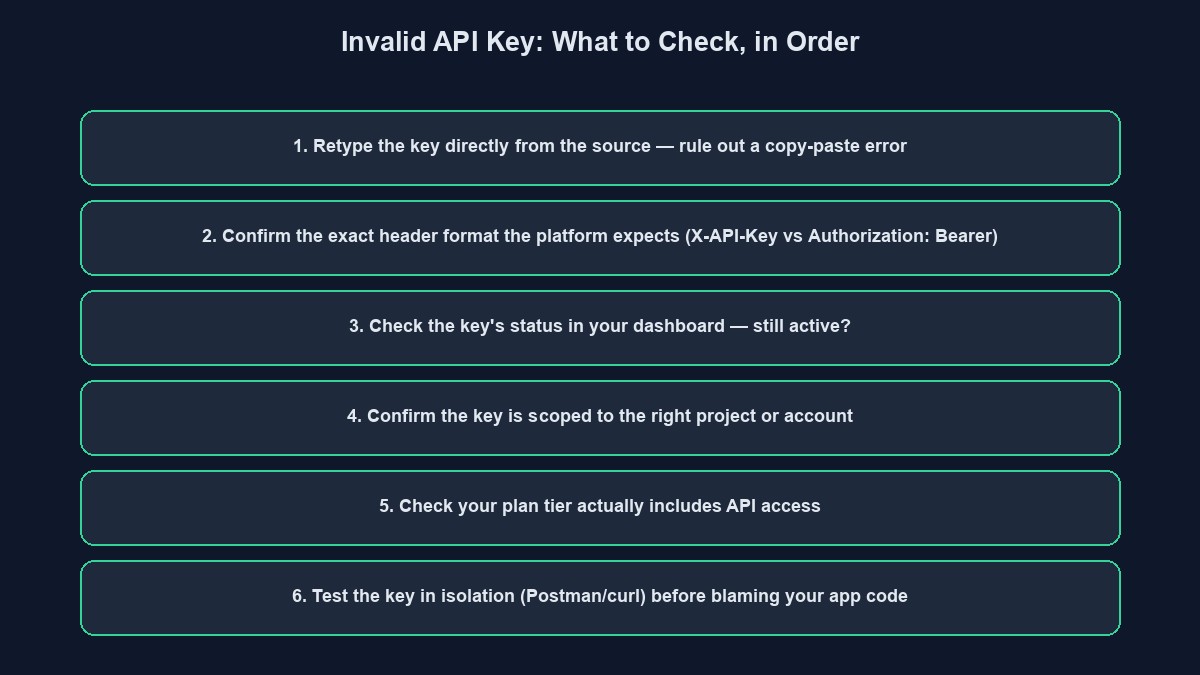
A stray space copied along with the key, a key truncated because only part of it was selected when copying, or a key from the wrong environment entirely, a test key used where a live one is expected, or the reverse, account for the overwhelming majority of "invalid key" errors, and none of them are a bug in your code. Delete the key from wherever you pasted it and retype it directly from the source, or copy it again carefully, confirming the copied length matches what the platform originally showed you. This single step resolves more of these errors than every other cause on this list combined.
Check which header the API actually expects, and that you sent it correctly
Different platforms expect an API key in different places, and mixing up the convention is a common, easy mistake. Some expect it in a custom header, commonly named something like X-API-Key. Others expect it inside the standard Authorization header, formatted as Bearer your_key_here, with the word "Bearer" and a single space required exactly as shown, not "bearer" lowercase, not "Bearer:" with a colon, not the key alone with no prefix at all. Check the specific platform's documentation for which format it actually expects, since assuming based on a different platform's convention is a frequent, invisible source of this exact error.
Confirm the key is actually still active
A key that worked yesterday can stop working today for entirely legitimate reasons: it was deliberately revoked, an account was disabled for inactivity or a billing issue, or the specific project or account tier it belongs to changed in a way that revoked API access as part of that change. Log into the platform's own dashboard directly and check the key's status there, rather than assuming code that worked recently must still be correctly configured. This is worth doing before assuming the problem is technical at all.
Confirm the key is scoped to the right project or account
Many platforms, ours included, issue API keys scoped to one specific project or account, not to your developer identity generally, and a key generated for one project will not work when called against a different project's endpoint, even if both projects belong to the same person. This produces exactly the same generic "invalid key" error as a genuinely wrong or expired key, with nothing in the error message distinguishing the two, which is precisely why it is worth checking directly rather than assuming.
A specific, real example: how this works on a VTU platform's developer API
It is worth walking through one real, concrete case in full detail, since the general advice above becomes much clearer against a specific implementation. On our own platform's public developer API, a key is accepted in either of two header formats, X-API-Key: xpk_yourkey or Authorization: Bearer xpk_yourkey, and every single call also requires the specific project ID in the request URL itself, since a key is issued by, and scoped to, one specific project's customer account.
Behind that one generic "Invalid or missing API key" response, several genuinely different conditions can be the actual cause, and it is worth checking each one specifically rather than guessing: the key itself might be correct but simply mistyped or truncated in transit; the key might belong to a different project than the one referenced in the URL; the key might have been deliberately deactivated; the underlying customer account the key belongs to might itself be disabled; or, distinctly from all of these, the project's own plan tier might not include API access at all, since developer API access on our platform is a feature gated by plan tier rather than something every project automatically has. A free-tier project's API key requests will fail with the exact same generic message as a genuinely invalid key, for a reason that has nothing to do with the key being wrong.
A note on keys that seem to work locally but fail once deployed
A specific, confusing variant of this problem: a key that works perfectly when tested from your own machine but fails the moment the same code runs on a live server. This is rarely the key itself, and almost always an environment configuration gap, the key was set correctly in your local environment file during development but never actually added to the production server's own environment variables, so the deployed code is either sending no key at all or an empty string where the key should be. Check your production environment's actual configured variables directly, rather than assuming that because it works locally, the deployment must have copied everything across correctly.
A note on rotating a key safely, once you find and fix the actual cause
If your investigation turns up a genuine reason to believe a key may have leaked, committed accidentally to a public repository, shared in a support message, it is worth rotating it, generating a new key and revoking the old one, rather than continuing to use a key that may be known outside your own team. Do this deliberately rather than reactively: generate the new key first, update every place the old one was used, confirm the new one works end to end, and only then revoke the old one, rather than revoking first and discovering afterward everywhere it was still referenced.
A worked example: tracing a real "invalid key" error to its actual cause
Picture a developer who generated an API key from their VTU dashboard weeks ago, integrated it into a working script, and is now suddenly getting 401 errors on every call, with no code changes made in between. Retyping the key directly from the dashboard rules out a copy-paste error, since it is identical to what was already in the code. Checking the dashboard confirms the key itself still shows as active, ruling out revocation. The actual cause turns out to be a plan change: the project was recently downgraded from a paid tier to the free tier, following an expired subscription, and API access is specifically not included on the free tier. Upgrading the plan resolves the error immediately, with no change to the key or the calling code required at all.
A general debugging technique that narrows this down quickly
Rather than guessing which specific cause applies, isolate the key from your actual application entirely: use a simple, separate tool, a command-line request or a tool like Postman or Insomnia, to make one minimal request using nothing but the key and the documented header format, outside your own codebase's other logic. If that isolated request also fails, the problem is genuinely the key, its status, or its scope, not a bug in how your application is sending it. If the isolated request succeeds while your application's own call still fails, the problem is specifically in how your code constructs the request, a header name typo, an extra character, a missing "Bearer " prefix, not in the key itself.
Mistakes that make this take longer to find than it should
Assuming the key itself is wrong before checking anything else. A key that is genuinely correct but scoped to the wrong project, deactivated, or blocked by a plan-tier restriction produces an identical error to a truly invalid key, and jumping straight to regenerating a new key often just reproduces the same failure.
Not checking the platform's specific documentation for its exact header format. "Authorization: Bearer" and a custom header like "X-API-Key" look similar enough that assuming one platform's convention applies to another is an easy, common mistake.
Testing only through your full application rather than isolating the request. A minimal, isolated test request is the fastest way to separate "the key itself has a problem" from "my code is sending it incorrectly," and skipping this step usually means debugging in the wrong place first.
Regenerating the key repeatedly without addressing the actual cause. If the real cause is a plan-tier restriction or a disabled account, a newly generated key will fail identically, and regenerating it repeatedly wastes time that checking the dashboard directly would have saved.
A short glossary
API key: a credential string identifying who, or which account, is making a request. Bearer token: a common convention for sending a credential in the Authorization header, prefixed with the word "Bearer" and a space. Scoped key: a key tied to one specific project or account, which will not work against a different one even if both belong to the same person. Plan-tier gating: a platform restricting a feature, API access included, to certain paid tiers, independent of whether any individual key or account is otherwise valid.
Where this fits with the rest of your integration
If you are building against our own platform's developer API, our guides to what an API actually is and REST APIs explained cover the underlying concepts this troubleshooting guide assumes. You can start building free to generate your own API key directly from your project's dashboard once you are on a plan that includes API access.


Comments
No comments yet. Be the first to share your thoughts.