How to Debug a Flutterwave Webhook That Never Arrives
This guide is the Flutterwave-specific companion to our broader guide on why a Paystack webhook doesn't fire. Most of the underlying causes are genuinely similar between the two gateways, because both are solving the same problem, notifying your server that something happened, using the same basic mechanism, a POST request to a URL you configured. Where they differ specifically is worth knowing, because applying a Paystack-specific fix to a Flutterwave problem, or the reverse, will not work, and this guide covers exactly where the two diverge.
Start with Flutterwave's own delivery record, not your own code
Exactly as with any other gateway, your first step should be checking Flutterwave's dashboard for the specific transaction in question, where a delivery log shows whether a webhook was attempted, and what response your server gave back. This single check immediately narrows the problem into one of three categories: no delivery attempted, delivery attempted and rejected, or delivery accepted and something wrong happened afterward in your own processing logic. Skipping this and guessing at your own code first is the most common reason debugging this takes far longer than it needs to.
Cause one: the URL is unreachable, exactly as with any gateway
Flutterwave, like every reputable webhook sender, requires a genuinely public, properly secured https address, and the same causes covered in our general webhook troubleshooting guide apply identically here: a plain http address, a URL pointing at a local or internal-only address, DNS that has not finished propagating after a recent change, or a firewall silently blocking Flutterwave's servers as unfamiliar traffic. Confirm the address is reachable from outside your own network, and confirm it is exactly, character for character, the address currently saved in your Flutterwave dashboard settings.
Cause two: your framework's CSRF protection, again
This remains the single most common cause among developers using Laravel, Django, or a similar framework, and it behaves identically regardless of which payment gateway is sending the webhook. Your framework's protection against forged browser requests has no way to know a legitimate external server, Flutterwave's, is making a genuine, server-to-server request, and will silently reject it unless the specific webhook route is explicitly excluded from that protection. If Flutterwave's dashboard shows delivery attempts consistently failing with a 419 or 403 status code, this is almost certainly the cause, and the fix is identical in shape to the Paystack case: exclude the specific webhook route from CSRF protection, since signature verification, covered below, is the correct protection mechanism for this kind of request instead.
Cause three: verif-hash mismatch, Flutterwave's own specific verification method
Here is where Flutterwave genuinely differs from Paystack in a way worth understanding clearly. Paystack calculates a hash from the raw payload using your secret key, and you must independently recalculate the same hash to verify it. Flutterwave uses a simpler mechanism: you set a secret hash value yourself, directly in your Flutterwave dashboard settings, and Flutterwave includes that exact same value in a header called verif-hash with every webhook it sends. Your code's job is simply comparing the received value against the value you configured, a direct string comparison, no calculation involved at all.
Because there is no calculation on your side, a mismatch here has a narrower, more specific set of causes than Paystack's signature failures: the value saved in your Flutterwave dashboard does not exactly match the value your code is comparing against, usually because of a copy-paste error, a trailing space, or confusion between your test and live dashboard's separately configured secret hash values. Retype both values directly, rather than trusting a copied value, and confirm you are checking the correct environment's configured secret against the correct environment's incoming webhook.
Cause four: checking the wrong header name entirely
A specific, easy mistake for a developer who has recently worked with Paystack's differently named and structured signature header, or who copied example code written for a different gateway: checking for the wrong header name in your Flutterwave webhook handler. Confirm your code is specifically reading the verif-hash header, exactly as Flutterwave's own documentation names it, rather than a header name borrowed from muscle memory or from a different integration's convention.
Cause five: environment mismatch between test and live secret hashes
Flutterwave, like most payment gateways, maintains separate test and live configurations, including separate secret hash values you set independently for each. If your application is running against live credentials while your code is still checking against a test-mode secret hash value, or the reverse, the comparison will never succeed, for the same fundamental reason as every environment-mismatch cause covered throughout this series: the two sides are genuinely using different, unrelated values, and no amount of correct comparison logic fixes a fundamentally mismatched configuration.
A worked example: an imagined debugging session, start to finish
Picture a developer whose Flutterwave webhook handler works flawlessly in testing and then silently stops updating orders the week after deploying to a new production server. Checking Flutterwave's dashboard delivery log first shows attempts being made and receiving a 403 response from the server, immediately ruling out a reachability problem and pointing toward something actively rejecting the request rather than never receiving it.
A quick check of the production server's own access logs confirms the request is arriving and being blocked before reaching the application's own webhook-handling code at all, which narrows the search to infrastructure-level blocking rather than application logic, in this specific case a web application firewall, newly configured on the production server as part of the same deployment that introduced the bug, blocking POST requests from IP ranges it did not recognise as legitimate browser traffic. The fix involves explicitly allow-listing Flutterwave's published IP ranges in the firewall's configuration, a step that had simply been overlooked during the otherwise careful production hardening described in our guide to hosting Laravel on a VPS, since webhook traffic from external services is easy to forget about when focused on general server security.
Testing your fix properly
Once you believe you have found and fixed the cause, use Flutterwave's dashboard feature for sending a genuine test webhook event to your currently configured URL, and watch your server's own logs in real time as it arrives, confirming both that the request reaches your code at all and that the verif-hash comparison succeeds. The local testing setup covered in our guide to testing webhooks locally with ngrok applies identically to Flutterwave, simply pointing your Flutterwave dashboard's webhook settings at your current ngrok address instead, and is worth using during active development rather than only testing against a fully deployed production environment each time.
A short checklist to work through in order
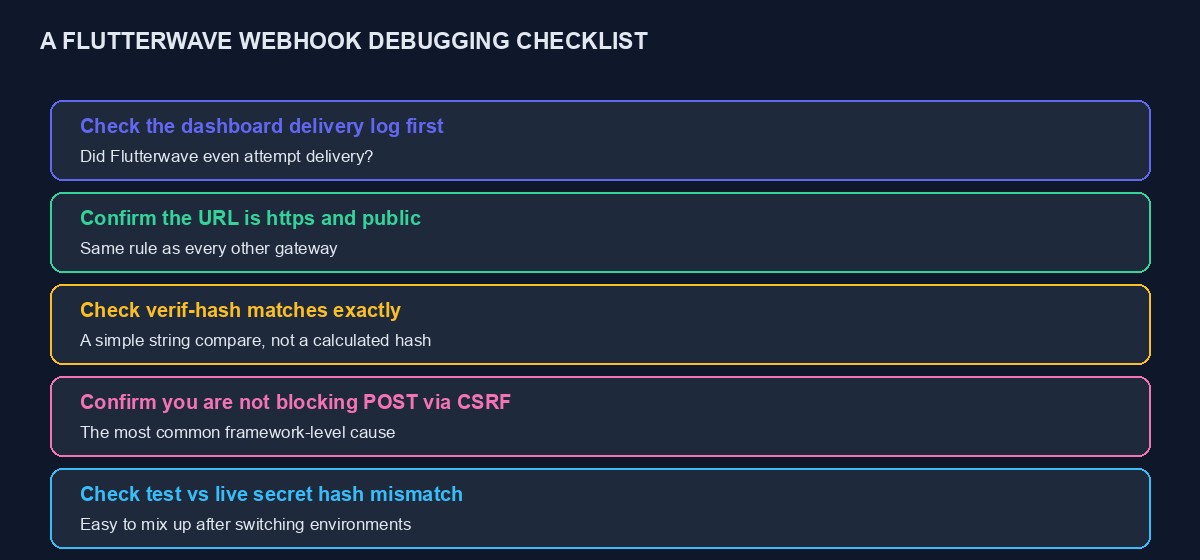
Check Flutterwave's own delivery log for the specific transaction first. If no attempt was made, verify https, public reachability, and the exact saved URL. If an attempt was made and rejected, check your framework's CSRF exclusion, then check for any firewall or reverse proxy that might be blocking the request before it reaches your application. If the request is reaching your code, confirm you are reading the correct verif-hash header name, and that the value you are comparing against matches exactly, including confirming you are checking the correct environment's configured secret. Test any fix with a genuine test webhook event, watched live in your server logs, before trusting it against real customer payments.
Mistakes that make this harder to diagnose
Assuming Paystack and Flutterwave verify webhooks the same way. They genuinely do not, and applying a calculated-hash mental model to Flutterwave's simple string comparison, or the reverse, sends debugging effort in the wrong direction entirely.
Not checking infrastructure layers beyond your own application code. A firewall, a reverse proxy, or a load balancer can each independently block a webhook before it ever reaches your application's own logs, which is why the worked example above specifically checked the server's access logs rather than only the application's own logs.
Leaving a temporary test configuration in place after deployment. A webhook URL, secret hash, or firewall rule configured for a staging environment and never updated for production is a common, easy-to-miss cause of a webhook that worked perfectly during development and mysteriously fails once genuinely live.
Debugging without checking the dashboard log first. This is worth repeating one final time, because it remains the single biggest time-saver across every cause covered in this guide: Flutterwave's own delivery record tells you immediately which broad category of problem you are actually facing, before you write or read a single line of your own code.
A quick reference for the two gateways side by side
Paystack signs its webhook with a calculated hash, using your secret key and the raw payload, which your code must independently recalculate and compare. Flutterwave uses a plain secret value, set by you in the dashboard, compared directly against a header called verif-hash, with no calculation involved. Both require https, both require your framework's CSRF protection to be explicitly excluded from the webhook route, and both benefit from the same local testing approach using ngrok. Keeping these specific differences straight, rather than assuming the two gateways behave identically underneath a similar-looking surface, is what separates a quick fix from an hour spent applying the wrong gateway's troubleshooting steps to the wrong problem.
Building the same safety net regardless of which gateway you use
Whichever specific cause turns out to be behind a broken webhook, the underlying lesson is the same one that applies across this entire troubleshooting series: a webhook is a single point of failure unless you deliberately build a second path alongside it. Verifying a transaction's status directly through the gateway's own API immediately after a customer returns from checkout, in addition to relying on the webhook to eventually arrive, means a temporarily broken webhook delays your system catching up rather than leaving an order permanently, silently stuck. This dual-path pattern, covered in more depth in our Flutterwave API tutorial, is worth building into any integration handling real customer payments, specifically because webhook delivery, however carefully configured, depends on a chain of infrastructure, DNS, firewalls, framework configuration, application code, any one link of which can quietly break without warning.
Pair this with the reconciliation habit covered in our guide to what happens when a payment fails but money appears deducted, a regular, deliberate comparison between your own order records and the gateway's actual settlement records, and you have a system that catches this entire category of problem on your own terms, before a confused or frustrated customer has to be the one to discover it for you.
A note on Flutterwave's retry behaviour
Like Paystack, Flutterwave will retry a failed webhook delivery a limited number of times before giving up, spaced out over a period rather than retried instantly and repeatedly. This matters for two practical reasons. First, if you fix the underlying cause of a rejection quickly enough, a previously failed delivery may still succeed on a later automatic retry without you needing to manually trigger anything, which is worth checking before assuming a fix requires a fresh manual test. Second, and more importantly, this retry window is not infinite, so a webhook configuration that has been broken for an extended period, days rather than hours, will have exhausted its retries for older transactions, meaning those specific events genuinely will not arrive even after you fix the cause, and any orders affected during that window need to be caught and corrected manually, through the reconciliation habit described above, rather than assumed to self-heal once the underlying problem is resolved.
When to escalate to Flutterwave's own support
If you have worked through every cause in this guide, confirmed your URL, your CSRF exclusion, your verif-hash comparison, and your environment configuration are all correct, and webhooks still are not arriving as expected, it is worth contacting Flutterwave's support directly with the specific transaction reference in hand, rather than continuing to guess. Occasionally the cause genuinely sits on the gateway's own side, a delivery queue issue, an account-specific configuration problem, that no amount of correct code on your end can resolve, and a specific transaction reference gives their support team something concrete to investigate rather than a vague description of the symptom.
Where this is already handled for you
If you are running a store, VTU platform or booking site on our platform, Flutterwave's webhook handling, including verif-hash verification, is already implemented, tested, and monitored, and connecting your own Flutterwave account is a matter of pasting your keys and configuring your dashboard rather than building or debugging any of the above yourself. You can start building free to see this directly. For the complete integration this troubleshooting guide assumes you have already built, see our Flutterwave API tutorial, and if you are still stuck after working through this guide, our code audit and rescue service can review the specific code directly.

Comments
No comments yet. Be the first to share your thoughts.