How to Protect Your Website When Hiring a Developer
When you hire a developer, you are letting someone into the back rooms of your business. They may be able to see your customer details, change your pages, move your money-related settings, or take your site offline. Most developers are honest and careful. But even honest people make mistakes, and not every stranger you hire is honest. A few simple habits protect you in both cases, and none of them needs technical skill.
Give only the access that is needed
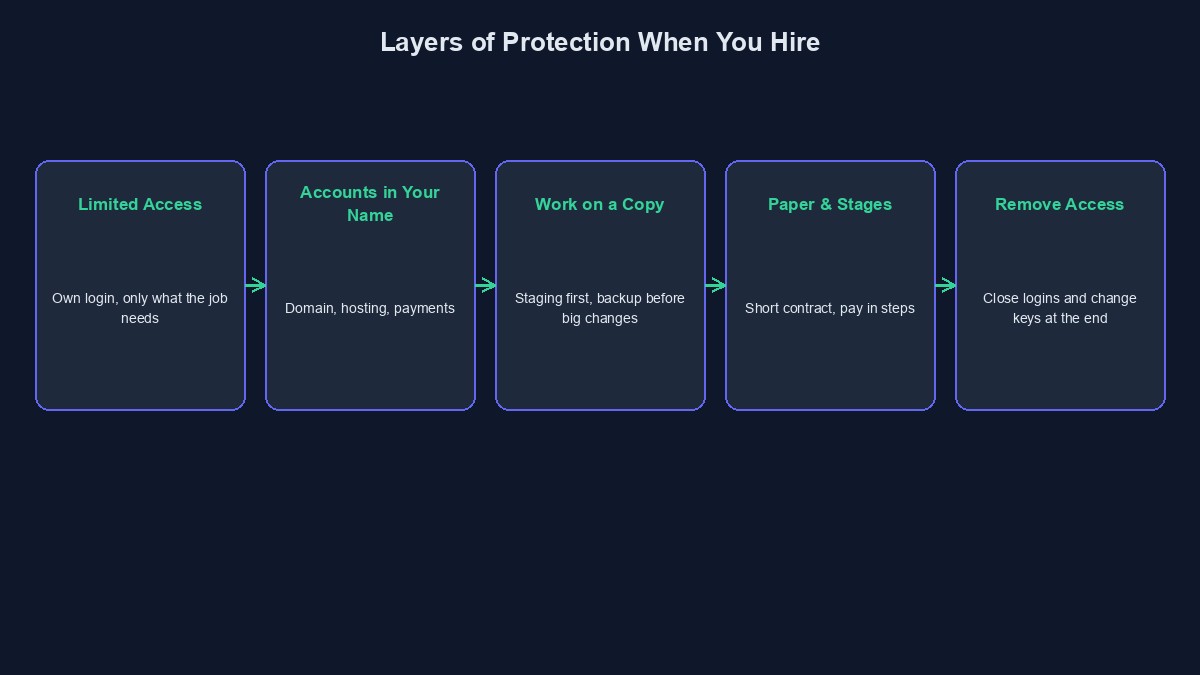
This is the most important rule. Do not hand over the owner password to any account. Create a separate login for the developer, with only the permissions they need for the job. A designer who is changing a page does not need access to your customer list or payment settings. When the project ends, you remove that login, and nothing else changes.
Keep the important accounts in your own name
Register your domain yourself, with your own email address. Open the hosting account yourself and add the developer as a user. Set up the payment gateway in your business name. If a developer insists on holding any of these for you, that is a warning sign. It also makes you dependent on them, which our guide on avoiding developer lock-in explains.
Turn on two-step login and use a password manager
Switch on two-step verification for your email, domain registrar, hosting and payment accounts. Your email is the master key to everything else, so protect it first. Use a password manager to share credentials with the developer, and avoid pasting passwords into WhatsApp or email, where they stay forever.
Make them work on a copy
Ask that all building and fixing is done on a separate staging copy, and only moved to the live site once you have seen and approved it. This protects you from the most common accident: a half-finished change going live while customers are using the site.
Take a backup before anything big
Before a major change, make sure there is a fresh, complete backup stored somewhere that is not the same server. Ask for it in writing: "Please confirm a full backup was taken today and where it is." It costs nothing, and it turns a disaster into an annoyance.
Keep a written agreement
Even a short contract protects both sides. It should say what is being built, how much it costs, when payments are due, who owns the result, and how either side can end the arrangement. A simple confidentiality clause is also sensible if you are sharing customer data or business plans. If the project is large, spend a little to have a Nigerian lawyer look at it. We are not lawyers, and this is general guidance only.
Pay in stages
Split the price into steps tied to visible progress. A deposit to begin, a payment when you see the first working version, and a final payment after everything is delivered and checked. This keeps the developer motivated to finish, and limits what you can lose if something goes wrong.
Be careful with other people's code
Some developers use pirated or "nulled" themes and plugins to save money. These often contain hidden code that gives someone else access to your site. Ask directly: "Are all themes and plugins properly licensed?" Also ask what outside services and code libraries are used, so you know what your site depends on.
Look after your customers' data
If your website collects names, phone numbers or payment information, you are responsible for protecting it, even if someone else handles the technical side. Nigeria has a data protection law, the Nigeria Data Protection Act of 2023, which expects organisations to look after personal data properly. Ask the developer where the data is stored, who can see it, and how it is backed up. For anything beyond a simple site, get proper advice.
Remove access when the work ends
On the last day, remove the developer's logins, rotate any shared passwords and keys, and check that nothing is still connected to their personal accounts. Do the same for any freelancer or designer who worked on a smaller job. Old access that nobody remembers is one of the quietest risks in a small business.
Keep an eye on what changes
Ask for a short note after each piece of work: what was changed and where. Many tools also record who logged in and what they changed. You do not need to read it every day, but you can look if something strange happens.
An example
Illustrative example: the people, businesses and numbers in this section are made up to show how this works. They are not real clients or real results.
A school in Kaduna hired a freelancer to add online fee payment to its website. The bursar created a limited account for him, kept the domain and payment gateway in the school's name, asked him to work on a staging copy, and paid in three parts. When the work was done, she removed his login and changed the shared keys. The project went smoothly. A neighbouring school gave out its main password, and later found that old logins still worked a year after the freelancer had left.
Short glossary
Two-step login: a second check, such as a code sent to your phone, needed to log in. Staging: a private copy for testing changes. Nulled theme: a paid theme that has been illegally copied, often carrying hidden risks.
Where to go from here
If you are still choosing a developer, read how to evaluate a developer. To know exactly what should end up in your hands, see what a developer should hand over. And if you already have a site and worry about its safety, our code audit service can check it for you.



Comments
No comments yet. Be the first to share your thoughts.