What Is API Integration and How Does It Work?
"We need to integrate with their API" is a sentence that gets said a lot in meetings, and it means something quite specific, even though it sounds vague. API integration is the actual work of connecting your own website, app, or system to someone else's, so the two can genuinely talk to each other, share data, and trigger actions, without a human copying information between them by hand. This guide explains what that work really involves, honestly, not just the happy-path version.
The problem integration actually solves
Before any integration exists, businesses genuinely do this by hand, or not at all. A store owner logs into a payment dashboard separately to check if a customer's transfer landed, then manually marks the order as paid somewhere else. A business checks a courier's website separately to see if a package has shipped, then manually messages the customer. Each of these is a real, working system, just not a connected one, and every manual step is a place where something gets forgotten, delayed, or entered wrong. Integration replaces that manual bridge with a direct, automatic, digital one.
What "integrating" actually means, concretely
At its core, integration means your own system and the other service's API agree on a specific, working conversation: your system sends a request when something happens, a customer places an order, a new user signs up, and the other service either does something in response, charges a card, sends an SMS, or hands back information your system then uses, a delivery estimate, a verification result. This conversation has to be built once, correctly, and then it keeps running automatically every time the same situation happens again, which is the entire point.
The real stages, in the order they actually happen
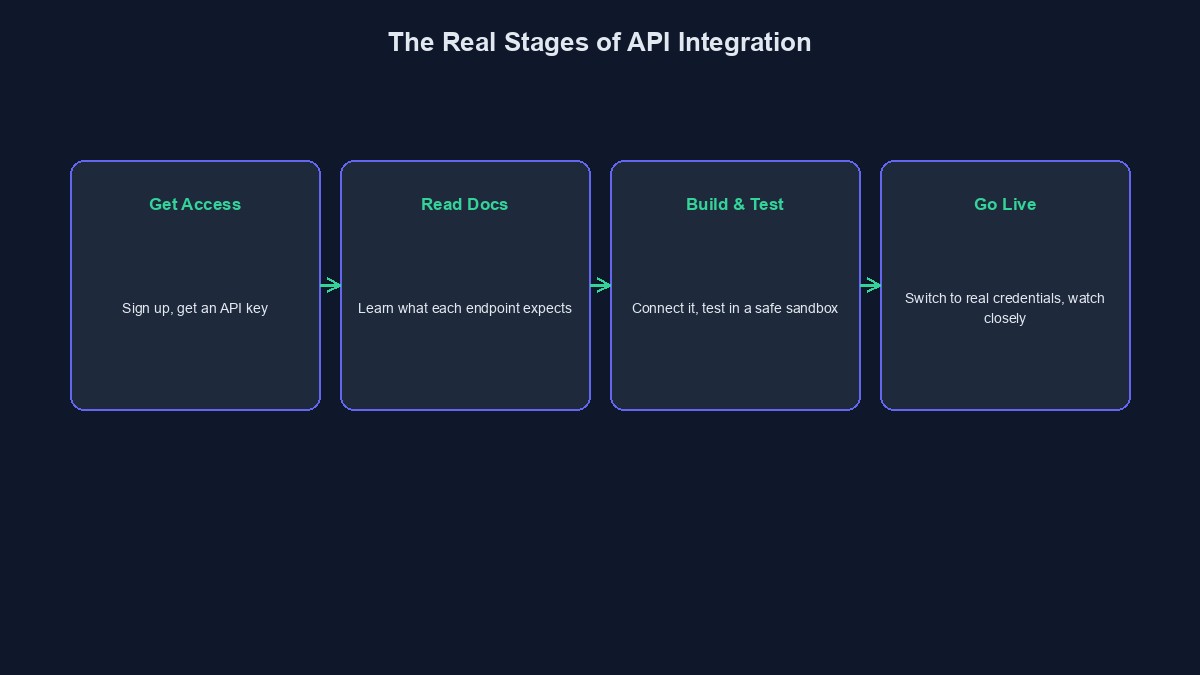
Getting access comes first, almost always meaning an account with the provider and an API key or similar credential proving your requests are genuinely yours. Reading the documentation comes next, and it is not optional busywork, since it tells you exactly which endpoints exist, what each expects, and what it sends back, information you cannot reliably guess your way through. Building the actual connection follows, writing the specific code that sends the right requests at the right moments and correctly handles what comes back. Testing comes next, almost always against a sandbox or test mode the provider offers specifically so mistakes do not touch real money or real customers while you are still getting it right. And going live is the final stage, switching from test credentials to real ones, carefully, usually starting with a small, closely watched volume rather than flipping everything on for every customer at once.
Authentication: the part that quietly blocks more integrations than anything else
Almost every real API requires you to prove who you are before it answers anything meaningful, and different providers do this differently, an API key in a header, a username and password exchanged for a temporary token, or a more involved handshake for services handling something sensitive like payments. Getting this part wrong is, honestly, the single most common reason a new integration does not work on the first attempt, and it usually shows up as a confusing "unauthorised" error that has nothing obviously to do with authentication if you are not specifically looking for it.
Mapping data between two systems that do not naturally agree
Your own system and the provider's API rarely describe the same thing in exactly the same words. Your database might call something "customer_name," while the provider's API expects "full_name," or splits it into "first_name" and "last_name" separately. This mismatch has to be deliberately handled, translating your data into the shape the other side actually expects, and translating what comes back into a shape your own system can actually use. Skipping this, assuming both sides naturally agree, is a quiet, common source of integrations that look finished but fail on real, specific data.
Handling the part that goes wrong, because something eventually will
A provider's service can be briefly unreachable. A specific request can fail because of bad data, a card that gets declined, a number that is not a valid phone number. A genuinely working integration does not assume every request succeeds, it checks what actually came back and has a real plan for what to do when it did not, retry, alert someone, or clearly tell the customer what happened rather than silently failing and leaving both sides confused about whether something actually went through.
Webhooks: when the other side needs to reach you, not the other way around
Some things cannot be answered instantly. A bank transfer can take minutes to confirm. A delivery status changes hours after you asked about it. For these situations, many providers use a webhook instead, a way for them to send your system a message the moment something actually changes, rather than you repeatedly asking "is it done yet." Setting this up correctly, giving the provider a real, working address on your own system to send these updates to, is its own specific piece of the integration work, separate from the main request-and-response connection.
A worked example: connecting a store to a delivery partner
Picture an online store that wants orders to automatically get handed to a courier service instead of someone manually calling a rider for every order. The integration means: when an order is marked ready, the store's system sends the courier's API the pickup address, the delivery address, and the package details. The courier's system responds with a tracking reference and an estimated delivery window. Later, as the delivery actually progresses, the courier's system sends webhook updates back to the store, picked up, in transit, delivered, and the store's own order page updates automatically, without anyone on either side manually checking or calling the other.
Mistakes worth avoiding
Skipping the provider's test mode and going straight to real transactions. Test mode exists specifically so a mistake costs nothing. Using it properly before going live is one of the cheapest forms of insurance available in this entire process.
Assuming every request will succeed. A real integration plans honestly for failure, not just the happy path where everything works first time.
Forgetting that documentation changes. Providers update their APIs, sometimes with notice, sometimes without much. An integration that worked perfectly at launch can quietly break months later if nobody is watching for provider-side changes.
A short glossary
API key: a credential proving your requests to a provider are genuinely yours. Sandbox / test mode: a safe version of a provider's API where you can test an integration without affecting real money or real customers. Webhook: a way for a provider to reach your own system automatically when something changes, instead of you repeatedly asking. Data mapping: translating information between the different shapes two separate systems expect.
Where to go from here
If you have not yet connected your first real API, our step-by-step guide to connecting an API to a website walks through the actual code involved. Our tutorials on the Paystack API and Flutterwave API are real, worked examples of exactly this process with a payment provider specifically. And if your business runs on a VTU, ecommerce, or booking platform, you can start building free and see payment, SMS, and vending integrations already wired up and working, rather than building each connection from nothing yourself.

Comments
No comments yet. Be the first to share your thoughts.