WhatsApp Marketing for Nigerian Small Businesses: Status, Broadcast Lists and Channels
If you sell anything in Nigeria, your customers are already on WhatsApp. Surveys put WhatsApp use among Nigerian internet users at around 96 percent, and many small businesses run almost their whole sales process there: a picture on Status, a chat, a price, a transfer, a delivery. The good news is that this is cheap to do. The bad news is that most people do it badly: they message everyone, annoy their customers, and sometimes get their number restricted. Here is how to do WhatsApp marketing properly, without spamming.
Start with the WhatsApp Business app, not your personal number
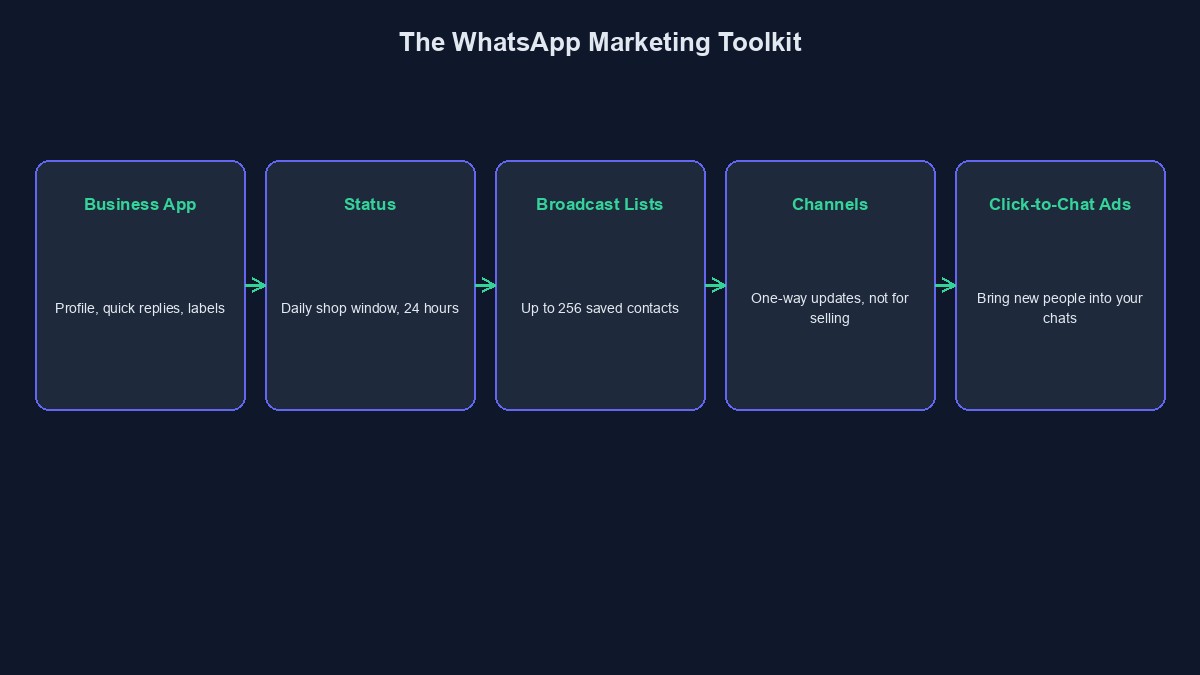
The free WhatsApp Business app is built for sellers. It lets you set up a business profile with your address, hours and website, save quick replies for common questions, send a greeting message to new customers and an "away" message when you are busy, and sort chats with labels such as "new enquiry," "waiting for payment" and "paid." These small tools save hours and make you look organised. One note: WhatsApp's built-in Catalog feature is not available for Nigerian numbers, and our guide on what to use instead of the WhatsApp catalog covers the workarounds.
Use Status like a shop window
Status updates disappear after 24 hours, and people check them daily, so they work like a window that people walk past. Post a clear photo or short video of one product with the price. Show a delivery, a customer thanking you, or a "just arrived" item. Keep it simple and regular, perhaps three to six updates a day, and not fifty at once. When someone views your Status and replies, that is a warm lead, so answer quickly.
Build your contact list the right way
Status can only be seen by people who have saved your number, so your list is your audience. Ask customers to save your number when they buy. Put your number on your packaging, your Instagram bio and your delivery notes. Say clearly why they should save it, for example "save this number to see our new arrivals every week." Do not add people to groups without asking them. Consent matters, and it is also better for business: people who chose to hear from you are the ones who buy.
Broadcast lists: one message, many individual chats
A broadcast list lets you send one message to many contacts, and each person receives it as a normal private message. A list can hold up to 256 contacts, and only people who have saved your number will receive it. Use it for things that matter to the person: a restock, a price drop, an offer that ends on Friday. Group your contacts by interest, for example "ladies' wear" and "men's wear," so the message fits. If people keep reporting you or blocking you, WhatsApp can limit your number, so keep your messages useful and not too frequent.
WhatsApp Channels: for updates, not selling
A Channel is a one-way way to share updates with followers, who cannot see each other's numbers. It suits tips, news, new arrivals and behind-the-scenes content. It is not designed for direct selling. Use it to build interest, then invite people to message you to order.
Click-to-WhatsApp ads: bring in new people
The three tools above mostly reach people who already know you. To reach new people, you can run Facebook and Instagram ads that open a WhatsApp chat when someone taps them. This is a very common and effective setup in Nigeria, because people prefer to ask questions in chat before they buy. Our guide on what Facebook and Instagram ads cost in Nigeria shows how to budget for it.
Reply fast, and reply well
Most WhatsApp sales are won or lost in the first few minutes. A customer who asks "how much?" and waits two hours has already asked three other sellers. Use quick replies for price, delivery and payment details. Greet by name. Send a clear photo. Make the next step obvious: "Send your address and I will confirm delivery today."
When you outgrow doing it by hand
As messages grow, answering the same questions all day becomes the bottleneck. A WhatsApp bot can handle the repeat questions, check an order, and hand over to you when a person is needed. Meta has rules about which kinds of bots are allowed on the WhatsApp Business API, and a purpose-built business bot is the allowed kind. We explain the rules in what changed for ChatGPT on WhatsApp Business, and show how to build one in how to create a WhatsApp bot.
Protect yourself and your customers
Fake accounts that copy a business and ask customers to pay into another account are common. Always say clearly which account numbers you use, and tell customers you will never ask them to pay into a personal account without confirmation. Our guide on WhatsApp impersonation scams explains what to look for.
What to measure
You do not need fancy tools. Each week, count how many people viewed your Status, how many replied, how many asked for prices, and how many paid. Over a month you will see which posts and which times of day lead to orders, and you can do more of those.
A simple weekly routine
Monday: post your new or best items on Status. Tuesday to Thursday: share a customer photo, a short video, or an answer to a common question. Friday: send one broadcast with an offer that ends on the weekend. Every day: reply to messages within the hour, label your chats and follow up on people who did not pay. Once a week: count what worked.
Mistakes to avoid
Messaging people who never asked to hear from you. It burns trust and risks restrictions on your number.
Posting only prices. Mix in proof: delivered orders, real customer messages, short videos.
Using one number for everything. If you have a team, use a proper business setup so you do not lose your history when someone leaves.
Short glossary
Status: pictures and videos that disappear after 24 hours. Broadcast list: a way of sending one message to many contacts as separate private chats. Channel: a one-way feed for updates. Click-to-WhatsApp ad: an advert that opens a chat with you when tapped.
Where to go from here
Marketing is now part of what our team offers, and WhatsApp is a good place to start for most Nigerian businesses. If you would like help planning it, message us on the contact page. If you are just starting out, begin with the plan in how to start digital marketing with ₦50,000.



Comments
No comments yet. Be the first to share your thoughts.