How to Verify a Nigerian Bank Account Number Before Sending Money
Every Nigerian who has ever sent money to a wrong account number understands the specific dread of that mistake: the transfer is instant, and reversing it, if it is even possible, involves the receiving bank, a police report in serious cases, and weeks of uncertainty. If your platform lets users send money to other people, whether that is a payout to a vendor, a peer-to-peer transfer, or a refund to a customer's bank account, verifying the account number before the money actually moves is one of the highest-value, lowest-effort features you can build. This is a practical tutorial for doing exactly that using Paystack's account resolution endpoint.
What account resolution actually does
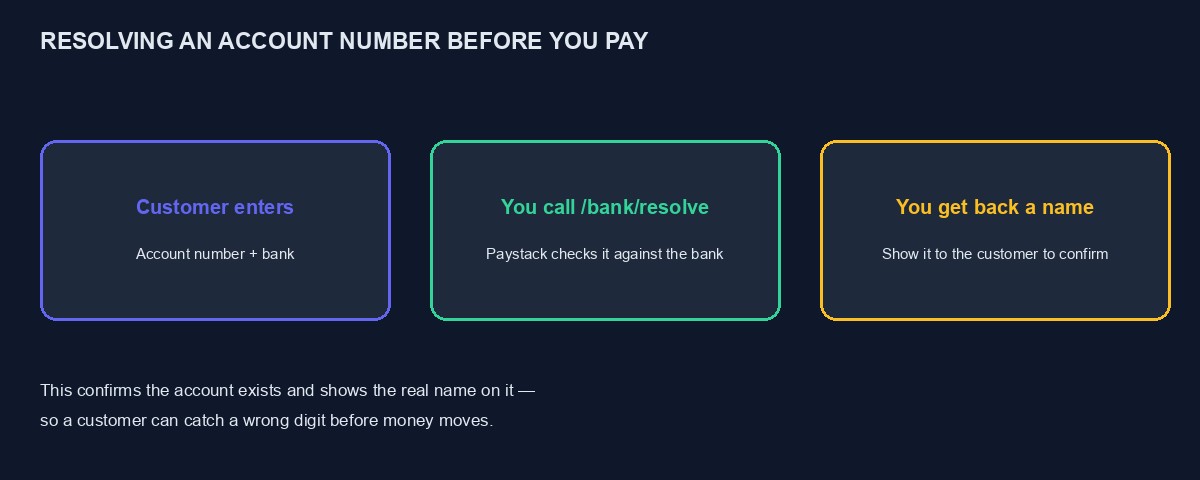
Paystack's account resolution endpoint takes a Nigerian bank account number and a bank code, checks it against the actual bank's own record, and returns the real, official name registered on that account. It does not move any money and does not require the account holder's permission or involvement, it simply confirms the account genuinely exists and tells you who it belongs to. This is the single most effective way to catch a mistyped digit before it becomes an irreversible transfer, since a customer who sees "Chinedu Okafor" appear when they expected to see their own name immediately knows something is wrong, whereas a bare, unverified account number gives them nothing to check against.
Getting the list of banks and their codes first
Before resolving any specific account, your application needs the list of Nigerian banks and their corresponding codes, since the resolution endpoint requires both the account number and the specific bank code, not just a bank's name typed freely. Paystack provides a list-banks endpoint for exactly this, returning every supported bank with its name and code, which you would typically call once, cache the result, and use to populate a bank selection dropdown in your own interface, updating the cached list only occasionally rather than calling this endpoint on every single page load.
Making the actual resolution request
With a bank code and an account number in hand, your server sends a GET request to Paystack's bank resolve endpoint, following the same server-side-only discipline covered in our guide to connecting an API to a website, carrying your secret key in the authorization header, and the account number and bank code as query parameters. A successful response returns the account number back to you alongside the account name registered on it. This endpoint is genuinely free to use on Paystack, which matters for a feature you might want to call frequently, once for every new recipient a user adds, without needing to budget for a per-check cost the way you would for identity verification, covered in our guide to adding NIN and BVN verification to your web app.
What to actually show the customer
Once you have the resolved account name, display it clearly to the customer before they confirm the transfer, framed as a confirmation step: "You are sending to [resolved name]. Is this correct?" This single, simple step is what actually prevents the mistake, since a customer glancing at a name they do not recognise is far more likely to notice and correct an error than one glancing at a string of digits they cannot easily verify by eye. Never skip this confirmation step purely for the sake of a faster checkout flow, since the seconds saved are trivial compared with the cost, to both you and your customer, of a transfer sent to the wrong person.
Handling a failed resolution properly
A resolution request can fail for reasons that are not necessarily the customer's fault: an invalid or mistyped account number, a bank code that does not match the account, or occasionally a temporary issue on the bank's own side rather than Paystack's. Show a clear, specific message, "we could not verify this account number, please check it and try again," rather than a generic error, and avoid implying the customer has done something suspicious, since the overwhelming majority of failed resolutions are simple, innocent typing mistakes rather than fraud attempts.
Building this into a real transfer flow
Account resolution is typically the first step in a larger transfer process, not the whole thing. Once resolved and confirmed, Paystack's transfer flow requires creating a transfer recipient, a saved record of the verified bank account details, which returns a recipient code you then use to actually initiate a transfer against, rather than resolving and transferring in a single step every time. This two-step structure, resolve and confirm once, then reuse the saved recipient for future transfers to the same account, is worth designing for explicitly if your platform sends repeat payments to the same people, a supplier, a regular payout recipient, since it avoids re-verifying an account you have already confirmed correct.
A worked example: refunds on a small marketplace
Picture a small online marketplace handling occasional refunds directly to a customer's bank account rather than back to their original card, a common need when a card refund is not straightforward or the customer specifically requests a bank transfer instead. Before this feature existed, refunds were processed manually, with a staff member typing account details from a customer's message directly into a banking app, a process that produced two genuine misdirected transfers in its first three months from simple typing errors under time pressure.
Adding account resolution to the refund flow means a customer enters their account number and selects their bank from a dropdown populated by the cached bank list, the platform resolves it immediately and shows the customer the returned name for confirmation before the refund is queued, and the staff member processing refunds sees the same confirmed name displayed clearly rather than a bare account number to type from memory. Misdirected refunds drop to zero in the following months, not because staff became more careful, but because the system itself now catches the exact category of mistake that previously depended entirely on human attention under pressure.
A worked example: debugging a resolution that returns the wrong bank error
Picture a developer whose account resolution feature works correctly for most banks and consistently fails for one specific bank, returning an error suggesting the account does not exist, despite the customer confirming the account genuinely works fine in their own banking app. Working through this methodically rather than assuming the customer made an error: the first thing to check is whether the bank code being sent actually matches the specific bank selected in the dropdown, since a common, easy mistake is a dropdown populated correctly with bank names but wired to a hardcoded or stale list of codes that has drifted out of sync with the live list Paystack's own bank endpoint returns, particularly after a bank merger or rebrand changes an existing code.
Refetching the bank list fresh from Paystack's endpoint, rather than trusting a cached copy that may be months old, and comparing the specific bank code against what the dropdown is actually sending, usually reveals the mismatch directly: the cached list, saved once during initial development, was missing a bank code update Paystack had since made. Refreshing the cached bank list periodically, rather than treating it as a one-time, permanent fetch, prevents this specific class of bug from recurring as banks occasionally update their own registered details on Paystack's side.
Combining account resolution with the customer's own confirmation habits
Beyond simply displaying the resolved name, consider requiring an explicit, deliberate action from the customer to confirm it, a checkbox or a clearly labelled button reading "yes, this is correct" rather than an automatically proceeding flow where the resolved name is shown but easy to glance past without genuinely reading. This small, deliberate friction costs almost nothing in genuine user experience and meaningfully increases the chance a customer actually reads and considers the name before a transfer proceeds, rather than the confirmation step becoming another screen clicked through on autopilot the way many onboarding and checkout confirmations regrettably are.
What this does and does not protect against
It is worth being precise about the limits of this feature. Account resolution confirms that an account number is real and tells you the name registered on it. It does not confirm that the person you are dealing with is genuinely who they claim to be, since a scammer could, in principle, provide a real, correctly resolving account number belonging to someone else entirely, expecting you to trust the resolved name without independently confirming it matches the actual person you believe you are paying. For a use case with genuine fraud risk, pairing account resolution with the identity verification discipline covered in our guide to NIN and BVN verification gives a considerably stronger combined signal than either check alone.
Cost and practical limits worth knowing
While Paystack's account resolution endpoint is currently free to use, it is worth checking the current terms directly before building a business model that assumes this remains true indefinitely, since pricing structures across this entire category of API do shift over time. Build your integration so that a future change to pricing or rate limits would not require a fundamental redesign, caching results sensibly as described above rather than architecting around an assumption of unlimited, free, unthrottled calls specifically because that happens to be true today.
Rate limits and sensible usage patterns
Even a free endpoint is worth using deliberately rather than carelessly, both to be a good citizen of a shared service and because Paystack, like any API, enforces rate limits to protect its own infrastructure. Resolve an account once when a customer adds a new recipient, cache the confirmed result against that recipient's saved record, and avoid re-resolving the same account repeatedly for every subsequent transaction to it, since the account details, once confirmed correct, do not need re-verifying on every single use.
Extending this to Flutterwave
Flutterwave offers an equivalent account verification capability within its own API, following a broadly similar shape, an account number and bank code in, a resolved account name out, and the same general discipline described throughout this guide, server-side calls only, a clear confirmation step shown to the customer, and sensible caching, applies identically regardless of which specific gateway's endpoint you are calling. If you are integrating both gateways, covered across our Paystack and Flutterwave tutorials, building this account confirmation step once as a shared piece of your own application logic, calling whichever gateway's resolution endpoint is relevant, keeps the customer-facing experience consistent regardless of which gateway is processing a given transfer.
A short checklist before you rely on this in production
Cache the bank list rather than fetching it on every page load. Always resolve server-side, never expose your secret key to the browser. Always show the resolved name to the customer for explicit confirmation before finalising anything. Handle a failed resolution with a neutral, helpful message rather than one implying suspicion. And save a confirmed recipient's details for reuse rather than re-resolving an account you have already verified correct.
A quick glossary for reading Paystack's transfer documentation
A few terms worth knowing before reading Paystack's own documentation directly. Bank code: a short number uniquely identifying a specific Nigerian bank, required alongside the account number for resolution. Transfer recipient: a saved record of a verified bank account, created once resolution succeeds, reused for future transfers without re-verifying. Recipient code: the identifier Paystack returns for a created recipient, used to actually initiate a transfer against it. Transfer PIN or OTP: an additional confirmation step Paystack may require before a transfer actually executes, a further layer of protection worth keeping in your own flow rather than trying to bypass for convenience.
Where this fits alongside our own platform
If you are running a project on our platform that involves sending money to customers or vendors, refunds, payouts, commissions, this same account resolution discipline applies to anything custom you build on top of our developer API, and our own payment gateway integrations follow this exact verify-before-transfer pattern internally. You can start building free to see the platform directly, and our broader guide to accepting online payments in Nigeria covers the wider payment integration this specific feature sits within.

Comments
No comments yet. Be the first to share your thoughts.